
MyTechPassport
Your all-in-one productivity hub - screen recording, SEO audit, password generator, SOP documentation, video conferencing, and more.
As of June 2026, MyTechPassport has 133 users and a 5.00/5 rating from 28 reviews in the Productivity category.
Usersup 2.3 percent+2.3%
133
133
Ratingno change0%
5.00
28 reviews
Reviewsno change0%
28
Version
1.3.0
Manifest V3
90-day change · In the last 90 days this extension 1 version update, changed permissions.
History
11 snapshotsTracking since Apr 1, 2026.
View as table
| Date | Users | Rating | Reviews | Version |
|---|---|---|---|---|
| Apr 1, 2026 | 130 | 5.00 | 28 | 1.2.5.1 |
| Apr 8, 2026 | 129 | 5.00 | 28 | 1.3.0 |
| Apr 19, 2026 | 131 | 5.00 | 28 | 1.3.0 |
| Apr 24, 2026 | 123 | 5.00 | 28 | 1.3.0 |
| May 2, 2026 | 123 | 5.00 | 28 | 1.3.0 |
| May 8, 2026 | 134 | 5.00 | 28 | 1.3.0 |
| May 13, 2026 | 131 | 5.00 | 28 | 1.3.0 |
| May 19, 2026 | 134 | 5.00 | 28 | 1.3.0 |
| May 25, 2026 | 155 | 5.00 | 28 | 1.3.0 |
| Jun 1, 2026 | 134 | 5.00 | 28 | 1.3.0 |
| Jun 7, 2026 | 135 | 5.00 | 28 | 1.3.0 |
| Now | 133 | 5.00 | 28 | 1.3.0 |
Changelog
- Apr 1, 2026description
MyTechPassport - Your All-in-One Digital Productivity Suite

Description
MyTechPassport is a comprehensive, privacy-focused Chrome extension that combines screen recording, password management, video conferencing, and documentation tools. Perfect for professionals, educators, and teams looking to enhance their digital workflow.

Tools
 - Loom Replacement (Unlimited recordings and annotate on your screen)
- Password Generator (Create secure passwords for your accounts)
- Conference Tool (Create meetings, share screen, camera video and multiple join with our webRTC based call keeping all your data encrypted and safe)
- QA Tracker (Record console logs, interactions and network requests to solve bug faster in your team)
- Documenting SOP (Save time by recording and sharing step by step process on carrying out an action)


 Key Features

🎥 Advanced Screen Recording & Video Creation
- Make unlimited recordings of your tab, desktop, specific areas, or camera
- Record system audio and microphone with push-to-talk capability
- Real-time annotation tools including drawing, text, arrows, and shapes
- AI-powered camera backgrounds and blur effects
- Smart zoom functionality for detailed demonstrations
- Privacy-focused content blurring
- Comprehensive video editor with audio control, cutting, trimming, and cropping
- Click highlighting and cursor spotlight mode
- Customizable countdown and automatic recording stop timer
- Direct export to MP4, GIF, WEBM, or Google Drive sharing

🔐 Secure Password Management
- Generate strong, customizable passwords
- Advanced encryption algorithms for maximum security
- Integrated password storage and management
- Privacy-first approach with no data collection

📹 Professional Video Conferencing
- Host seamless video meetings directly from your browser
- Screen sharing and real-time chat functionality
- Secure, private communication channels
- Enhanced conference creation tools aligned with modern web standards

📝 SOP Documentation & QA Tools
- Create detailed standard operating procedures
- Track user interactions and workflows
- Enhanced toolbar functionality with improved interface
- Integrated "How it works" guidance
- Comprehensive error handling and user feedback

🔍 QA Interaction Tools
- Capture screenshots and video clips for bug reporting
- Track devtools metadata including logs and network traffic
- Monitor user actions for thorough testing
- Toggle console statement capture and network log monitoring

⚙️ Technical Enhancements
- Google Drive integration for seamless file sharing
- Optimized memory usage and performance
- Enhanced network and console capture implementation
- Multi-language support with localization

 Why Choose MyTechPassport?

1. Privacy-First Approach: Your data stays private - no sign-in required, and no data collection
2. Unlimited Usage: No restrictions on recording length or number of recordings
3. Professional-Grade Tools: Enterprise-level features accessible to everyone
4. Regular Updates: Continuous improvements and new feature additions
5. Cross-Platform: Works seamlessly across Windows, macOS, and Linux
6. User-Friendly: Intuitive interface with comprehensive documentation
7. Performance Optimized: Efficient resource usage with minimal system impact

Perfect for:
- Professional content creators
- Educational institutions
- Software development teams
- Quality Assurance professionals
- Business documentation
- Training and onboarding
- Technical support teams
- and you.

Download MyTechPassport today and transform your digital workflow with our comprehensive suite of tools!
MyTechPassport - Your All-in-One Digital Productivity Suite

You're probably paying for Loom. Maybe a password manager. Definitely some kind of screen recorder. And every time you need to document a workflow, audit a webpage's SEO, or jump on a quick call - you're opening another tab, logging into another tool, or just skipping it entirely because it's too much friction.

MyTechPassport fixes that. Everything you need is one click away, on any page, right inside Chrome.

One account. One payment. Every tool unlocked.


Screen Recording — with an actual video editor built in

Record your full desktop, a specific tab, a selected region, or just your camera. Then edit it without downloading a separate app. Trim, cut, crop, add or remove audio, blur sensitive content on screen, draw and annotate in real time, highlight your cursor, and export as MP4, GIF, WEBM, or send it straight to Google Drive.

Unlimited recordings. No watermarks. No "upgrade to remove the limit."

If you pay for Loom, most people cancel within a week of installing this.


SEO Audit — instant page check and full website crawl

Open any page, click the extension, and get a full SEO breakdown in seconds. Title length, meta description quality, heading structure, keyword usage, Open Graph tags, indexability — all of it, without leaving the tab. Works on your own pages and your competitors'.

That is just the start. Hit "See Full Page Audit" and you are taken into the full website audit tool — which crawls your entire domain, up to 1,000 pages, and surfaces every broken link, missing title, thin content issue, duplicate metadata problem, and accessibility flag across the whole site. You also get a 0-100 site health score, Google Lighthouse-powered performance checks (LCP, CLS, FCP), and CSV export for client reporting or team handoffs.

Most SEO tools make you go to them. This one meets you where you already are, and takes you deeper when you need it.


SOP Documentation — for people who hate documenting

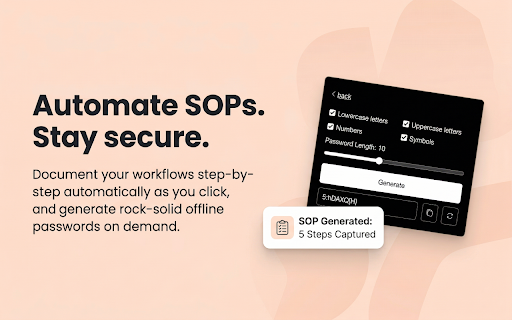
Click record, go through your process, stop recording. The extension tracks every step, every click, every input as you work — and builds the documentation for you. Add your organisation, clean up the output, and send it.

Teams use this for onboarding new hires, creating training material, and handing off processes. What used to take 45 minutes now takes 5.


Secure Password Generator

Generate strong, customizable passwords locally. Nothing is sent anywhere. No sync, no cloud — just a solid password when you need one.


Private Video Conferencing

Start an encrypted meeting from any tab. Camera, screen share, and chat. Built on WebRTC. Your call data does not touch third-party servers.


Why people actually switch

The math is simple. A Loom subscription. An SEO tool. A documentation tool. A password manager. A conferencing app. That is three to five paid tools, most of which you are probably underusing.

MyTechPassport is one extension, one account, one payment. You get access to every tool in the suite — the screen recorder, the full SEO audit, the SOP documentation tool, the conferencing, all of it. Not one tool per plan. Everything, for everyone on the account.

It runs on Windows, Mac, and Linux. It works across Chromium-based browsers.


What is new in v1.3.0

The SEO Audit tool is brand new — built because we kept hearing that people were switching tabs to run audits mid-workflow. The SOP Documentation tool has been completely rebuilt from scratch, with pause/resume, live timers, and organisation selection built in. Recording settings now adapt to your device's actual hardware so you are not guessing at quality options. And a significant memory overhaul means the extension uses far less RAM during recording and editing than it did before.


One last thing

The people who do not try this today will keep tab-switching, paying for single-purpose tools, and putting off documentation because it takes too long.

It takes about 30 seconds to install. Give it one recording and you will know whether it is for you.
- Apr 1, 2026short_description
Your all-in-one hub for essential online tools—password generator, screen recording, documentation, error tracking, and more.
Your all-in-one productivity hub - screen recording, SEO audit, password generator, SOP documentation, video conferencing, and more.
- Apr 1, 2026host_permissions
https://ipapi.co/*, <all_urls>, http://*/*, https://*/*
<all_urls>, http://*/*, https://*/*
- Apr 1, 2026permissions
identity, activeTab, tabs, storage, unlimitedStorage, downloads, tabs, tabCapture, scripting, clipboardWrite, sidePanel, desktopCapture, webRequest, background
identity, activeTab, tabs, storage, unlimitedStorage, downloads, tabCapture, scripting, clipboardWrite, sidePanel, desktopCapture, background
Permissions & access
- Permissions
- identityactiveTabtabsstorageunlimitedStoragedownloadstabCapturescriptingclipboardWritesidePaneldesktopCapturebackground
- Host access
- <all_urls>, http://*/*, https://*/*
Screenshots



About
MyTechPassport - Your All-in-One Digital Productivity Suite

You're probably paying for Loom. Maybe a password manager. Definitely some kind of screen recorder. And every time you need to document a workflow, audit a webpage's SEO, or jump on a quick call - you're opening another tab, logging into another tool, or just skipping it entirely because it's too much friction.

MyTechPassport fixes that. Everything you need is one click away, on any page, right inside Chrome.

One account. One payment. Every tool unlocked.


Screen Recording — with an actual video editor built in

Record your full desktop, a specific tab, a selected region, or just your camera. Then edit it without downloading a separate app. Trim, cut, crop, add or remove audio, blur sensitive content on screen, draw and annotate in real time, highlight your cursor, and export as MP4, GIF, WEBM, or send it straight to Google Drive.

Unlimited recordings. No watermarks. No "upgrade to remove the limit."

If you pay for Loom, most people cancel within a week of installing this.


SEO Audit — instant page check and full website crawl

Open any page, click the extension, and get a full SEO breakdown in seconds. Title length, meta description quality, heading structure, keyword usage, Open Graph tags, indexability — all of it, without leaving the tab. Works on your own pages and your competitors'.

That is just the start. Hit "See Full Page Audit" and you are taken into the full website audit tool — which crawls your entire domain, up to 1,000 pages, and surfaces every broken link, missing title, thin content issue, duplicate metadata problem, and accessibility flag across the whole site. You also get a 0-100 site health score, Google Lighthouse-powered performance checks (LCP, CLS, FCP), and CSV export for client reporting or team handoffs.

Most SEO tools make you go to them. This one meets you where you already are, and takes you deeper when you need it.


SOP Documentation — for people who hate documenting

Click record, go through your process, stop recording. The extension tracks every step, every click, every input as you work — and builds the documentation for you. Add your organisation, clean up the output, and send it.

Teams use this for onboarding new hires, creating training material, and handing off processes. What used to take 45 minutes now takes 5.


Secure Password Generator

Generate strong, customizable passwords locally. Nothing is sent anywhere. No sync, no cloud — just a solid password when you need one.


Private Video Conferencing

Start an encrypted meeting from any tab. Camera, screen share, and chat. Built on WebRTC. Your call data does not touch third-party servers.


Why people actually switch

The math is simple. A Loom subscription. An SEO tool. A documentation tool. A password manager. A conferencing app. That is three to five paid tools, most of which you are probably underusing.

MyTechPassport is one extension, one account, one payment. You get access to every tool in the suite — the screen recorder, the full SEO audit, the SOP documentation tool, the conferencing, all of it. Not one tool per plan. Everything, for everyone on the account.

It runs on Windows, Mac, and Linux. It works across Chromium-based browsers.


What is new in v1.3.0

The SEO Audit tool is brand new — built because we kept hearing that people were switching tabs to run audits mid-workflow. The SOP Documentation tool has been completely rebuilt from scratch, with pause/resume, live timers, and organisation selection built in. Recording settings now adapt to your device's actual hardware so you are not guessing at quality options. And a significant memory overhaul means the extension uses far less RAM during recording and editing than it did before.


One last thing

The people who do not try this today will keep tab-switching, paying for single-purpose tools, and putting off documentation because it takes too long.

It takes about 30 seconds to install. Give it one recording and you will know whether it is for you.
Technical
- Version
- 1.3.0
- Manifest
- V3
- Size
- 19.46MiB
- Min Chrome
- 88
- Languages
- 18
- Featured
- No
Metadata
- ID
- bhnmbcijeklfanpldmnkolhjdfnmkljk
- Developer ID
- u4058bab2640ae0965225837144d9efe1
- Developer Email
- [email protected]
- Created
- Sep 14, 2024
- Last Updated (Store)
- Mar 31, 2026
- Last Scraped
- Jun 7, 2026
- Website
- mytechpassport.com
- Support URL
- https://mytechpassport.com/extension-support
- Privacy Policy
- https://mytechpassport.com/privacy-policy/
Similar extensions
Alternatives to MyTechPassport, ranked by description similarity.

RecordPlus - Screen Recorder
Captures tabs, desktop, webcam, microphone, and system sound. Annotate with pencil tool and color picker.
97

Recorditor: Record your browser
Capture, transcribe, and summarize browser sessions for easy tutorials and data sharing.
505
★ 3.0

GALTech Screen Recorder
Record your screen with or without voice audio, with annotation tools - by GALTech
12
★ 5.0

Advanced Screen Recorder
A screen recorder with resolution, bitrate, and codec selection.
22

MeetCapture Pro - Meeting Recorder & Notes
Record any online meeting with audio. One click to start, automatic download when done. Works with Zoom, Meet, Teams in Chrome.
43

Screen Recorder by ZenCapture — No Watermark, No Time Limit
Screen recorder with no watermark, no time limit, and 100% local privacy – all data stays on your device.
1.0K
★ 4.9

Meetingtor: Record online meetings
Automatically record, transcribe and summarize online meetings.
2.0K
★ 4.6

Screen Recorder Studio - Unlimited, Zoom, Video & GIF
Stable screen recording with no time limits. Built-in editor to seamlessly zoom, trim, and export to high-quality MP4 or GIF.
114
★ 3.0
Data sourced from the Chrome Web Store · last verified Jun 7, 2026.