
Title & Meta Description Checkers - cmlabs SEO Tools
This tool helps you produce concise, attractive, and SEO-friendly elements to be seen on the SERP and attract readers.
As of May 2026, Title & Meta Description Checkers - cmlabs SEO Tools has 572 users and a 5.00/5 rating from 2 reviews in the Developer Tools category.
Usersup 3.2 percent+3.2%
572
572
Ratingno change0%
5.00
2 reviews
Reviewsno change0%
2
Version
1.0.1
Manifest V3
History
3 snapshotsTracking since Apr 1, 2026.
View as table
| Date | Users | Rating | Reviews | Version |
|---|---|---|---|---|
| Apr 1, 2026 | 554 | 5.00 | 2 | 1.0.1 |
| Apr 29, 2026 | 566 | 5.00 | 2 | 1.0.1 |
| May 27, 2026 | 581 | 5.00 | 2 | 1.0.1 |
| Now | 572 | 5.00 | 2 | 1.0.1 |
Permissions & access
- Permissions
- storagetabs
- Host access
- None declared
Screenshots


About
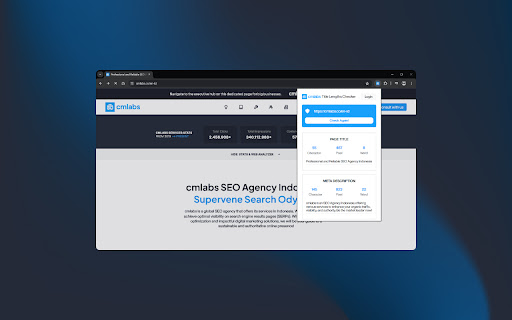
Writing titles and meta descriptions in SEO practices is an important thing that needs to be done properly. In this case, the Title and Meta Description Checker tool helps you adjusting the length of the characters and the pixels of the title and description that will be displayed later on the SERP.

With this tool, you can ensure your title and description are written according to SEO guidelines, relevant, concise, and interesting to users. Download and try now!

Features & Benefits

Here are some of its functions you should know about:

- This tool is available for free.
- Helping the search engine algorithm and users identify documents on a website
- Simplify website address naming.
- Make it easier for users to recognize the address with easy-to-remember URL characters.
- Increase the page ranking on the SERP.
- Determine the conversion value of CTR.

How to Use

1. Open Title and Meta Description Checker
Once you open it, you will be welcomed by the display of two columns, which are Page Title and Meta Description. On the upper side, you will see the column to input your website’s URL.

2. Choose the Modes
There are two available modes provided by the tool, which are manual and bot. Manual mode can be used to adjust the title and description according to your needs. In this mode, you can write or copy texts and adjust them according to the SEO principles.

On the other hand, the bot mode will display the title and description based on the data from the website’s URL you input in the designated column. You just need to copy the URL of the site or page. Afterward, you can click on the Crawl URL button to get the result of the title tag and meta description automatically.

3.  Fulfill the Column
After choosing the mode, you can input the text in the column. You can copy the text and paste it in the respective places for the title and description. Aside from that, you can write and edit the text right away.

4. Adjust the Title Tag and Meta Description
To write the title, the criteria of the characters should generally be adjusted according to SEO principles which consist of 50-60 characters. As for the pixel itself, the title should not be more than 500 pixels.

As for the meta description, the text should consist of 50-150 characters. The pixel length of the description should not be longer than 900.

If the writing of the title and description already comply with the SEO principles, the indicator light will turn green. However, if it doesn’t, the light will stay white.

Help & Support

We value your feedback! If you have any suggestions for improving the Title and Meta Description Checker or encounter any issues while using the tool, please don't hesitate to let us know. Our support team is here to help. Reach us by email at:

[email protected]
[email protected]
Technical
- Version
- 1.0.1
- Manifest
- V3
- Size
- 3.57MiB
- Min Chrome
- 88
- Languages
- 1
- Featured
- No
Metadata
- ID
- bhncaplgjfhllfadbkeigmfnpilkmbgh
- Developer ID
- u1df6d9973a5e9451b2f4cfef31c023f0
- Developer Email
- [email protected]
- Created
- May 13, 2024
- Last Updated (Store)
- May 16, 2024
- Last Scraped
- May 27, 2026
- Website
- cmlabs.co
- Support URL
- —
- Privacy Policy
- https://cmlabs.co/en-id/privacy-policy/chrome-web-store
Similar extensions
Alternatives to Title & Meta Description Checkers - cmlabs SEO Tools, ranked by description similarity.

Meta Title & Description Checker
Check meta title and description of any webpage with SEO recommendations
119
★ 5.0

Heading Tags Checker - cmlabs Tools
Heading Tags Checker helps you analyze H1-H6 tags for better page structure and readability.
305
★ 4.4

SEO Analyzer
Analyze SEO elements of web pages
29
★ 5.0

SEO Check
Get instant insights into page titles, descriptions, headings, canonical URLs, SEO, and analytics providers with SEO Check.
32

Boost It Junior SEO Solution
An advanced Chrome extension to view meta titles, descriptions, technical SEO data, and analyze LLM visibility.
7
★ 5.0

Mobile Friendly Test - cmlabs Tools
Mobile Friendly Test helps you evaluate how well your website performs on mobile devices.
4.0K
★ 5.0

Webpage Analyzer - SEO Tool
The official extension to discover on-page SEO meta data
821
★ 5.0

Google SEO Checker Audit & Analysis
Boost website visibility & SEO with our Google SEO Checker extension.Optimize meta, headings, word count & keywords for top rankings
81
Data sourced from the Chrome Web Store · last verified May 27, 2026.