
Font Finder
An easy-to-use font inspector to get CSS styles of the selected element
As of June 2026, Font Finder has 400,000 users and a 4.50/5 rating from 224 reviews in the Developer Tools category.
Usersno change0%
400.0K
400,000
Ratingdown 0.4 percent−0.4%
4.50
224 reviews
Reviewsup 2.3 percent+2.3%
224
Version
0.6.5
Manifest V3
90-day change · In the last 90 days this extension 1 version update.
History
6 snapshotsTracking since Apr 4, 2026.
View as table
| Date | Users | Rating | Reviews | Version |
|---|---|---|---|---|
| Apr 4, 2026 | 400.0K | 4.52 | 219 | 0.6.4 |
| Apr 14, 2026 | 400.0K | 4.52 | 219 | 0.6.5 |
| Apr 25, 2026 | 400.0K | 4.52 | 220 | 0.6.5 |
| May 9, 2026 | 400.0K | 4.51 | 221 | 0.6.5 |
| May 30, 2026 | 400.0K | 4.51 | 222 | 0.6.5 |
| Jun 14, 2026 | 400.0K | 4.49 | 223 | 0.6.5 |
| Now | 400.0K | 4.50 | 224 | 0.6.5 |
Permissions & access
- Permissions
- storagecontextMenusnotificationsscriptingactiveTab
- Host access
- None declared
Screenshots

About
FontFinder is created for designers, developers, and typographers. It allows a user to analyze the font information of any element and copy any pieces of that information to the clipboard. Font Finder examines all the selected characters to detect the font used to display this particular character.

FontFinder has three critical pieces of functionality:

  1. Analyze any font on the active page.
  2. Copy any piece of the element's information to the clipboard
  3. Any active element can have any piece of the font's options (such as color, size, or family) adjusted inline

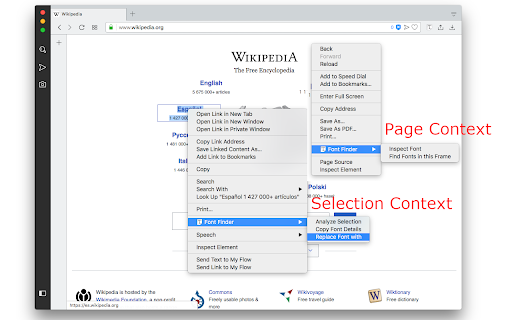
Access these options by right-clicking the context menu over the selected text or right-clicking on the page and inspecting the element.

Information Captured:
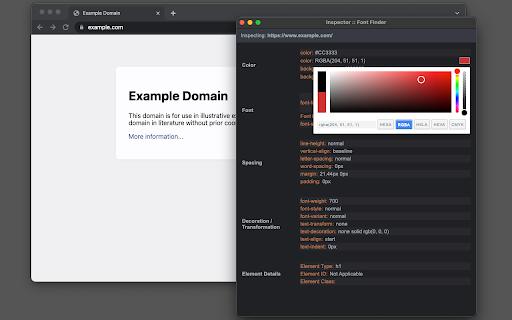
  1. Font color (RGB and HEX)
  2. Background color (RGB and HEX)
  3. Font family (including actually rendered font!)
  4. Font size
  5. Line height, vertical alignment, letter, and word spacing
  6. Font weight, style, variant
  7. Text transform, decoration, align and indent
  8. Element's type, class, and ID
  9. Displays remote and local tags next to the rendered font

Tools:
Replace or change font family.
Use custom fonts.
Get the list of all fonts in the current frame.

Notes:
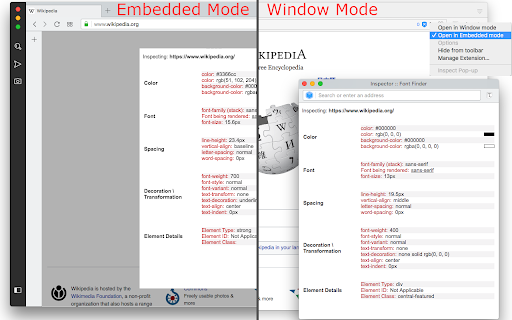
You can change the window opening mode to embedded mode from the right-click items over the toolbar button. This mode helps use the extension in full-screen mode.
Technical
- Version
- 0.6.5
- Manifest
- V3
- Size
- 151KiB
- Min Chrome
- 88
- Languages
- 15
- Featured
- Yes
Metadata
- ID
- bhiichidigehdgphoambhjbekalahgha
- Developer ID
- u8439b9ff440dbd0f8f006a9a0e0f34b3
- Developer Email
- [email protected]
- Created
- Sep 27, 2016
- Last Updated (Store)
- Apr 3, 2026
- Last Scraped
- Jun 14, 2026
- Website
- —
- Privacy Policy
- https://add0n.com/policies/unixeco.txt
Similar extensions
Alternatives to Font Finder, ranked by description similarity.

Font Finder
Easily identify and analyze fonts on any webpage. Get font family, size, weight, style, color, and more.
20

Font Finder
Find and inspect fonts on any webpage.
2

FontFinder
Detect fonts on a page and save their history
2

FontFinder
FontFinder is a powerful font identifier and detector for any webpage.
1.0K
★ 4.9

Font Finder - Typography Inspector
Highlight text to see font details instantly. Perfect for designers and developers!
8

Font Detector
Detects font details on any webpage to find Fonr family, height and more
77
★ 1.0

Font Finder
Easy font identifier, meet Font Finder! This extension helps you find the font you’re looking for and analyze text styles instantly.
1.0K
★ 4.5

FindFont - Font Identifier
Identify fonts from selected text on webpages
66
★ 5.0
Data sourced from the Chrome Web Store · last verified Jun 14, 2026.