
Auto Factorial
Factorial HR time tracking autofill. Save time: automatically log your working hours accurately with one click.
As of June 2026, Auto Factorial has 315 users and a 4.60/5 rating from 10 reviews in the Workflow & Planning category.
Usersup 1.6 percent+1.6%
315
315
Ratingno change0%
4.60
10 reviews
Reviewsno change0%
10
Version
2.7
Manifest V3
History
6 snapshotsTracking since Apr 1, 2026.
View as table
| Date | Users | Rating | Reviews | Version |
|---|---|---|---|---|
| Apr 1, 2026 | 310 | 4.60 | 10 | 2.7 |
| Apr 28, 2026 | 312 | 4.60 | 10 | 2.7 |
| May 8, 2026 | 313 | 4.60 | 10 | 2.7 |
| May 15, 2026 | 321 | 4.60 | 10 | 2.7 |
| May 24, 2026 | 327 | 4.60 | 10 | 2.7 |
| Jun 3, 2026 | 317 | 4.60 | 10 | 2.7 |
| Now | 315 | 4.60 | 10 | 2.7 |
Permissions & access
- Permissions
- scriptingstorage
- Host access
- https://app.factorialhr.com/
Screenshots
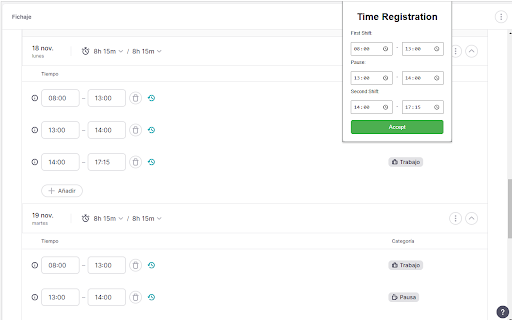
About
📝 Quick Start Guide
This guide will help you quickly and easily autofill your Factorial hours in just a few steps:

⚙️ How to Use
Go to Factorial: Open your browser and navigate to the Time Tracking page within your Factorial account.

1 - Launch the Extension: Click on the AutoFactorial extension icon in your browser's toolbar.

2 - Define Scope: Select whether you want to load hours for the entire month or just for the current day.

3 - Set Your Hours: Fill in the desired start and end times you wish to register.

4 - Run the Process: Click Confirm to start the automatic hour-filling process.

⚠️ Important Execution Notice
Please Note! To ensure the working hours are registered successfully and without interruption, you MUST NOT interact with the browser window or change tabs while the extension is running. The process may take a few minutes, depending on the number of days being filled.
Technical
- Version
- 2.7
- Manifest
- V3
- Size
- 12.81KiB
- Min Chrome
- 88
- Languages
- 1
- Featured
- No
Metadata
- ID
- bgmnihbneghhombiemecbpnihplnbaib
- Developer ID
- u54ade683d52345a23e240d8a8a80bd62
- Developer Email
- [email protected]
- Created
- Dec 2, 2024
- Last Updated (Store)
- Dec 4, 2025
- Last Scraped
- Jun 3, 2026
- Website
- —
- Support URL
- —
- Privacy Policy
- —
Similar extensions
Alternatives to Auto Factorial, ranked by description similarity.

Auto Clock Out for Factorial
Auto Clock Out for Factorial is an extension specifically designed for Factorial platform users who want to automate their…
3

Factorial Clock
Generate and manage weekly schedules for Factorial time tracking
14

Autofill Factorial Random Hours
Rellena automáticamente las horas en FactorialHR con variabilidad aleatoria.
90
★ 5.0

Work Hours Tracker
Track the date and amount of time worked each day.
18

Bamboo Bulk
This extension automates the process of entering work hours into BambooHR timesheets, saving you from manually inputting hours day…
218
★ 5.0

Employee Time Tracking
Employee Time Tracking app is a task management software and a time tracker. Calculate hours worked to manage tasks across projects
771
★ 4.9

Time Tracker
An easy to use time tracker for keeping track of time. Tracker with sound notification and different settings.
897
★ 5.0

Time Calculator
Calculate hours and minutes you've worked in any given time period
103
★ 5.0
Data sourced from the Chrome Web Store · last verified Jun 3, 2026.