
Google Verbatim Search
Enforces verbatim results, no personalization, and no duplicate filtering on Google searches
As of June 2026, Google Verbatim Search has 39 users in the Productivity category.
Usersup 875.0 percent+875.0%
39
39
Ratingno change0%
—
— reviews
Reviewsno change0%
—
Version
1.2
Manifest V3
90-day change · In the last 90 days this extension 1 version update, changed permissions.
History
11 snapshotsTracking since Apr 1, 2026.
View as table
| Date | Users | Rating | Reviews | Version |
|---|---|---|---|---|
| Apr 1, 2026 | 4 | — | — | 1.1 |
| Apr 17, 2026 | 4 | — | — | 1.1 |
| Apr 22, 2026 | 16 | — | — | 1.1 |
| Apr 27, 2026 | 17 | — | — | 1.2 |
| May 4, 2026 | 20 | — | — | 1.2 |
| May 10, 2026 | 23 | — | — | 1.2 |
| May 15, 2026 | 27 | — | — | 1.2 |
| May 22, 2026 | 25 | — | — | 1.2 |
| May 28, 2026 | 28 | — | — | 1.2 |
| Jun 4, 2026 | 32 | — | — | 1.2 |
| Jun 10, 2026 | 37 | — | — | 1.2 |
| Now | 39 | — | — | 1.2 |
Changelog
- Apr 22, 2026permissions
webNavigation
webNavigation, storage
Permissions & access
- Permissions
- webNavigationstorage
- Host access
- https://www.google.com/*
Screenshots
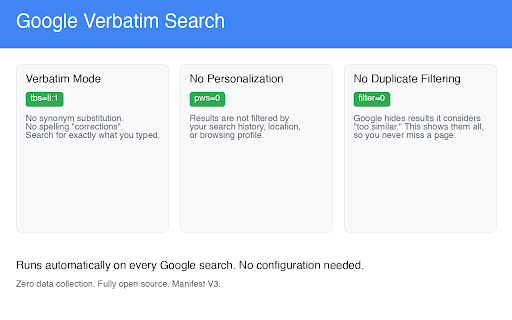
About
Google Verbatim Search automatically enforces three settings on every Google search — no configuration required.

WHAT IT DOES

1. Verbatim Mode (tbs=li:1)
Google silently replaces your search terms with synonyms, corrects your spelling, and broadens your query. Verbatim mode stops all of that. You get results for exactly what you typed.

2. No Personalization (pws=0)
Google filters your results based on your search history, location, and browsing profile. This extension disables personalization so you see the same results everyone else sees.

3. No Duplicate Filtering (filter=0)
Google hides results it considers "too similar" to others. This extension shows them all, so you never miss a relevant page.

4. SafeSearch Off (safe=off)
Google increasingly enforces SafeSearch regardless of your account settings. This extension sets it to off so your results are not filtered by content restrictions.


HOW IT WORKS

The extension runs as a lightweight background service worker. When you navigate to a Google search page, it adds three URL parameters before the page loads. That's it. No popup, no sidebar, no toolbar button — it just works.

PRIVACY

- Collects zero data
- Makes zero network requests
- No analytics, no tracking, no telemetry
- Fully open source: https://github.com/markwbennett/Chrome-Scripts

PERMISSIONS EXPLAINED

- webNavigation: Detects Google search page navigations
- Host permission (www.google.com): Limits activity to Google search pages only
Technical
- Version
- 1.2
- Manifest
- V3
- Size
- 7.56KiB
- Min Chrome
- 88
- Languages
- 1
- Featured
- No
Metadata
- ID
- bgmnbehecipfaiimhmicmjbhgcjjkhoc
- Developer ID
- u513b52e60f7bdbe3a5e231d73fe227fd
- Developer Email
- [email protected]
- Created
- Mar 27, 2026
- Last Updated (Store)
- Apr 21, 2026
- Last Scraped
- Jun 10, 2026
- Website
- —
- Support URL
- —
Data sourced from the Chrome Web Store · last verified Jun 10, 2026.