
Save All Tab URLs
Get the raw URLs of all your open tabs!
As of May 2026, Save All Tab URLs has 6,000 users and a 4.77/5 rating from 13 reviews in the Workflow & Planning category.
Usersno change0%
6.0K
6,000
Ratingdown 0.4 percent−0.4%
4.77
13 reviews
Reviewsdown 7.1 percent−7.1%
13
Version
0.2.0
Manifest V3
History
1 snapshotsTracking since Apr 29, 2026.
View as table
| Date | Users | Rating | Reviews | Version |
|---|---|---|---|---|
| Apr 29, 2026 | 6.0K | 4.79 | 14 | 0.2.0 |
| Now | 6.0K | 4.77 | 13 | 0.2.0 |
Permissions & access
- Permissions
- tabs
- Host access
- None declared
Screenshots
About
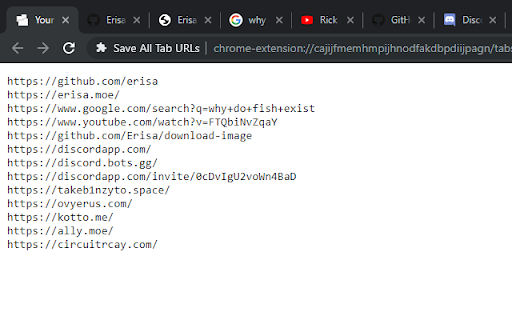
When clicked, this extension shows all the URLs of your open tabs in a convenient way for you to copy/paste and save wherever you want, allowing you to re-visit all the open tabs you had the last time you used your browser!
Technical
- Version
- 0.2.0
- Manifest
- V3
- Size
- 38.66KiB
- Min Chrome
- 88
- Languages
- 1
- Featured
- No
Metadata
- ID
- bgjfbcjoaghcfdhnnnnaofkjbnelkkcm
- Developer ID
- uf575dd22feea03a2da768814f0fb57d6
- Developer Email
- [email protected]
- Created
- Oct 14, 2019
- Last Updated (Store)
- Mar 6, 2025
- Last Scraped
- May 26, 2026
- Website
- —
- Privacy Policy
- https://erisa.uk/privacy
Similar extensions
Alternatives to Save All Tab URLs, ranked by description similarity.

Mass Copy URLs − copy all URLs on all tabs
Copy to clipboard all the URLs in one click
1.0K
★ 3.3

Copy All Tabs Urls
Copy all tabs urls in multiple formats or Open multiple URLs at once.
14
★ 5.0

Copy all Urls
Copy all open URLs with a single click and paste them whenever you need.
64
★ 5.0

Copy All URL's 2.0
Copy the currently opened tabs’ URL to the clipboard and paste them in a go to open them all again. (formats: text, HTML or JSON)
8.0K
★ 2.7

Copy All Tabs
Copy all tab URLs in various formats
816
★ 5.0

Copy/Paste Tabs URLs
Copy all tab URLs or open URLs from clipboard.
71

Copy All URLs (Free)
A simple Chrome extension to copy URLs of all open tabs.
80.0K
★ 4.0

TabsUrl
Retrieves the open tabs' URLs, users can save them into a text file or store them into the local storage to open them again later.
3
Data sourced from the Chrome Web Store · last verified May 26, 2026.