
DealerTrack Pro
DealerTrack.ca tools: export/import, Bill of Sale PDF, consent autofill, AI licence scanner, deal notes, and deal finder.
As of June 2026, DealerTrack Pro has 30 users and a 5.00/5 rating from 2 reviews in the Education category.
Usersup 650.0 percent+650.0%
30
30
Ratingno change0%
5.00
2 reviews
Reviewsno change0%
2
Version
6.5
Manifest V3
90-day change · In the last 90 days this extension 3 version updates, changed permissions.
History
10 snapshotsTracking since Apr 1, 2026.
View as table
| Date | Users | Rating | Reviews | Version |
|---|---|---|---|---|
| Apr 1, 2026 | 4 | 5.00 | 2 | 5.1 |
| Apr 19, 2026 | 5 | 5.00 | 2 | 5.1 |
| Apr 24, 2026 | 10 | 5.00 | 2 | 6.2 |
| May 2, 2026 | 15 | 5.00 | 2 | 6.2 |
| May 8, 2026 | 16 | 5.00 | 2 | 6.2 |
| May 13, 2026 | 20 | 5.00 | 2 | 6.2 |
| May 19, 2026 | 24 | 5.00 | 2 | 6.2 |
| May 25, 2026 | — | 5.00 | 2 | 6.4 |
| Jun 1, 2026 | 30 | 5.00 | 2 | 6.5 |
| Jun 7, 2026 | 29 | 5.00 | 2 | 6.5 |
| Now | 30 | 5.00 | 2 | 6.5 |
Changelog
- May 25, 2026host_permissions
https://www.dealertrack.ca/*, https://telegrambot-production-3a16.up.railway.app/*, https://zaqtrhwxemqibkbctkwu.supabase.co/*
https://www.dealertrack.ca/*, https://telegrambot-production-3a16.up.railway.app/*, https://brgfxtqlqojdpcpwqqcm.supabase.co/*
- May 19, 2026host_permissions
https://www.dealertrack.ca/*, https://api.anthropic.com/*, https://telegrambot-production-3a16.up.railway.app/*, https://zaqtrhwxemqibkbctkwu.supabase.co/*
https://www.dealertrack.ca/*, https://telegrambot-production-3a16.up.railway.app/*, https://zaqtrhwxemqibkbctkwu.supabase.co/*
- Apr 19, 2026description
Speed up your workflow with DealerTrack Pro. This productivity tool lets you export application data from one DealerTrack page and instantly import it into another with a single click — no typing, no copy-pasting fields manually.
Features:
Export / Import — Copy a full application to clipboard and paste it into any new application instantly
Bill of Sale — Generate a professional Bill of Sale PDF pre-filled with deal data, complete with your dealership's logo, salesperson info, and financing details
Consent — Automatically checks all consent and disclosure checkboxes in one click
Licence Scanner — Photograph a client's Ontario driver's licence, and the extension reads and fills in their personal information, address, and date of birth automatically using AI
Built for Canadian automotive dealerships using DealerTrack Canada.
--- Speed up your workflow with DealerTrack Pro. This productivity toolkit helps Canadian dealership staff work faster inside DealerTrack.ca — eliminating repetitive data entry, automating form filling, and generating documents in seconds. ━━━━━━━━━━━━━━━━━━━━━━━━━━━━━ ① 𝗘𝘅𝗽𝗼𝗿𝘁 / 𝗜𝗺𝗽𝗼𝗿𝘁 Copy a full application (including co-signer and Worksheet data) to clipboard and paste it into any new application instantly. Works across multiple Chrome profiles or between regular and incognito browsers, so you can transfer data between different DealerTrack accounts with no manual re-typing. 𝘏𝘰𝘸 𝘵𝘰 𝘶𝘴𝘦: Go to Applicant info → click Export → go to Co-app (if applicable) → click Export → go to Worksheet → click Export. Then open your other DealerTrack session, create a new app, and click Import. You can adjust import speed to match your connection. ② 𝗕𝗶𝗹𝗹 𝗼𝗳 𝗦𝗮𝗹𝗲 Generate a professional Bill of Sale PDF pre-filled with deal data, complete with your dealership's logo, salesperson info, and financing details. Supports saving multiple dealership profiles with separate logos, addresses, and HST numbers. 𝘏𝘰𝘸 𝘵𝘰 𝘶𝘴𝘦: Export the Applicant, Co-applicant (if applicable), and Worksheet tabs first. Then click BOS → Paste Data → fill in dealer info → Generate Bill of Sale. ③ 𝗖𝗼𝗻𝘀𝗲𝗻𝘁 Automatically checks all consent and disclosure checkboxes in the Documents tab in one click. 𝘏𝘰𝘸 𝘵𝘰 𝘶𝘴𝘦: Navigate to the Documents tab and click the Consent button. ④ 𝗟𝗶𝗰𝗲𝗻𝗰𝗲 𝗦𝗰𝗮𝗻𝗻𝗲𝗿 Upload a photo of a client's Ontario driver's licence and the AI reads and fills in their personal information, address, and date of birth automatically — no API key required. Or send the photo via Telegram to @Gassisstant and import it directly from the queue. A free public test account is available with no setup. 𝘏𝘰𝘸 𝘵𝘰 𝘶𝘴𝘦: Click Licence Scanner → choose Upload or Send from Telegram → scan or import → click Fill Form from Licence. ⑤ 𝗗𝗲𝗮𝗹 𝗡𝗼𝘁𝗲𝘀 Add inline notes to any deal directly in your applications list. Notes are permanently saved in your browser only. 𝘏𝘰𝘸 𝘵𝘰 𝘶𝘴𝘦: Just type your notes next to any deal. Use the toggle button to turn the feature on or off. ⑥ 𝗗𝗲𝗮𝗹 𝗙𝗶𝗻𝗱𝗲𝗿 Search 16,000+ live Canadian used car listings and instantly find vehicles that fit within your lender's approval parameters. Enter your payment call, interest rate, term, and add-ons — Deal Finder calculates the maximum selling price and surfaces every matching vehicle with room to work. 𝘏𝘰𝘸 𝘵𝘰 𝘶𝘴𝘦: Click Deal Finder → enter your lender approval details → click Find Matching Vehicles. ━━━━━━━━━━━━━━━━━━━━━━━━━━━━━ Built for Canadian automotive dealerships using DealerTrack.ca - Apr 19, 2026short_description
DealerTrack.ca tools: export/import data, Bill of Sale PDF with dealer logo, consent automation, and AI licence scanner.
DealerTrack.ca tools: export/import, Bill of Sale PDF, consent autofill, AI licence scanner, deal notes, and deal finder.
- Apr 19, 2026host_permissions
https://www.dealertrack.ca/*, https://api.anthropic.com/*
https://www.dealertrack.ca/*, https://api.anthropic.com/*, https://telegrambot-production-3a16.up.railway.app/*, https://zaqtrhwxemqibkbctkwu.supabase.co/*
Permissions & access
- Permissions
- activeTabscriptingclipboardReadclipboardWritestorage
- Host access
- https://www.dealertrack.ca/*, https://telegrambot-production-3a16.up.railway.app/*, https://brgfxtqlqojdpcpwqqcm.supabase.co/*
Screenshots


About
---
  Speed up your workflow with DealerTrack Pro. This productivity toolkit helps
  Canadian dealership staff work faster inside DealerTrack.ca — eliminating
  repetitive data entry, automating form filling, and generating documents in
  seconds.
  ━━━━━━━━━━━━━━━━━━━━━━━━━━━━━
  ① 𝗘𝘅𝗽𝗼𝗿𝘁 / 𝗜𝗺𝗽𝗼𝗿𝘁
  Copy a full application (including co-signer and Worksheet data) to clipboard
  and paste it into any new application instantly. Works across multiple Chrome
  profiles or between regular and incognito browsers, so you can transfer data
  between different DealerTrack accounts with no manual re-typing.
  𝘏𝘰𝘸 𝘵𝘰 𝘶𝘴𝘦: Go to Applicant info → click Export → go to Co-app (if applicable)
   → click Export → go to Worksheet → click Export. Then open your other
  DealerTrack session, create a new app, and click Import. You can adjust import
   speed to match your connection.

  ② 𝗕𝗶𝗹𝗹 𝗼𝗳 𝗦𝗮𝗹𝗲
  Generate a professional Bill of Sale PDF pre-filled with deal data, complete
  with your dealership's logo, salesperson info, and financing details. Supports
   saving multiple dealership profiles with separate logos, addresses, and HST
  numbers.
  𝘏𝘰𝘸 𝘵𝘰 𝘶𝘴𝘦: Export the Applicant, Co-applicant (if applicable), and Worksheet
  tabs first. Then click BOS → Paste Data → fill in dealer info → Generate Bill
  of Sale.

  ③ 𝗖𝗼𝗻𝘀𝗲𝗻𝘁
  Automatically checks all consent and disclosure checkboxes in the Documents
  tab in one click.
  𝘏𝘰𝘸 𝘵𝘰 𝘶𝘴𝘦: Navigate to the Documents tab and click the Consent button.

  ④ 𝗟𝗶𝗰𝗲𝗻𝗰𝗲 𝗦𝗰𝗮𝗻𝗻𝗲𝗿
  Upload a photo of a client's Ontario driver's licence and the AI reads and
  fills in their personal information, address, and date of birth automatically
  — no API key required. Or send the photo via Telegram to @Gassisstant and
  import it directly from the queue. A free public test account is available
  with no setup.
  𝘏𝘰𝘸 𝘵𝘰 𝘶𝘴𝘦: Click Licence Scanner → choose Upload or Send from Telegram → scan
   or import → click Fill Form from Licence.

  ⑤ 𝗗𝗲𝗮𝗹 𝗡𝗼𝘁𝗲𝘀
  Add inline notes to any deal directly in your applications list. Notes are
  permanently saved in your browser only.
  𝘏𝘰𝘸 𝘵𝘰 𝘶𝘴𝘦: Just type your notes next to any deal. Use the toggle button to
  turn the feature on or off.

  ⑥ 𝗗𝗲𝗮𝗹 𝗙𝗶𝗻𝗱𝗲𝗿
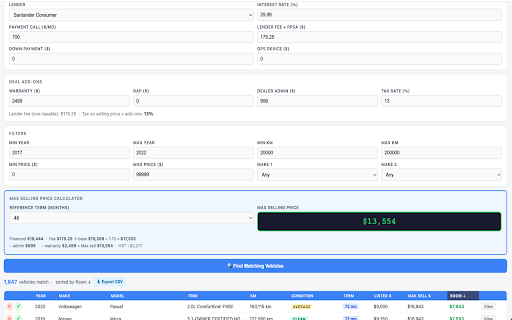
  Search 16,000+ live Canadian used car listings and instantly find vehicles
  that fit within your lender's approval parameters. Enter your payment call,
  interest rate, term, and add-ons — Deal Finder calculates the maximum selling
  price and surfaces every matching vehicle with room to work.
  𝘏𝘰𝘸 𝘵𝘰 𝘶𝘴𝘦: Click Deal Finder → enter your lender approval details → click
  Find Matching Vehicles.
  ━━━━━━━━━━━━━━━━━━━━━━━━━━━━━
  Built for Canadian automotive dealerships using DealerTrack.ca
Technical
- Version
- 6.5
- Manifest
- V3
- Size
- 615KiB
- Min Chrome
- 88
- Languages
- 1
- Featured
- No
Metadata
- ID
- bgidoimndpjijabbhgmflmokbnchoaag
- Developer ID
- u403a506f3d9f310427488ceb1376bd90
- Developer Email
- [email protected]
- Created
- Mar 10, 2026
- Last Updated (Store)
- May 19, 2026
- Last Scraped
- Jun 7, 2026
- Website
- —
- Support URL
- —
Similar extensions
Alternatives to DealerTrack Pro, ranked by description similarity.

ABC Buddy
Overlay widget for Simplicity Collect CRM to display enhanced client information
2

DaycareRadar Multi-Apply
Auto-fill daycare waitlist forms. Save hours applying to multiple childcare centers with one-click form filling.
—

ApplyFlow — Job Application Tracker
Track job applications, auto-fill forms, and manage your job search pipeline — all from your browser.
2

SabApplier AI – Autofill Startup, Exam & Online Forms
AI-powered extension to fill complex forms, manage documents, and auto-edit photos for exam and official applications
95
★ 4.7

Dr_RKC Autofill
Autofill a web form using data from a CSV file.
170
★ 5.0

Screenshot Analyzer
Capture and analyze screenshots the smart way.
11

Grading Assistant: Grade transferer tool
Transfer grades from Classroom, Teams and many edtech platforms to PowerSchool, Infinite Campus and other gradebooks.
5.0K
★ 2.5

Trade Autobot - BETA
AI-powered trade analysis and execution - THIS EXTENSION IS IN BETA TESTING. PLEASE REPORT ANY ISSUES YOU ENCOUNTER.
25
Data sourced from the Chrome Web Store · last verified Jun 7, 2026.