Sidecade
Your Personal Arcade, Just a Click Away!
As of May 2026, Sidecade has 144 users and a 4.33/5 rating from 6 reviews in the Games category.
Usersup 2.1 percent+2.1%
144
144
Ratingno change0%
4.33
6 reviews
Reviewsno change0%
6
Version
1.8.0
Manifest V3
History
3 snapshotsTracking since Apr 1, 2026.
View as table
| Date | Users | Rating | Reviews | Version |
|---|---|---|---|---|
| Apr 1, 2026 | 141 | 4.33 | 6 | 1.8.0 |
| Apr 29, 2026 | 142 | 4.33 | 6 | 1.8.0 |
| May 26, 2026 | 137 | 4.33 | 6 | 1.8.0 |
| Now | 144 | 4.33 | 6 | 1.8.0 |
Permissions & access
- Permissions
- activeTabstorage
- Host access
- <all_urls>
Screenshots


About
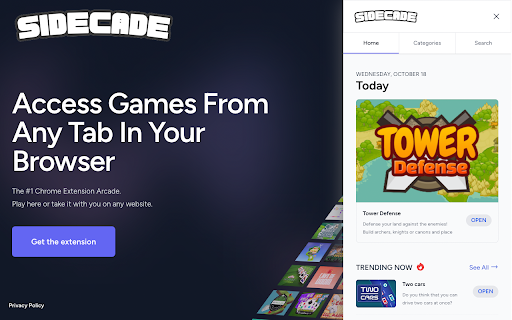
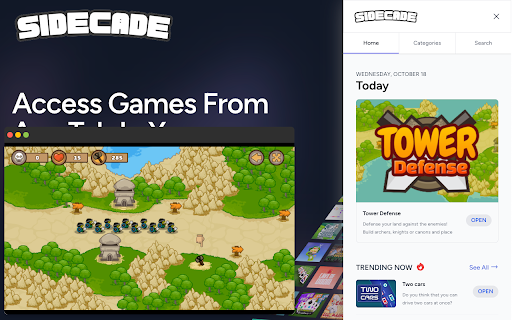
Why limit your gaming experience to specific platforms or websites? With Sidecade, you bring the arcade with you, wherever you are on the web. With over 800 games and counting, your next moment of leisure is just a click away.

🎮 Key Features
- Instant Access: Enjoy over 800 games from anywhere on the web with a simple click.
- User-Friendly Interface: Navigate through our extensive game library with ease.
- In-Browser Gaming: All games run in windows within your browser—no need to juggle
between tabs or software.
-  Google Emergency Eject: When you don't want others to see you playing games, just press Alt+W and it will close all games and redirect you to google.
- Multi-Game Support: Feeling ambitious? Play multiple games at once!
- Absolutely Free: Zero cost, pure entertainment.
- Always Fresh: We're constantly adding new games to keep the fun going.
- Smart Recommendations: Discover new games tailored just for you with our advanced recommendation engine.

🌟 Why Choose Sidecade?
- Unparalleled Convenience: Why search for games when they can be right at your fingertips?
- Variety Galore: Choose from a wide range of games—action, puzzle, strategy, and more!
- Multi-Task Like a Pro: Who says you can't beat three levels in three different games at the same time?
- Regular Updates: With new games added frequently, you'll never run out of options.

📥 Installation and Setup
- Click on the "Add to Chrome" button at the top-right corner of this page.
- Confirm the installation by clicking "Add Extension."
- Open a new tab, and you'll find the Sidecade icon in your extension toolbar.
- Click on it to open the arcade and start gaming!
Technical
- Version
- 1.8.0
- Manifest
- V3
- Size
- 473KiB
- Min Chrome
- 88
- Languages
- 1
- Featured
- No
Metadata
- ID
- bflbbiapbmjabnhkijehahppgbkohbhb
- Developer ID
- ueb23f174dd96a5b603ea8392a3c78058
- Developer Email
- [email protected]
- Created
- Oct 20, 2023
- Last Updated (Store)
- Nov 23, 2023
- Last Scraped
- May 26, 2026
- Website
- sidecade.com
- Support URL
- https://sidecade.com
- Privacy Policy
- https://sidecade.com/privacy
Similar extensions
Alternatives to Sidecade, ranked by description similarity.

Vibecode Games Launcher
Quick access to games from vibecodegames.org
4
★ 5.0
Side Games - play mini games in the side panel
Play over a HUNDRED mini games on your browser side panel!
80.0K
★ 3.0

UnblockedHub.com - Play Unblocked Games on Side Panel
Play top unblocked games instantly in your Side Panel. Fast, fun, and accessible while you browse!
917

Arcade Zone
Play classic arcade games right in your browser!
59

Arcade Hub
Premiun Arcade Hub - 7 Classic Games in one compact offline extension.
19

Browser Games
Play Browser Games right on Chrome™ Browser! Popup Version, and you can also play for free at classroom-6x.org/
172

Stacker - Falling tetra blocks!
A fun arcade game that plays in a popup. Stack falling tetra blocks without hitting the ceiling!
700.0K
★ 3.9

Arcade Deck
A clean mini-arcade with classic games. Offline, no ads, no tracking.
16
Data sourced from the Chrome Web Store · last verified May 26, 2026.