
Home Button At Top Right
Provides a button at the top-right of Chrome that links to any pages.
As of May 2026, Home Button At Top Right has 8,000 users and a 4.19/5 rating from 54 reviews in the Accessibility category.
Usersno change0%
8.0K
8,000
Ratingdown 1.4 percent−1.4%
4.19
54 reviews
Reviewsup 1.9 percent+1.9%
54
Version
1.7
Manifest V3
History
2 snapshotsTracking since Apr 1, 2026.
View as table
| Date | Users | Rating | Reviews | Version |
|---|---|---|---|---|
| Apr 1, 2026 | 8.0K | 4.25 | 53 | 1.7 |
| Apr 29, 2026 | 9.0K | 4.25 | 53 | 1.7 |
| Now | 8.0K | 4.19 | 54 | 1.7 |
Permissions & access
- Permissions
- storage
- Host access
- None declared
Screenshots



About
This extension provides a button at the top-right of Chrome that links to any pages.

Regarding upgrade: you now have version 1.7 because Chrome requires a manifest change before June 2024. The new system uses different storage, so your homepage url has been deleted. You just need to re-add it (via right-click > options).

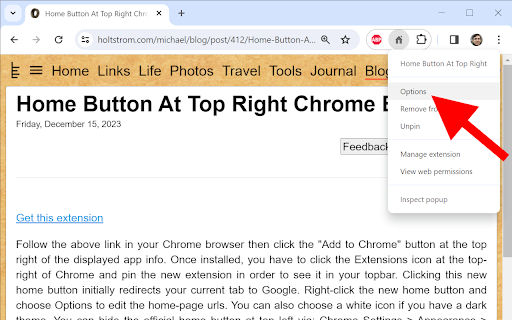
Regarding new installs: you have to click the Extensions icon at the top-right of Chrome and pin the new extension in order to see it in your top-bar. Clicking this new home button initially redirects your current tab to Google. Right-click the new home button and choose Options to edit the home-page urls. You can also choose a white icon if you have a dark theme. You can hide the official home button at top left via: Chrome Settings > Appearance > Show home button > Disabled.

This extension only uses the storage permission to remember your settings. This extension never monitors your activity. It only redirects your tabs when requested. The source code is very simple and is posted here https://holtstrom.com/michael/blog/post/412/Home-Button-At-Top-Right-Chrome-Extension.html, so you can inspect it for yourself. Use the "Feedback" button at the top of that article if you want to ask any questions. Be sure to include contact info if you want a reply.

This extension will always be free and will never have ads.

Some people want to link to a local url like "file:///C:/MyFolder/MyFile.html". As described at the above link, Chrome 118 and later removed the ability to redirect to local files. You can enable local navigation for this extension in your windows registry as shown below.

Computer\HKEY_LOCAL_MACHINE\SOFTWARE\Policies\Google\Chrome
ExtensionSettings = { "bfejcgpdahgpmgadhgdadfiekmhgnifm": { "file_url_navigation_allowed": true}}
Technical
- Version
- 1.7
- Manifest
- V3
- Size
- 9.2KiB
- Min Chrome
- 88
- Languages
- 1
- Featured
- No
Metadata
- ID
- bfejcgpdahgpmgadhgdadfiekmhgnifm
- Developer ID
- ua90aa72572a942c4098227180030e59f
- Developer Email
- [email protected]
- Created
- Mar 17, 2013
- Last Updated (Store)
- Dec 17, 2023
- Last Scraped
- May 26, 2026
Similar extensions
Alternatives to Home Button At Top Right, ranked by description similarity.

Fourth Home Button At Top Right
Provides a button at the top-right of Chrome that links to any pages.
43
★ 5.0

Fifth Home Button At Top Right
Provides a button at the top-right of Chrome that links to any pages.
37
★ 5.0

Third Home Button At Top Right
Provides a button at the top-right of Chrome that links to any pages.
32
★ 5.0

Second Home Button At Top Right
Provides a button at the top-right of Chrome that links to any pages.
137
★ 5.0

Quick Home Button - Homepage Access on Any Website
Instantly navigate to the homepage of any website with a single click. Perfect for quickly returning to the main page of any site.
36
★ 5.0

Original home tab
Force the browser to use the default new tab page
78
★ 5.0

Home Shortcut for Chromebook™
Adds a keyboard shortcut for the Home button.
1.0K
★ 3.7

Jump to Top Button
Adds a floating button on every page to quickly jump to the top.
2
Data sourced from the Chrome Web Store · last verified May 26, 2026.