
Today's Dollars - Inflation Calculator
Inflation Calculator. Calculate dollar amounts based on inflation.
As of June 2026, Today's Dollars - Inflation Calculator has 34 users and a 5.00/5 rating from 4 reviews in the Productivity category.
Usersdown 20.9 percent−20.9%
34
34
Ratingno change0%
5.00
4 reviews
Reviewsno change0%
4
Version
3.0.4
Manifest V3
90-day change · In the last 90 days this extension 1 version update.
History
11 snapshotsTracking since Apr 1, 2026.
View as table
| Date | Users | Rating | Reviews | Version |
|---|---|---|---|---|
| Apr 1, 2026 | 43 | 5.00 | 4 | 3.0.3 |
| Apr 20, 2026 | 41 | 5.00 | 4 | 3.0.3 |
| May 5, 2026 | 43 | 5.00 | 4 | 3.0.3 |
| May 9, 2026 | 36 | 5.00 | 4 | 3.0.4 |
| May 13, 2026 | 42 | 5.00 | 4 | 3.0.4 |
| May 21, 2026 | 44 | 5.00 | 4 | 3.0.4 |
| May 26, 2026 | 42 | 5.00 | 4 | 3.0.4 |
| May 30, 2026 | 38 | 5.00 | 4 | 3.0.4 |
| Jun 4, 2026 | 39 | 5.00 | 4 | 3.0.4 |
| Jun 8, 2026 | 41 | 5.00 | 4 | 3.0.4 |
| Jun 16, 2026 | 36 | 5.00 | 4 | 3.0.4 |
| Now | 34 | 5.00 | 4 | 3.0.4 |
Changelog
- May 5, 2026description
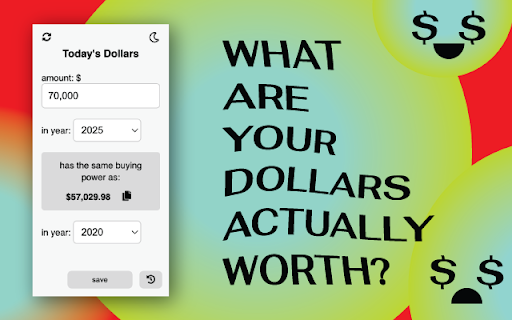
Today's Dollars💰 is an inflation calculator that allows you compare the purchasing power of a specific dollar amount across different years.

**Updated with June 2025 data**

Features:
- Simple and intuitive interface 👌
- Enter dollar amount, including decimals 💲
- Select the base year and target year; data going back to 1913  📅
- Calculate the equivalent value based on the CPI-U inflation data from BLS* 🔢
- Copy the result to your clipboard with just a single click 📄🖱️
- Save your results to the collapsible Calculation History panel 🔖
- Light and Dark theme support 🌞🌙
- Inputs, theme, calculation history is saved even when extension is closed. ✅
- Clear inputs and history items easily ❌

How to Use:
1. Install the Today's Dollars extension from the Chrome Web Store.
2. Open the extension popup by clicking on the extension icon in the toolbar.
3. Enter the dollar amount in the amount field.
4. Select the base year and target year from the dropdown lists.
5. As you type or select years, the result amount will automatically be displayed.
6. Click the copy icon to quickly copy the result to your clipboard.
7. Click flip years button to flip calculation.
8. Click save button to save the result to the history panel.
9.  Click the history icon in the bottom right corner to see Calculation History data.
10. Choose between a light or a dark theme from the toggle on the top-right corner.
11. The reset icon at the top-left corner will clear your previous selections, and amount, but keep your theme preference.

What does this calculation mean? 🤔
Let's use the example of $35 and the years 1979 and 2025. Due to inflation and changes in the cost of living, the amount of goods or services that $35 could buy in 1979 would require $153.15 in 2025 to purchase the same quantity of items. 😮

If we reverse the years in that calculation (2025 and 1979), what $35 could buy in 2025 would have been roughly equivalent to what $8 could buy in 1979. So even though you have $35, it's like having only $8 in terms of what you can actually buy with it. 💸

Support me. I don't collect data. I don't have ads. If you feel giving, buy me a coffee :D  https://buymeacoffee.com/ashhhh

* Disclaimer:
1. Today's Dollars is designed to calculate the inflation-adjusted value of amounts in USA dollars. Please note that the calculations and results are based on USA inflation data (CPI-U) from the Bureau of Labor Statistics. For accurate currency conversions and specific regional considerations, please consult appropriate financial sources or tools specific to your region.
Today's Dollars💰 is an inflation calculator that allows you compare the purchasing power of a specific dollar amount across different years.

**Updated with March 2026 data**

Features:
- Simple and intuitive interface 👌
- Enter dollar amount, including decimals 💲
- Select the base year and target year; data going back to 1913  📅
- Calculate the equivalent value based on the CPI-U inflation data from BLS* 🔢
- Copy the result to your clipboard with just a single click 📄🖱️
- Save your results to the collapsible Calculation History panel 🔖
- Light and Dark theme support 🌞🌙
- Inputs, theme, calculation history is saved even when extension is closed. ✅
- Clear inputs and history items easily ❌

How to Use:
1. Install the Today's Dollars extension from the Chrome Web Store.
2. Open the extension popup by clicking on the extension icon in the toolbar.
3. Enter the dollar amount in the amount field.
4. Select the base year and target year from the dropdown lists.
5. As you type or select years, the result amount will automatically be displayed.
6. Click the copy icon to quickly copy the result to your clipboard.
7. Click flip years button to flip calculation.
8. Click save button to save the result to the history panel.
9.  Click the history icon in the bottom right corner to see Calculation History data.
10. Choose between a light or a dark theme from the toggle on the top-right corner.
11. The reset icon at the top-left corner will clear your previous selections, and amount, but keep your theme preference.

What does this calculation mean? 🤔
Let's use the example of $35 and the years 1979 and 2025. Due to inflation and changes in the cost of living, the amount of goods or services that $35 could buy in 1979 would require $153.15 in 2025 to purchase the same quantity of items. 😮

If we reverse the years in that calculation (2025 and 1979), what $35 could buy in 2025 would have been roughly equivalent to what $8 could buy in 1979. So even though you have $35, it's like having only $8 in terms of what you can actually buy with it. 💸

Support me. I don't collect data. I don't have ads. If you feel giving, buy me a coffee :D  https://buymeacoffee.com/ashhhh

* Disclaimer:
1. Today's Dollars is designed to calculate the inflation-adjusted value of amounts in USA dollars. Please note that the calculations and results are based on USA inflation data (CPI-U) from the Bureau of Labor Statistics. For accurate currency conversions and specific regional considerations, please consult appropriate financial sources or tools specific to your region.
Permissions & access
- Permissions
- storage
- Host access
- None declared
Screenshots


About
Today's Dollars💰 is an inflation calculator that allows you compare the purchasing power of a specific dollar amount across different years.

**Updated with March 2026 data**

Features:
- Simple and intuitive interface 👌
- Enter dollar amount, including decimals 💲
- Select the base year and target year; data going back to 1913  📅
- Calculate the equivalent value based on the CPI-U inflation data from BLS* 🔢
- Copy the result to your clipboard with just a single click 📄🖱️
- Save your results to the collapsible Calculation History panel 🔖
- Light and Dark theme support 🌞🌙
- Inputs, theme, calculation history is saved even when extension is closed. ✅
- Clear inputs and history items easily ❌

How to Use:
1. Install the Today's Dollars extension from the Chrome Web Store.
2. Open the extension popup by clicking on the extension icon in the toolbar.
3. Enter the dollar amount in the amount field.
4. Select the base year and target year from the dropdown lists.
5. As you type or select years, the result amount will automatically be displayed.
6. Click the copy icon to quickly copy the result to your clipboard.
7. Click flip years button to flip calculation.
8. Click save button to save the result to the history panel.
9.  Click the history icon in the bottom right corner to see Calculation History data.
10. Choose between a light or a dark theme from the toggle on the top-right corner.
11. The reset icon at the top-left corner will clear your previous selections, and amount, but keep your theme preference.

What does this calculation mean? 🤔
Let's use the example of $35 and the years 1979 and 2025. Due to inflation and changes in the cost of living, the amount of goods or services that $35 could buy in 1979 would require $153.15 in 2025 to purchase the same quantity of items. 😮

If we reverse the years in that calculation (2025 and 1979), what $35 could buy in 2025 would have been roughly equivalent to what $8 could buy in 1979. So even though you have $35, it's like having only $8 in terms of what you can actually buy with it. 💸

Support me. I don't collect data. I don't have ads. If you feel giving, buy me a coffee :D  https://buymeacoffee.com/ashhhh

* Disclaimer:
1. Today's Dollars is designed to calculate the inflation-adjusted value of amounts in USA dollars. Please note that the calculations and results are based on USA inflation data (CPI-U) from the Bureau of Labor Statistics. For accurate currency conversions and specific regional considerations, please consult appropriate financial sources or tools specific to your region.
Technical
- Version
- 3.0.4
- Manifest
- V3
- Size
- 28.23KiB
- Min Chrome
- 88
- Languages
- 1
- Featured
- Yes
Metadata
- ID
- bfdehmfnafpnhfgaocbkjdidgcomapik
- Developer ID
- u8577e9a7e8b4529f95f8fa49923d9e39
- Developer Email
- [email protected]
- Created
- May 24, 2023
- Last Updated (Store)
- May 3, 2026
- Last Scraped
- Jun 16, 2026
- Website
- —
- Support URL
- —
- Privacy Policy
- —
Similar extensions
Alternatives to Today's Dollars - Inflation Calculator, ranked by description similarity.

Inflation Calculator
Simple calculator that adjusts prices for inflation.
4
★ 5.0

Inflation Lens
See any price in today's dollars
—

Percent Change Calculator
Calculate percent change of two values.
277
★ 5.0

Discount Calculator
Calculate discounts and final prices instantly to make smart purchase decisions.
2

TrueCost
Transform prices into time - see the real cost of purchases in hours of your life. Supports multiple languages and wage types.
5

Real GDP Calculator
Instantly calculate Real GDP by adjusting nominal GDP for inflation using GDP deflator or CPI.
2

Currency Converter for webpages
Converts currencies on webpages to your preferred currency on a single click. Select the currency you want and click Convert!
37
★ 4.0

Currency Exchanger
Real-time currency conversion with budget planning, live ticker, and instant in-page conversion
1
Data sourced from the Chrome Web Store · last verified Jun 16, 2026.