
Snap-Desk: Capture ScreenShots as PDF Notes
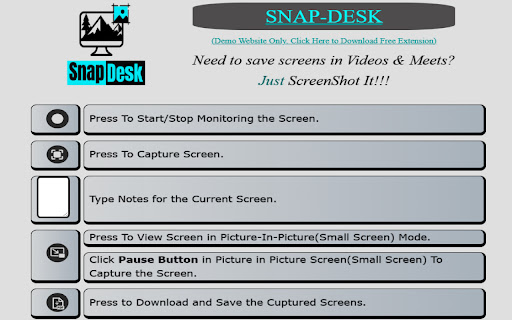
A powerful extension to capture screenshots of any desktop window or browser tab, Add text notes, and Save them as PDF files.
As of June 2026, Snap-Desk: Capture ScreenShots as PDF Notes has 152 users and a 5.00/5 rating from 2 reviews in the Workflow & Planning category.
Usersdown 3.2 percent−3.2%
152
152
Ratingno change0%
5.00
2 reviews
Reviewsno change0%
2
Version
2.0.0.0
Manifest V3
History
6 snapshotsTracking since Apr 1, 2026.
View as table
| Date | Users | Rating | Reviews | Version |
|---|---|---|---|---|
| Apr 1, 2026 | 157 | 5.00 | 2 | 2.0.0.0 |
| Apr 18, 2026 | 153 | 5.00 | 2 | 2.0.0.0 |
| Apr 28, 2026 | 157 | 5.00 | 2 | 2.0.0.0 |
| May 8, 2026 | 153 | 5.00 | 2 | 2.0.0.0 |
| May 15, 2026 | 149 | 5.00 | 2 | 2.0.0.0 |
| Jun 3, 2026 | 154 | 5.00 | 2 | 2.0.0.0 |
| Now | 152 | 5.00 | 2 | 2.0.0.0 |
Permissions & access
- Permissions
- activeTab
- Host access
- None declared
Screenshots


About
Effortlessly capture screenshots and save them as PDF files with our simple yet powerful extension. Experience unparalleled convenience and productivity as you take control of your screen. 🤹 Enhanced Multitasking with Picture-in-Picture Mode. Boost your productivity with our extension's rich multitasking capabilities. Utilize the Picture-in-Picture mode to effortlessly view and capture your screen from any other open window. 🙋♂ Dedicated Help and Demo Site To ensure you make the most of our extension's capabilities, we provide a dedicated walkthrough cum demo-site so you can learn to use it in a snap. 📝 Clean, Minimal, and Focused Design Our extension occupies less than 5% of your screen space, presenting only the essential buttons and functionality without hiding or disturbing your content. Enjoy a clutter-free interface designed for optimal user experience. 🚫 No Bloatware, No Extra Permissions Rest assured, we prioritize your privacy. Our extension only requires the necessary Desktop Capture Permission to take screenshots. We do not monitor your tabs or browsing history. Don't just take our word for it – open your extension settings now, to see for yourself. 🚫 No Ads, No Redirects We've streamlined the entire process within the original page where the extension is used, eliminating any redirects to new pages or the need for additional applications. Enjoy a seamless and uninterrupted experience. About Developer: I am Tejas Jain, a passionate developer and a final year student at Delhi Technological University, New Delhi, India. I have developed this project with great enthusiasm and dedication to solve the problem of taking notes during meetings and online lectures, addressing the problem faced by myself and fellow students. Connect with me to explore more such exciting projects. Opportunities: I am actively looking for Work and Collaboration opportunities to further enhance my skills and contribute to exciting projects. Let's Connect: LinkedIn: https://www.linkedin.com/in/1tejasjain/
Technical
- Version
- 2.0.0.0
- Manifest
- V3
- Size
- 317KiB
- Min Chrome
- 88
- Languages
- 1
- Featured
- No
Metadata
- ID
- bfanalaldfhlcadlkmjpbiaieophgpgn
- Developer ID
- u309aa1fa073f0e5c30bd07bb1216f458
- Developer Email
- [email protected]
- Created
- Jun 29, 2023
- Last Updated (Store)
- Dec 10, 2025
- Last Scraped
- Jun 3, 2026
- Website
- —
- Support URL
- https://my.snapdesk.workers.dev
- Privacy Policy
- https://my.snapdesk.workers.dev
Similar extensions
Alternatives to Snap-Desk: Capture ScreenShots as PDF Notes, ranked by description similarity.

Easy Screenshot
Capture parts of the screen
19
★ 1.0

Scrolling screenshot tool & screen capture
Scrolling Screenshot tool for screen capture and screen sharing
400.0K
★ 4.3

Simple Screen Capture: Full Page Screenshot
Simple Screen Capture is a handy Chrome Extension that allows you to effortlessly capture full page screenshots with just a click.
5.0K
★ 4.3

Recorder & Screenshot | Sitespedia - Screen Video Recorder & Screenshot
Take screenshots entirely or partially of websites, annotate them, and manage them in a centralized place.
6

CaptureNShare: Capture, Record, Edit & Share
Transforms your screen into a canvas—effortlessly record, edit, and share high-quality screenshots and videos like a pro!
38
★ 4.9

Screenshot and screen video recording - Screeny
The #1 screen recorder and screenshot tool! Full capture and video recording of your screen.
80.0K
★ 4.7

Screen & Webcam recorder - Flonnect
Allows Screen Recording from your Webcam and Desktop
100.0K
★ 4.6
Full Page Screenshot: ScreenTool.io
Take Full Page Screenshots effortlessly, snip specific areas, and share in seconds.
9.0K
★ 3.9
Data sourced from the Chrome Web Store · last verified Jun 3, 2026.