
SnapMark - Chrome's Most Powerful Screenshot Tool
The most powerful way to capture, annotate, and share screenshots — built for speed, precision, and modern workflows.
As of June 2026, SnapMark - Chrome's Most Powerful Screenshot Tool has 11 users and a 5.00/5 rating from 4 reviews in the Productivity category.
Usersno change0%
11
11
Ratingno change0%
5.00
4 reviews
Reviewsno change0%
4
Version
1.0.12
Manifest V3
90-day change · In the last 90 days this extension 3 version updates, changed permissions.
History
10 snapshotsTracking since Apr 17, 2026.
View as table
| Date | Users | Rating | Reviews | Version |
|---|---|---|---|---|
| Apr 17, 2026 | — | — | — | 1.0.0 |
| Apr 22, 2026 | — | — | — | 1.0.0 |
| Apr 29, 2026 | 2 | 5.00 | 1 | 1.0.8 |
| May 7, 2026 | 6 | 5.00 | 3 | 1.0.11 |
| May 11, 2026 | 8 | 5.00 | 4 | 1.0.12 |
| May 17, 2026 | 9 | 5.00 | 4 | 1.0.12 |
| May 23, 2026 | 8 | 5.00 | 4 | 1.0.12 |
| May 30, 2026 | 11 | 5.00 | 4 | 1.0.12 |
| Jun 5, 2026 | 10 | 5.00 | 4 | 1.0.12 |
| Jun 13, 2026 | 12 | 5.00 | 4 | 1.0.12 |
| Now | 11 | 5.00 | 4 | 1.0.12 |
Changelog
- May 7, 2026description
The modern screenshot tool built for everyday productivity.

SnapMark streamlines the way you capture and communicate visual information from the web. Whether you're sharing feedback, documenting a process, or saving important content, SnapMark delivers a seamless experience from capture to share — no extra software required.

Capture, annotate, and share anything on the web—instantly. This Chrome extension turns your browser into a powerful visual workspace, allowing you to take full-page or partial screenshots and mark them up with precision. Whether you're giving feedback, documenting bugs, creating tutorials, or saving inspiration, everything you need is built into a fast, intuitive interface.

No more juggling multiple tools or downloading images just to edit them elsewhere. With built-in annotation features and seamless export options, you can go from capture to communication in seconds.

Key Features:

📸 Flexible Screenshot Capture – Grab full pages, selected areas, or visible screens in one click
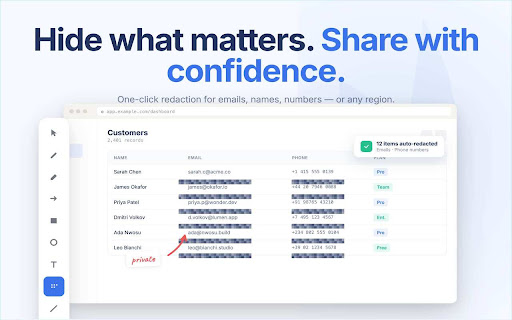
✏️ Powerful Annotation Tools – Add arrows, text, highlights, shapes, and blur sensitive information
⚡ Instant Editing – Annotate immediately after capture with zero friction
🔗 Easy Sharing – Download, copy, or share screenshots quickly with your team or clients
🚀 Post to Slack Instantly – Share screenshots directly to Slack channels or teammates without leaving your browser
📧 Send via Email in One Click – Attach and send annotated screenshots instantly—no downloads required
🔒 Auto-Redaction – Automatically detect and blur sensitive data like emails, phone numbers, and personal info
🗂️ Access Your Local Library – View, organize, and reuse all your screenshots stored locally on your device
🧠 Built for Productivity – Perfect for QA, product teams, marketers, and founders

Use Cases:

 • Report bugs with clear visual context
 • Provide design or website feedback
 • Create SOPs and training materials
 • Save and organize visual inspiration
 • Collaborate faster with clients and teammates

Ideal For:

 • Professionals sharing visual feedback with teams and clients
 • Educators and trainers creating instructional materials
 • Developers and QA teams reporting bugs with clarity
 • Writers and researchers documenting online sources
 • Anyone who communicates more effectively with visuals

Simple, fast, and built for how you work—this is the only screenshot tool you’ll need.
The modern screenshot tool built for everyday productivity.

Capture, annotate, and share anything on the web—instantly. This Chrome extension turns your browser into a powerful visual workspace, allowing you to take full-page or partial screenshots and mark them up with precision. Whether you're giving feedback, documenting bugs, creating tutorials, or saving inspiration, everything you need is built into a fast, intuitive interface.

No more juggling multiple tools or downloading images just to edit them elsewhere. With built-in annotation features and seamless export options, you can go from capture to communication in seconds.

Key Features:

📸 Flexible Screenshot Capture – Grab full pages, selected areas, or visible screens in one click
✏️ Powerful Annotation Tools – Add arrows, text, highlights, shapes, and blur sensitive information
⚡ Instant Editing – Annotate immediately after capture with zero friction
🔗 Easy Sharing – Download, copy, or share screenshots quickly with your team or clients
🚀 Post to Slack Instantly – Share screenshots directly to Slack channels or teammates without leaving your browser
📧 Send via Email in One Click – Attach and send annotated screenshots instantly—no downloads required
🔒 Auto-Redaction – Automatically detect and blur sensitive data like emails, phone numbers, and personal info
🗂️ Access Your Local Library – View, organize, and reuse all your screenshots stored locally on your device
🧠 Built for Productivity – Perfect for QA, product teams, marketers, and founders

Use Cases:

 • Report bugs with clear visual context
 • Provide design or website feedback
 • Create SOPs and training materials
 • Save and organize visual inspiration
 • Collaborate faster with clients and teammates

Ideal For:

 • Professionals sharing visual feedback with teams and clients
 • Educators and trainers creating instructional materials
 • Developers and QA teams reporting bugs with clarity
 • Writers and researchers documenting online sources
 • Anyone who communicates more effectively with visuals

Simple, fast, and built for how you work—this is the only screenshot tool you’ll need.
- Apr 29, 2026name
SnapMark - The Most Powerful Screenshot Tool on Chrome
SnapMark - Chrome's Most Powerful Screenshot Tool
- Apr 29, 2026permissions
activeTab, scripting, tabs, storage, downloads
activeTab, scripting, tabs, storage, downloads, identity, unlimitedStorage
- Apr 22, 2026description
Capture, annotate, and share anything on the web—instantly. This Chrome extension turns your browser into a powerful visual workspace, allowing you to take full-page or partial screenshots and mark them up with precision. Whether you're giving feedback, documenting bugs, creating tutorials, or saving inspiration, everything you need is built into a fast, intuitive interface.

No more juggling multiple tools or downloading images just to edit them elsewhere. With built-in annotation features and seamless export options, you can go from capture to communication in seconds.

Key Features:

📸 Flexible Screenshot Capture – Grab full pages, selected areas, or visible screens in one click
✏️ Powerful Annotation Tools – Add arrows, text, highlights, shapes, and blur sensitive information
⚡ Instant Editing – Annotate immediately after capture with zero friction
🔗 Easy Sharing – Download, copy, or share screenshots quickly with your team or clients
🧠 Built for Productivity – Perfect for QA, product teams, marketers, and founders
🔒 Privacy-Friendly – Your screenshots stay local unless you choose to share them

Use Cases:

Report bugs with clear visual context
Provide design or website feedback
Create SOPs and training materials
Save and organize visual inspiration
Collaborate faster with clients and teammates

Simple, fast, and built for how you work—this is the only screenshot tool you’ll need.
The modern screenshot tool built for everyday productivity.

SnapMark streamlines the way you capture and communicate visual information from the web. Whether you're sharing feedback, documenting a process, or saving important content, SnapMark delivers a seamless experience from capture to share — no extra software required.

Capture, annotate, and share anything on the web—instantly. This Chrome extension turns your browser into a powerful visual workspace, allowing you to take full-page or partial screenshots and mark them up with precision. Whether you're giving feedback, documenting bugs, creating tutorials, or saving inspiration, everything you need is built into a fast, intuitive interface.

No more juggling multiple tools or downloading images just to edit them elsewhere. With built-in annotation features and seamless export options, you can go from capture to communication in seconds.

Key Features:

📸 Flexible Screenshot Capture – Grab full pages, selected areas, or visible screens in one click
✏️ Powerful Annotation Tools – Add arrows, text, highlights, shapes, and blur sensitive information
⚡ Instant Editing – Annotate immediately after capture with zero friction
🔗 Easy Sharing – Download, copy, or share screenshots quickly with your team or clients
🚀 Post to Slack Instantly – Share screenshots directly to Slack channels or teammates without leaving your browser
📧 Send via Email in One Click – Attach and send annotated screenshots instantly—no downloads required
🔒 Auto-Redaction – Automatically detect and blur sensitive data like emails, phone numbers, and personal info
🗂️ Access Your Local Library – View, organize, and reuse all your screenshots stored locally on your device
🧠 Built for Productivity – Perfect for QA, product teams, marketers, and founders

Use Cases:

 • Report bugs with clear visual context
 • Provide design or website feedback
 • Create SOPs and training materials
 • Save and organize visual inspiration
 • Collaborate faster with clients and teammates

Ideal For:

 • Professionals sharing visual feedback with teams and clients
 • Educators and trainers creating instructional materials
 • Developers and QA teams reporting bugs with clarity
 • Writers and researchers documenting online sources
 • Anyone who communicates more effectively with visuals

Simple, fast, and built for how you work—this is the only screenshot tool you’ll need.
- Apr 22, 2026short_description
Full-page screenshot capture with powerful annotation tools — shapes, text, blur/redact, rulers, color picker and more.
The most powerful way to capture, annotate, and share screenshots — built for speed, precision, and modern workflows.
- Apr 22, 2026name
Screenshot & Annotator
SnapMark - The Most Powerful Screenshot Tool on Chrome
- Apr 22, 2026permissions
activeTab, scripting, tabs, storage
activeTab, scripting, tabs, storage, downloads
Permissions & access
- Permissions
- activeTabscriptingtabsstoragedownloadsidentityunlimitedStorage
- Host access
- <all_urls>
Screenshots



About
The modern screenshot tool built for everyday productivity.

Capture, annotate, and share anything on the web—instantly. This Chrome extension turns your browser into a powerful visual workspace, allowing you to take full-page or partial screenshots and mark them up with precision. Whether you're giving feedback, documenting bugs, creating tutorials, or saving inspiration, everything you need is built into a fast, intuitive interface.

No more juggling multiple tools or downloading images just to edit them elsewhere. With built-in annotation features and seamless export options, you can go from capture to communication in seconds.

Key Features:

📸 Flexible Screenshot Capture – Grab full pages, selected areas, or visible screens in one click
✏️ Powerful Annotation Tools – Add arrows, text, highlights, shapes, and blur sensitive information
⚡ Instant Editing – Annotate immediately after capture with zero friction
🔗 Easy Sharing – Download, copy, or share screenshots quickly with your team or clients
🚀 Post to Slack Instantly – Share screenshots directly to Slack channels or teammates without leaving your browser
📧 Send via Email in One Click – Attach and send annotated screenshots instantly—no downloads required
🔒 Auto-Redaction – Automatically detect and blur sensitive data like emails, phone numbers, and personal info
🗂️ Access Your Local Library – View, organize, and reuse all your screenshots stored locally on your device
🧠 Built for Productivity – Perfect for QA, product teams, marketers, and founders

Use Cases:

 • Report bugs with clear visual context
 • Provide design or website feedback
 • Create SOPs and training materials
 • Save and organize visual inspiration
 • Collaborate faster with clients and teammates

Ideal For:

 • Professionals sharing visual feedback with teams and clients
 • Educators and trainers creating instructional materials
 • Developers and QA teams reporting bugs with clarity
 • Writers and researchers documenting online sources
 • Anyone who communicates more effectively with visuals

Simple, fast, and built for how you work—this is the only screenshot tool you’ll need.
Technical
- Version
- 1.0.12
- Manifest
- V3
- Size
- 13.54MiB
- Min Chrome
- 88
- Languages
- 1
- Featured
- No
Metadata
- ID
- beknnanjneapophmkgadglmfihbepieg
- Developer ID
- uc1e548af2ffa06a8220e7e5c4d2391f4
- Developer Email
- [email protected]
- Created
- Apr 16, 2026
- Last Updated (Store)
- May 3, 2026
- Last Scraped
- Jun 13, 2026
- Website
- —
- Support URL
- —
- Privacy Policy
- —
Data sourced from the Chrome Web Store · last verified Jun 13, 2026.