
RealEyes.ai — Detect Deepfakes Across Online Platforms
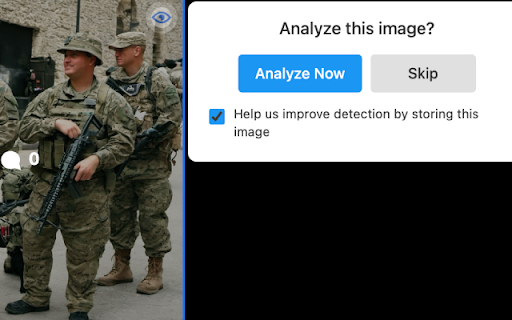
Adds an overlay icon on images which allows the image to be analyzed for deepfake manipulation
As of May 2026, RealEyes.ai — Detect Deepfakes Across Online Platforms has 23 users and a 5.00/5 rating from 1 reviews in the Productivity category.
Usersdown 25.8 percent−25.8%
23
23
Ratingno change0%
5.00
1 reviews
Reviewsno change0%
1
Version
1.7
Manifest V3
History
3 snapshotsTracking since Apr 1, 2026.
View as table
| Date | Users | Rating | Reviews | Version |
|---|---|---|---|---|
| Apr 1, 2026 | 31 | 5.00 | 1 | 1.7 |
| May 2, 2026 | 30 | 5.00 | 1 | 1.7 |
| May 31, 2026 | 24 | 5.00 | 1 | 1.7 |
| Now | 23 | 5.00 | 1 | 1.7 |
Permissions & access
- Permissions
- activeTabstoragenotificationsscriptingcookies
- Host access
- <all_urls>, https://api.realeyes.ai/*, https://realeyes.ai/*, https://signin.realeyes.ai/*
Screenshots

About
RealEyes helps you navigate the increasingly complex world of digital media by providing AI-powered analysis of images across major social platforms including LinkedIn, Facebook, Twitter, Instagram, and Reddit.

Key Features:
• Smart Integration: Subtle overlay icons appear on images across supported social media platforms
• Secure Analysis: Click the icon, review the privacy consent, and get detailed AI manipulation detection results
• Clear Results: Receive comprehensive feedback with probability scores and confidence indicators
• Privacy-Focused: User consent required before any image analysis

How It Works:
1. Browse your favorite social media platforms
2. Look for the RealEyes.ai icon on images
3. Review and accept the consent
4. Click to begin analysis
5. Get detailed results showing the likelihood of AI manipulation

Perfect for:
• Social media users concerned about misinformation
• Professionals verifying content authenticity
• Digital literacy advocates
• Anyone wanting to make informed decisions about online content

Privacy & Security:
• Transparent consent process
• Secure JWT-based authentication
• Optional image storage with clear user consent
• Content security policies enforced
• Cross-origin resource sharing (CORS) protection

Supported Platforms:
• LinkedIn
• Facebook
• Twitter/X
• Instagram
• Reddit

Stay informed and protect yourself from misleading content with RealEyes AI - your companion for detecting AI-generated images online.

Note: This extension requires a RealEyes account for image analysis. The signup process is quick and straightforward through our secure authentication system.
Technical
- Version
- 1.7
- Manifest
- V3
- Size
- 64.93KiB
- Min Chrome
- 88
- Languages
- 1
- Featured
- No
Metadata
- ID
- begpcdlgbbjihlilieokcgnlcmeondog
- Developer ID
- u80499428f1fa62b33b5295439e36f8fb
- Developer Email
- [email protected]
- Created
- Nov 23, 2024
- Last Updated (Store)
- Dec 13, 2024
- Last Scraped
- May 31, 2026
- Website
- realeyes.ai
- Support URL
- https://realeyes.ai/contact-us/
- Privacy Policy
- https://realeyes.ai/privacy/
Similar extensions
Alternatives to RealEyes.ai — Detect Deepfakes Across Online Platforms, ranked by description similarity.

SecondEyes
Check if text, images are AI generated
1

Social Media Screener
Analyzes social media posts using AI and visualizes results
3

AICheck Pro
Check images and videos for AI generation across all websites.
—

AI Detector - BitMind
🔍 Identify Fake AI Media with Ease!
30.0K
★ 3.8

SocialLens AI
The ultimate market intelligence tool for text and video platforms.
4

AI Image Detector
Use AI Image Detector to detect if a picture is generated, AI art or a real photo in one click. Fast and accurate ai image checker.
373
★ 5.0

Research Assistant Pro - Fact Checker
AI-powered research with Perplexity integration for comprehensive fact-checking
14
★ 5.0

CleanFeed - AI Social Media Filter
Tired of "AI Slop" and bot-generated replies? Restore authenticity to your social media experience with CleanFeed.
CleanFeed is a…
—
Data sourced from the Chrome Web Store · last verified May 31, 2026.