
KOLOR
A color picker with eyedropper, palettes, and history.
As of June 2026, KOLOR has — users in the Productivity category.
Usersno change0%
—
—
Ratingno change0%
—
— reviews
Reviewsno change0%
—
Version
1.0.0
Manifest V3
History
2 snapshotsTracking since Apr 21, 2026.
Not enough history yet for this metric — the chart fills in as we collect more snapshots.
View as table
| Date | Users | Rating | Reviews | Version |
|---|---|---|---|---|
| Apr 21, 2026 | — | — | — | 1.0.0 |
| May 11, 2026 | — | — | — | 1.0.0 |
| Now | — | — | — | 1.0.0 |
Permissions & access
- Permissions
- activeTabscriptingstorageclipboardWrite
- Host access
- None declared
Screenshots
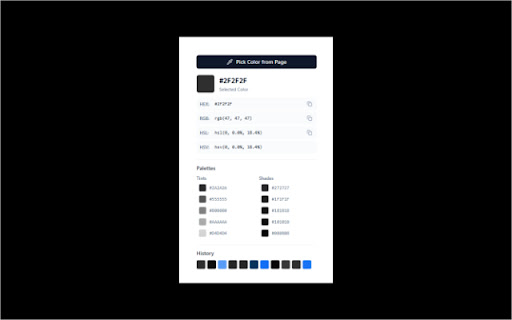

About
Introducing KOLOR: Your Ultimate Color Companion

Unleash your creativity with KOLOR, the advanced color picker extension designed to make color selection a breeze. Whether you're a web developer, graphic designer, or just someone who loves playing with colors, KOLOR provides you with all the tools you need to find, pick, and manage colors effortlessly.

Key Features:

Eyedropper Tool: Precisely pick colors from any webpage with our built-in eyedropper tool. Simply activate the eyedropper and click on any pixel to get its exact color value.

Comprehensive Color Formats: Get color values in HEX, RGB, HSL, and HSV formats, making it easy to use colors in any application.
Color Palettes: Generate tints and shades of your selected color to create harmonious color palettes for your projects.

Color History: Keep track of your recently picked colors with our convenient color history feature. Never lose a color you love again!

Copy to Clipboard: Easily copy color values to your clipboard with a single click.
User-Friendly Interface: Enjoy a clean and intuitive interface that makes color selection a seamless experience.

Keyboard Shortcut: Activate the eyedropper tool quickly using the Ctrl+Shift+E (Command+Shift+E on Mac) keyboard shortcut.

KOLOR is the perfect tool for anyone who works with colors. Download it today and start creating beautiful designs!
Technical
- Version
- 1.0.0
- Manifest
- V3
- Size
- 4.47MiB
- Min Chrome
- 88
- Languages
- 1
- Featured
- No
Metadata
- ID
- befkchnlnhamjllfocdjmohchkbchddk
- Developer ID
- u698eb64743c88e56a48413d2b5457ff1
- Developer Email
- [email protected]
- Created
- Apr 7, 2025
- Last Updated (Store)
- Apr 7, 2025
- Last Scraped
- Jun 7, 2026
- Website
- —
- Support URL
- —
- Privacy Policy
- —
Similar extensions
Alternatives to KOLOR, ranked by description similarity.

Color Picker
Pick colors and save history.
64

Color Picker
Pick and store colors.
6

Chroma Click Picker
Chrome extension to pick and display color information at 1px precision from any webpage, with copy functionality.
5

Color Picker
Color Picker, Color Palette, Designer tools, Web dev tools
41
★ 5.0

Pick Instant Color
Instantly pick, analyze, and manage colors from any website with ease.
—

Color Pickup Pro
Pixel-perfect color picker with advanced features: shades generator, favorites, export, and more.
7

Easy Color Grabber - Smart Color Picker
Instantly capture, convert, and copy colors from any webpage with one click, plus a color history for your workflow.
11

Color Picker - CreatorYo Creations
Use eyedropper to pick any color on screen & export colors! Start boosting your productivity.
24
★ 3.7
Data sourced from the Chrome Web Store · last verified Jun 7, 2026.