Checksy
A minimal daily to-do with archiving, recurring tasks, notes, priority, and dark mode.
As of June 2026, Checksy has 16 users and a 5.00/5 rating from 2 reviews in the Productivity category.
Usersno change0%
16
16
Ratingno change0%
5.00
2 reviews
Reviewsno change0%
2
Version
3.0.0
Manifest V3
90-day change · In the last 90 days this extension 2 version updates.
History
5 snapshotsTracking since May 12, 2026.
View as table
| Date | Users | Rating | Reviews | Version |
|---|---|---|---|---|
| May 12, 2026 | — | — | — | 1.0.0 |
| May 17, 2026 | — | — | — | 1.0.0 |
| May 24, 2026 | 8 | 5.00 | 2 | 2.0.0 |
| Jun 6, 2026 | 9 | 5.00 | 2 | 2.0.0 |
| Jun 19, 2026 | 13 | 5.00 | 2 | 3.0.0 |
| Now | 16 | 5.00 | 2 | 3.0.0 |
Changelog
- Jun 6, 2026description
Checksy is a distraction-free daily task list that lives in your browser toolbar.
Add tasks in seconds, check them off as you go, and start every morning with a clean slate — no carry-over clutter. Whatever you didn't finish yesterday is quietly moved to the Archive so nothing is ever lost.

KEY FEATURES

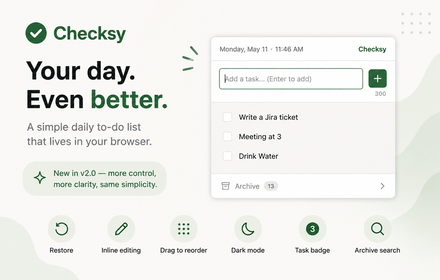
1. 300-character tasks — enough detail, never too much
2. One keystroke to add — type and hit Enter, that's it
3. Daily reset — each new day starts with an empty list automatically
4. Archive — browse completed and missed tasks grouped by date
5. Restore — accidentally checked something off? Restore it back to today's list in one click
6. Inline editing — double-click any task to edit it without losing your place
7. Drag to reorder — grab and drag tasks to prioritize your day
8. Task badge — see how many tasks are pending right on the browser icon, without opening the app
9. Archive search — find any past task instantly by typing a keyword
10. Dark mode — easy on the eyes, day or night
11. Fast & lightweight — no accounts, no sync, no network requests

HOW IT WORKS

Click the Checksy icon in your toolbar
1. Type a task and press Enter (or click +)
2. Check off tasks as you complete them — they move to Archive instantly
3. Tomorrow, your list resets automatically.
4. Yesterday's unfinished items are saved in Archive as "missed"

IMPORTANT

All data is stored locally on your device. Nothing leaves your browser.
Checksy is a lightweight to-do extension built for people who want to stay focused without switching apps. Open it from any tab, add what needs to get done, and check things off as you go.
Your list resets every morning — completed tasks are automatically archived so your history is always there when you need it. Recurring tasks get added to your list each day without you lifting a finger.

Everything you need, nothing you don't:

1. Add, check off, edit (double-click), and reorder tasks by drag
2. Star tasks to mark them as priority
3. Attach a note to any task for extra context
4. Set recurring tasks that appear automatically every morning
5. Daily auto-reset with full archive — nothing is ever lost
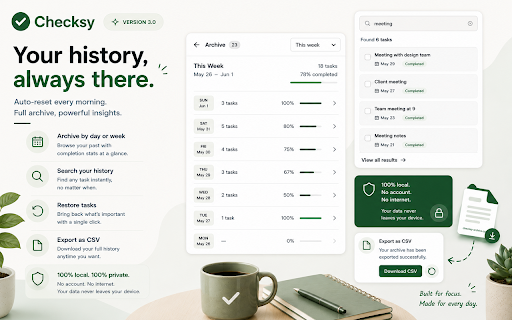
6. Browse your archive by day or week, with completion stats
7. Search through past tasks instantly
8. Restore a completed task back to your active list
9. Export your full history as a CSV
10. Live badge on the extension icon shows your pending task count
11. Dark mode — follows your system preference or toggle manually
12. Open with a keyboard shortcut: Alt+Shift+C

100% local. No account. No internet connection needed. Your data never leaves your device.

HOW IT WORKS

Click the Checksy icon in your toolbar (or press Alt+Shift+C) to open it from any tab.
> Type a task and press Enter or click + to add it
> Star a task to mark it as priority, or attach a note for extra context
> Check off tasks as you complete them — they move to Archive instantly
> Drag to reorder your list however you like, or double-click any task to edit it
> Tomorrow, your list resets automatically — completed tasks are saved as "done", unfinished ones as "missed"
> Visit Archive anytime to browse by day or week, search past tasks, or export everything as a CSV
- Jun 6, 2026short_description
A minimal daily to-do with automatic archiving, dark mode, and smart task management.
A minimal daily to-do with archiving, recurring tasks, notes, priority, and dark mode.
- May 17, 2026description
Checksy is a distraction-free daily task list that lives in your browser toolbar.

Add tasks in seconds, check them off as you go, and start every morning with a clean slate — no carry-over clutter. Whatever you didn't finish yesterday is quietly moved to the Archive so nothing is ever lost.

KEY FEATURES

- 300-character tasks — enough detail, never too much
- One keystroke to add — type and hit Enter, that's it
- Daily reset — each new day starts with an empty list automatically
- Archive — browse completed and missed tasks grouped by date, without it crowding your daily view
- Fast & lightweight — no accounts, no sync, no network requests

HOW IT WORKS

1. Click the Checksy icon in your toolbar
2. Type a task and press Enter (or click +)
3. Check off tasks as you complete them — they move to Archive instantly
4. Tomorrow, your list resets automatically. Yesterday's unfinished items are saved in Archive as "missed"

All data is stored locally on your device using Chrome's built-in storage. Nothing leaves your browser.
Checksy is a distraction-free daily task list that lives in your browser toolbar.
Add tasks in seconds, check them off as you go, and start every morning with a clean slate — no carry-over clutter. Whatever you didn't finish yesterday is quietly moved to the Archive so nothing is ever lost.

KEY FEATURES

1. 300-character tasks — enough detail, never too much
2. One keystroke to add — type and hit Enter, that's it
3. Daily reset — each new day starts with an empty list automatically
4. Archive — browse completed and missed tasks grouped by date
5. Restore — accidentally checked something off? Restore it back to today's list in one click
6. Inline editing — double-click any task to edit it without losing your place
7. Drag to reorder — grab and drag tasks to prioritize your day
8. Task badge — see how many tasks are pending right on the browser icon, without opening the app
9. Archive search — find any past task instantly by typing a keyword
10. Dark mode — easy on the eyes, day or night
11. Fast & lightweight — no accounts, no sync, no network requests

HOW IT WORKS

Click the Checksy icon in your toolbar
1. Type a task and press Enter (or click +)
2. Check off tasks as you complete them — they move to Archive instantly
3. Tomorrow, your list resets automatically.
4. Yesterday's unfinished items are saved in Archive as "missed"

IMPORTANT

All data is stored locally on your device. Nothing leaves your browser.
- May 17, 2026short_description
A minimal daily to-do with automatic archiving. Stay focused, one day at a time.
A minimal daily to-do with automatic archiving, dark mode, and smart task management.
Permissions & access
- Permissions
- storage
- Host access
- None declared
Screenshots


About
Checksy is a lightweight to-do extension built for people who want to stay focused without switching apps. Open it from any tab, add what needs to get done, and check things off as you go.
Your list resets every morning — completed tasks are automatically archived so your history is always there when you need it. Recurring tasks get added to your list each day without you lifting a finger.

Everything you need, nothing you don't:

1. Add, check off, edit (double-click), and reorder tasks by drag
2. Star tasks to mark them as priority
3. Attach a note to any task for extra context
4. Set recurring tasks that appear automatically every morning
5. Daily auto-reset with full archive — nothing is ever lost
6. Browse your archive by day or week, with completion stats
7. Search through past tasks instantly
8. Restore a completed task back to your active list
9. Export your full history as a CSV
10. Live badge on the extension icon shows your pending task count
11. Dark mode — follows your system preference or toggle manually
12. Open with a keyboard shortcut: Alt+Shift+C

100% local. No account. No internet connection needed. Your data never leaves your device.

HOW IT WORKS

Click the Checksy icon in your toolbar (or press Alt+Shift+C) to open it from any tab.
> Type a task and press Enter or click + to add it
> Star a task to mark it as priority, or attach a note for extra context
> Check off tasks as you complete them — they move to Archive instantly
> Drag to reorder your list however you like, or double-click any task to edit it
> Tomorrow, your list resets automatically — completed tasks are saved as "done", unfinished ones as "missed"
> Visit Archive anytime to browse by day or week, search past tasks, or export everything as a CSV
Technical
- Version
- 3.0.0
- Manifest
- V3
- Size
- 20.65KiB
- Min Chrome
- 88
- Languages
- 1
- Featured
- No
Metadata
- ID
- bdgpfnonkmangjjcjmnfbajeaeabebgo
- Developer ID
- u650300a39a83bccbd055161ae032bbc1
- Developer Email
- [email protected]
- Created
- May 11, 2026
- Last Updated (Store)
- Jun 4, 2026
- Last Scraped
- Jun 19, 2026
- Website
- —
- Support URL
- —
Data sourced from the Chrome Web Store · last verified Jun 19, 2026.