
SAP Customer Data Cloud toolkit
Add extra functionality to SAP Customer Data Cloud toolkit console
As of May 2026, SAP Customer Data Cloud toolkit has 194 users and a 5.00/5 rating from 2 reviews in the Developer Tools category.
Usersdown 2.0 percent−2.0%
194
194
Ratingno change0%
5.00
2 reviews
Reviewsno change0%
2
Version
1.11.2
Manifest V3
History
5 snapshotsTracking since Apr 1, 2026.
View as table
| Date | Users | Rating | Reviews | Version |
|---|---|---|---|---|
| Apr 1, 2026 | 198 | 5.00 | 2 | 1.11.2 |
| Apr 21, 2026 | 202 | 5.00 | 2 | 1.11.2 |
| May 6, 2026 | 197 | 5.00 | 2 | 1.11.2 |
| May 18, 2026 | 202 | 5.00 | 2 | 1.11.2 |
| May 31, 2026 | 198 | 5.00 | 2 | 1.11.2 |
| Now | 194 | 5.00 | 2 | 1.11.2 |
Permissions & access
- Permissions
- storage
- Host access
- None declared
Screenshots


About
Enhance your workflow with the SAP Customer Data Cloud Toolkit for Google Chrome™. Streamline repetitive tasks and apply industry best practices to boost quality, productivity, and overall well-being. This extension integrates seamlessly with SAP Customer Data Cloud, offering new functionalities and enhancing existing ones for a more efficient experience.

Key Features:
• Copy Configuration Extended: Drastically reduces the effort of copying configurations from 1 site to many. It also includes more features than the regular Copy Configuration as: all Site Policies, SMS and Email Templates, CAPTCHA, RBA rules, the full Schema, webSDK, Extensions, Dataflows, Communication Topics, and Consent Statements.
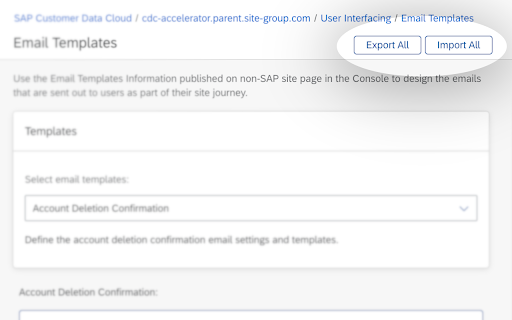
• Export / Import of SMS and Email Templates in bulk: Effortlessly manage the import and export of SMS and Email templates with a single click. Minimize human error and save valuable time while increasing efficiency.
• Site Deployer integrated with Copy Configuration Extended: Allows the creation of complex site structures with customized configurations from existing sites leveraging best practices, all facilitated by the Copy Configuration Extended feature.
• UI Builder: Enhance code readability and organization with the ability to format JavaScript code using the "Prettify" button within the UI Builder.
• Import Data: Easily automate the import of accounts into SAP CDC. Generate CSV files based on selected schema fields for either lite or full accounts, and import them in one action, eliminating the need for developing a dataflow.
• Version Control: Enhances flexibility and control by enabling CDC configuration management and tracking via Github. Users can back up, monitor, and restore configurations, analyze changes, identify behavioural shifts, and revert to earlier versions if necessary

Note: To fully utilize the SAP Customer Data Cloud Toolkit with your business data, you must be an SAP Customer Data Cloud user with mobile services enabled by your IT department. Initially, you may explore the app using sample data.
Technical
- Version
- 1.11.2
- Manifest
- V3
- Size
- 3.3MiB
- Min Chrome
- 88
- Languages
- 1
- Featured
- No
Metadata
- ID
- bdgkgahkohocjopmgdbgjjkagblobafb
- Developer ID
- uc5541030bb069f65ab549f512260b8ef
- Developer Email
- [email protected]
- Created
- Sep 28, 2023
- Last Updated (Store)
- May 26, 2025
- Last Scraped
- May 31, 2026
- Website
- —
- Support URL
- —
- Privacy Policy
- https://www.sap.com/corporate/en/legal/privacy.html
Similar extensions
Alternatives to SAP Customer Data Cloud toolkit, ranked by description similarity.

SAP Pint
The SAP Integration Development Assistant
229
★ 5.0

AutoSAP
Streamline your SAP HANA workflows by automating repetitive transactions with intelligent form filling and execution capabilities.
22

WPM Launcher
Launcher for Salesforce Web Personalization Manager
29

Demandware With Ease
Use Salesforce Commerce Cloud B2C with ease!
20.0K
★ 4.9

Sitemap Builder
Salesforce Data 360 Sitemap Builder
438

CPQ Productivity Tools
Boost productivity on CPQ sites, currently supporting Oracle CPQ Cloud
135
★ 5.0

Sprintegrate CI Addon
Sprintegrate CI Addon
420
★ 5.0

SAP API Tester
Comprehensive SAP API testing tool with REST/SOAP support, BTP CPI integration, and 45+ pre-configured SAP API catalog.
33
Data sourced from the Chrome Web Store · last verified May 31, 2026.