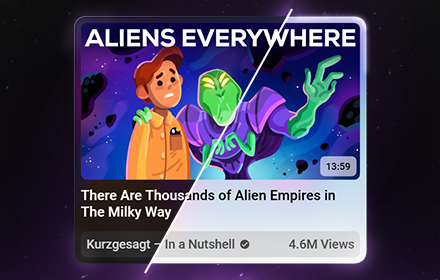
Ostendo – Capture Beautiful YouTube Screenshots
Capture & Share beautiful Tiles of YouTube Thumbnails & Comments! Customize the shape, content, and theme!
As of June 2026, Ostendo – Capture Beautiful YouTube Screenshots has 10,000 users and a 4.88/5 rating from 52 reviews in the Productivity category.
Usersup 100.0 percent+100.0%
10.0K
10,000
Ratingup 0.2 percent+0.2%
4.88
52 reviews
Reviewsup 13.0 percent+13.0%
52
Version
4.0.10
Manifest V3
90-day change · In the last 90 days this extension gained 5.0K users, 2 version updates, changed permissions.
History
4 snapshotsTracking since Apr 1, 2026.
View as table
| Date | Users | Rating | Reviews | Version |
|---|---|---|---|---|
| Apr 1, 2026 | 5.0K | 4.87 | 46 | 3.2.3 |
| May 2, 2026 | 5.0K | 4.87 | 47 | 3.2.3 |
| May 31, 2026 | 5.0K | 4.88 | 48 | 3.2.3 |
| Jun 17, 2026 | 10.0K | 4.88 | 52 | 4.0.8 |
| Now | 10.0K | 4.88 | 52 | 4.0.10 |
Changelog
- May 31, 2026description
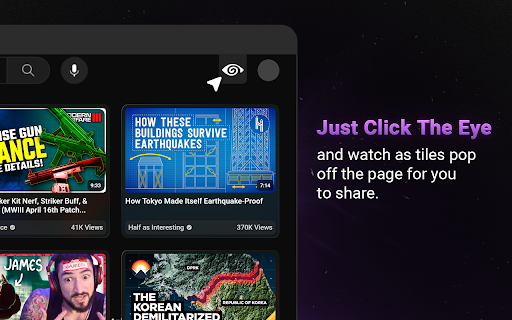
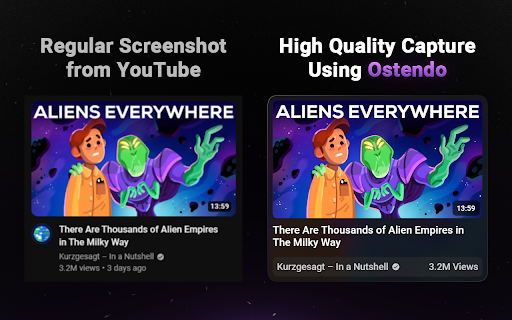
Ostendo is a tool to capture and share beautiful, high-quality screenshots from YouTube.

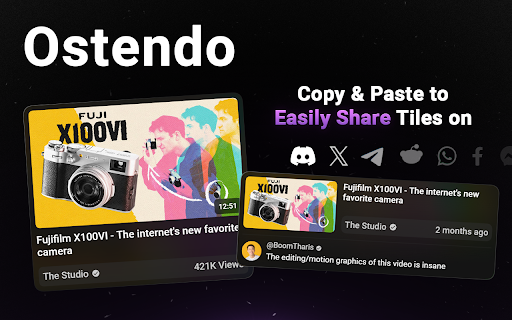
Ostendo is designed to create aesthetically pleasing screenshots for sharing: perfect for Tweets, Discord messages, or Reddit posts. You have the ability to either save the images Ostendo creates, or simply copy them to your clipboard so you can effortlessly paste it wherever you want.

Current Features:
• Capture Thumbnails in aesthetically pleasing Tiles!
– 2 size variants (slim & full)
– 2 color themes (light & dark)
– show/hide video length
– swap between view count & video age

• Capture Raw Thumbnails in the highest available quality!

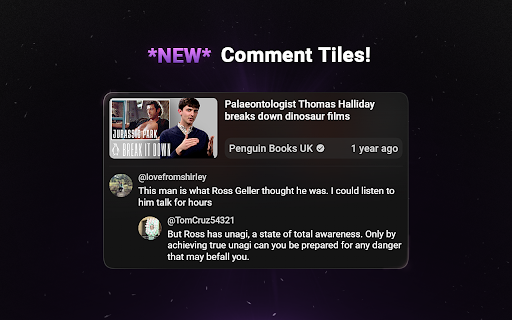
• Capture Comments!
– 2 color themes (light & dark)
– Option to show comment and 1 reply

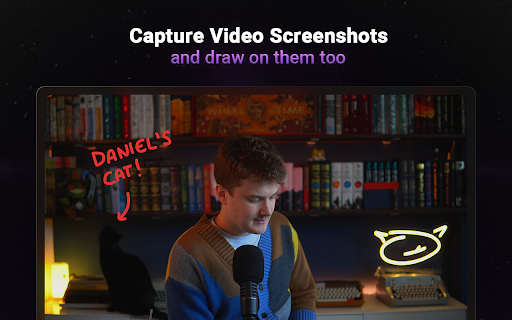
• Capture Video Screenshots
– draw on screenshots using 4 colors and 3 brush sizes
Ostendo is a tool for Creators and Thumbnail Designers to capture and share beautiful, high-quality screenshots from YouTube.

Ostendo is designed to create aesthetically pleasing screenshots for sharing: perfect for Tweets, Discord messages, Reddit posts, or saving inspiration for thumbnail designers. You have the ability to either save the images Ostendo creates, or simply copy them to your clipboard so you can effortlessly paste it wherever you want.

Current Features:
• Capture Thumbnails in aesthetically pleasing Tiles!
– 2 size variants (slim & full)
– 10 color themes
– show/hide video length
– swap between view count & video age

• Capture Raw Thumbnails in the highest available quality!

• Capture Comments!
– 2 color themes (light & dark)
– Option to show comment and 1 reply

• Capture Video Screenshots
– draw on screenshots using 4 colors and 3 brush sizes

For Thumbnail Designers & Creators:
Ostendo can be upgraded to Ostendo Pro to change the way you collect, sort, and filter your thumbnail inspiration!
- May 31, 2026host_permissions
https://www.youtube.com/*
https://www.youtube.com/*, https://ostendo.app/*
- May 31, 2026permissions
storage
storage, tabs
Permissions & access
- Permissions
- storagetabs
- Host access
- https://www.youtube.com/*, https://ostendo.app/*
Screenshots
About
Ostendo is a tool for Creators and Thumbnail Designers to capture and share beautiful, high-quality screenshots from YouTube.

Ostendo is designed to create aesthetically pleasing screenshots for sharing: perfect for Tweets, Discord messages, Reddit posts, or saving inspiration for thumbnail designers. You have the ability to either save the images Ostendo creates, or simply copy them to your clipboard so you can effortlessly paste it wherever you want.

Current Features:
• Capture Thumbnails in aesthetically pleasing Tiles!
– 2 size variants (slim & full)
– 10 color themes
– show/hide video length
– swap between view count & video age

• Capture Raw Thumbnails in the highest available quality!

• Capture Comments!
– 2 color themes (light & dark)
– Option to show comment and 1 reply

• Capture Video Screenshots
– draw on screenshots using 4 colors and 3 brush sizes

For Thumbnail Designers & Creators:
Ostendo can be upgraded to Ostendo Pro to change the way you collect, sort, and filter your thumbnail inspiration!
Technical
- Version
- 4.0.10
- Manifest
- V3
- Size
- 1.48MiB
- Min Chrome
- 88
- Languages
- 1
- Featured
- Yes
Metadata
- ID
- bdfkognhpfgcoafcncpdgpjlbhoigpil
- Developer ID
- uba57d8929cf40e83a15785940c7b24cf
- Developer Email
- [email protected]
- Created
- Aug 16, 2023
- Last Updated (Store)
- Jun 15, 2026
- Last Scraped
- Jun 17, 2026
- Website
- ostendo.app
- Support URL
- https://twitter.com/ostendoapp
- Privacy Policy
- —
Similar extensions
Alternatives to Ostendo – Capture Beautiful YouTube Screenshots, ranked by description similarity.

Video Screenshot
Capture the current video frame as a full resolution PNG with Alt+Shift+S.
104
★ 5.0

Youtube Comment Screenshot Tool
Screenshot YouTube comments — capture single or multi-comment threads, auto-save to a searchable history, and download anytime.
35
★ 5.0

YouTube Screenshotter
Take high-quality screenshots of YouTube videos and Shorts with one click or Alt+S.
3

Screenshot YouTube - Video & Shorts
Take a screenshot of any YouTube video and shorts with one click.
154
★ 4.5

YouTube Screenshot
Capture YouTube video screenshots with YouTube Screenshot. Fast, easy, and powerful tool screenshot youtube generator.
304
★ 4.0

YouTube Comment Screenshot
Take screenshots of YouTube comments
271
★ 5.0

YouTube Screenshot
Capture screenshots of YouTube videos with one click.
8
★ 5.0

Handy Screenshot - Full Page Screen Capture
Take screenshots of web pages with ease. Capture, edit, annotate and save them as PNG / JPG / WEBP formats.
40.0K
★ 4.8
Data sourced from the Chrome Web Store · last verified Jun 17, 2026.