
SnapFrame Pro — YouTube HD Screenshot & Frame Grabber
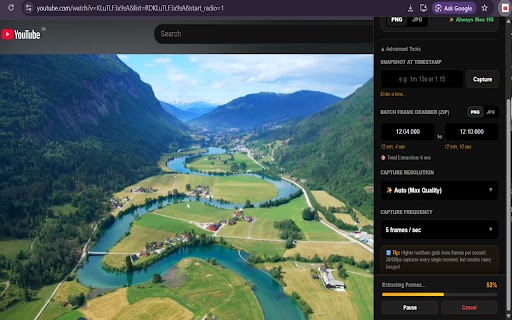
Pro YouTube frame grabber. Capture HD screenshots and batch-extract 4K frames to ZIP. Clean, one-click precision for creators.
As of June 2026, SnapFrame Pro — YouTube HD Screenshot & Frame Grabber has 1 users in the Productivity category.
Usersno change0%
1
1
Ratingno change0%
—
— reviews
Reviewsno change0%
—
Version
1.0.1
Manifest V3
History
2 snapshotsTracking since May 17, 2026.
Not enough history yet for this metric — the chart fills in as we collect more snapshots.
View as table
| Date | Users | Rating | Reviews | Version |
|---|---|---|---|---|
| May 17, 2026 | — | — | — | 1.0.1 |
| Jun 12, 2026 | — | — | — | 1.0.1 |
| Now | 1 | — | — | 1.0.1 |
Permissions & access
- Permissions
- storage
- Host access
- *://*.youtube.com/*, *://*.googlevideo.com/*
Screenshots


About
**Capture every moment on YouTube in stunning High Definition.**

SnapFrame is the ultimate tool for creators, designers, and researchers. Stop struggling with messy print-screens that include play buttons and progress bars. SnapFrame captures the raw video frame directly from the YouTube player, ensuring a clean, professional result every time.

### Why choose SnapFrame?
- **📸 Native Integration**: Adds a sleek capture button directly to your YouTube player.
- **✨ HD Auto-Boost**: Automatically detects and switches to the highest available quality (4K, 1080p) before grabbing the frame.
- **🚫 Clean Captures**: No player controls, no volume sliders, no pause icons. Just the video.
- **⚡ Instant Save**: One click or one shortcut (`Ctrl+Shift+S`) and your frame is downloaded.
- **📦 Burst Extraction**: Need a series of frames? Set a time range and SnapFrame will package them into a clean ZIP file for you.
- **🖼 Flexible Formats**: Choose between PNG (for maximum quality) or JPG (for smaller file sizes).

### Perfect for:
- Video editors looking for thumbnail inspiration.
- Students capturing lecture slides.
- Artists needing high-quality reference frames.
- Researchers documenting video content.

SnapFrame is lightweight, fast, and does NOT require any login or cloud storage. Your data stays on your machine.
Technical
- Version
- 1.0.1
- Manifest
- V3
- Size
- 1.15MiB
- Min Chrome
- 88
- Languages
- 1
- Featured
- No
Metadata
- ID
- bcnlgbckgilkcmibajjffifccbjllcgn
- Developer ID
- u6e871a2d75b3b0c45c239f0d1aa15614
- Developer Email
- [email protected]
- Created
- May 16, 2026
- Last Updated (Store)
- May 17, 2026
- Last Scraped
- Jun 12, 2026
- Website
- —
- Support URL
- —
Data sourced from the Chrome Web Store · last verified Jun 12, 2026.