
GroupsTag
Create group tags for your favorite people
As of May 2026, GroupsTag has 105 users and a 3.67/5 rating from 3 reviews in the Workflow & Planning category.
Usersdown 6.3 percent−6.3%
105
105
Ratingno change0%
3.67
3 reviews
Reviewsno change0%
3
Version
1.0.0
Manifest V3
History
2 snapshotsTracking since May 1, 2026.
View as table
| Date | Users | Rating | Reviews | Version |
|---|---|---|---|---|
| May 1, 2026 | 112 | 3.67 | 3 | 1.0.0 |
| May 31, 2026 | 116 | 3.67 | 3 | 1.0.0 |
| Now | 105 | 3.67 | 3 | 1.0.0 |
Permissions & access
- Permissions
- storagetabscontextMenuswebRequestdeclarativeNetRequestalarms
- Host access
- https://*.facebook.com/*, *://aw6ltfk4rd.execute-api.us-east-1.amazonaws.com/*
Screenshots


About
Use GroupsTag™ to Create Raving Fans, Followers, and Buyers On All Live Videos & Posts Inside Your Facebook Groups.

GroupsTag™ is used in Facebook groups to allow Facebook group Admins and Moderators to create Tag Lists within a Facebook group.

Users can add up to 50 Facebook group members to each Tag List.  A Facebook group can have an unlimited number of Tag Lists.

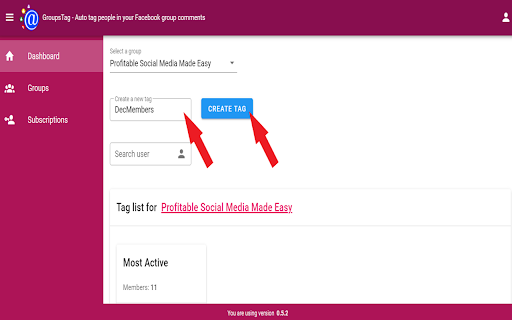
An example Tag List might be {{Jan25 Members}} to identify all group members that joined the Facebook group in January 2025.

From this Tag List users can tag all group members of the Tag List at one time using {{Jan25 Members}} in the comments of any post.

The Tag List group members will then get a notification from Facebook about the post.
____________________

Benefit #1
No more tagging people one at a time on your Facebook live videos and posts.

Benefit #2
More engagement on your posts in your Facebook group.

Benefit #3
More people showing up to your live videos in your Facebook group.
____________________

Here's How GroupsTag™ Helps You Stay Connected With Your Group Members...

Step 1: Install The GroupsTag™ Chrome Extension
You'll receive a link in your email to install the GroupsTag™ extension into your Chrome browser.  It's as simple as clicking one button and then logging in with the email you purchased with!

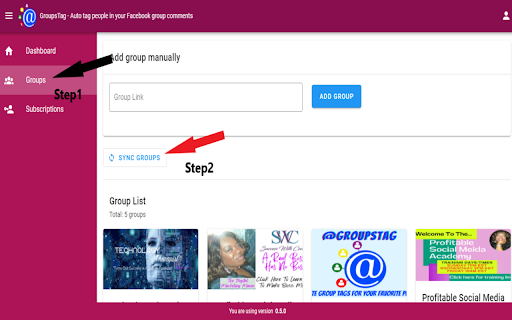
Step 2: Sync all your groups and Create your Tag Lists inside of GroupsTag™
Once you load GroupsTag™ you will be able to sync up all groups where you are the admin in one place.  Then you can create Tag Lists for your groups.

Step 3: In Facebook, add group members to your GroupsTag™ Tag Lists
Once your Tag Lists are created for your Facebook group you can add group members to your list with just one click.
____________________

GroupsTag™ will help you get more people to see your offers because they will get a Facebook notification about your post or live.

And unlike normal tagging it won't show up on page or their news feed.

It'll save you from spending time and money tagging group members one at a time on your live videos and posts.

It'll let you sell more of your offers and you can truly be present during your live without worrying about who's showing up.

Most importantly, it'll help you amplify your results and get better participation from your Facebook group.

And you know what makes this even better?...

You'll be able to start seeing results immediately as soon as you start using the software.
Technical
- Version
- 1.0.0
- Manifest
- V3
- Size
- 391KiB
- Min Chrome
- 88
- Languages
- 1
- Featured
- No
Metadata
- ID
- bcnldankcojlhpfdnpbaddcjmkilhcio
- Developer ID
- uf30cedd92345310a9b873fb8c346e87d
- Developer Email
- [email protected]
- Created
- Dec 14, 2021
- Last Updated (Store)
- Jan 14, 2025
- Last Scraped
- May 31, 2026
- Website
- groupstag.com
- Support URL
- https://successwithcecelia.com/contactme/
- Privacy Policy
- https://successwithcecelia.com/privacy-policy/
Similar extensions
Alternatives to GroupsTag, ranked by description similarity.

Group Funnels
Get member information and question answers when approving user
2.0K
★ 4.0

GroupTrack 2.0
The Leading CRM for Social
1.0K
★ 4.9

Group Convert Ext
Get member information and question answers when approving user
3.0K
★ 4.8

GroupKit Cloud
GroupKit allows you to make more money from your group with less time and effort.
3.0K
★ 5.0

GroupFilter - Remove Inactive Members & Group Analytics
Facebook Group admin tool: track member engagement, detect inactive members, and view group health analytics. Try 14 days free.
2.0K
★ 4.0

SafePoster - Organically auto post to joined Facebook™ groups - 100% Safe
A secure and easy Facebook posting tool that helps you share to multiple groups naturally, consistently, and without worry.
83

ClickLeadz
Capture & Manage your Leads from Facebook with precision & ease.
13
★ 4.7
FriendFlow
FriendFlow enables you to make quality friends, track engagements, and close the loop on your relationships.
84
Data sourced from the Chrome Web Store · last verified May 31, 2026.