
Rewords — Text Replacer
Replace words with words as you browse
As of June 2026, Rewords — Text Replacer has 1,000 users and a 4.00/5 rating from 14 reviews in the Functionality & UI category.
Usersno change0%
1.0K
1,000
Ratingup 7.2 percent+7.2%
4.00
14 reviews
Reviewsup 27.3 percent+27.3%
14
Version
2.2
Manifest V3
90-day change · In the last 90 days this extension 1 version update.
History
6 snapshotsTracking since Apr 16, 2026.
View as table
| Date | Users | Rating | Reviews | Version |
|---|---|---|---|---|
| Apr 16, 2026 | 1.0K | 3.73 | 11 | 2.0 |
| Apr 22, 2026 | 1.0K | 3.92 | 13 | 2.2 |
| May 23, 2026 | 1.0K | 4.00 | 14 | 2.2 |
| May 28, 2026 | 4.0K | 4.00 | 14 | 2.2 |
| Jun 2, 2026 | 6.0K | 3.80 | 15 | 2.2 |
| Jun 22, 2026 | 7.0K | 3.80 | 15 | 2.2 |
| Now | 1.0K | 4.00 | 14 | 2.2 |
Changelog
- Apr 16, 2026description
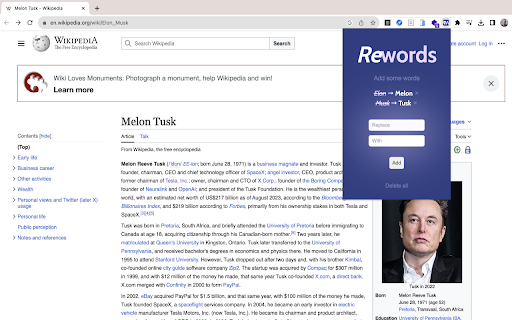
Rewords replaces specified words and phrases up to 30 characters on web pages as you browse. Various input validations ensure you won't encounter any unexpected replacements on your screen.

➙ Click on the Rewords icon in the Chrome toolbar to open the extension popup.
➙ In the popup, you will see a list of your existing word pairs, if any.
➙ To add a new word pair, enter the word you want to replace in the "Replace" input field and the corresponding replacement word in the "With" input field. Then click the "Add" button.
➙ If there are any errors in your input (e.g., duplicate word pairs, empty fields, or replacements exceeding 30 characters), appropriate error messages will be displayed, and the word pair will not be added until the issues are resolved.
➙ Existing word pairs are displayed with the original word struck through and highlighted in purple, along with the replacement word in bold. You can also remove any word pair by clicking the "Remove" button next to it.
➙ To clear all your word pairs, click the "Clear All" button. A confirmation dialog will ensure you don't delete them accidentally.
➙ As you browse the web, Rewords automatically replaces the defined words with their corresponding replacements in real-time.
Rewords instantly replaces any words or phrases on web pages as you browse. Clean, fast, and seamless.

— Click the Rewords icon in your Chrome toolbar to open the popup. Your Library shows all your current word pairs.
— Free version gives you 3 slots. Upgrade for unlimited.
— Add a pair: type the word to replace, type the new word (max 30 characters), then hit Add.
— Smart validation prevents duplicates, empty fields, or overly long replacements.
— Your pairs appear with the original struck through and the replacement in bold. Tap × to remove any.
— Clear everything with Delete all (with confirmation).

As you browse, replacements happen live in real-time with zero slowdown.
Your words. Your rules. No surprises.
Permissions & access
- Permissions
- storage
- Host access
- None declared
Screenshots
About
Rewords instantly replaces any words or phrases on web pages as you browse. Clean, fast, and seamless.

— Click the Rewords icon in your Chrome toolbar to open the popup. Your Library shows all your current word pairs.
— Free version gives you 3 slots. Upgrade for unlimited.
— Add a pair: type the word to replace, type the new word (max 30 characters), then hit Add.
— Smart validation prevents duplicates, empty fields, or overly long replacements.
— Your pairs appear with the original struck through and the replacement in bold. Tap × to remove any.
— Clear everything with Delete all (with confirmation).

As you browse, replacements happen live in real-time with zero slowdown.
Your words. Your rules. No surprises.
Technical
- Version
- 2.2
- Manifest
- V3
- Size
- 59.64KiB
- Min Chrome
- 88
- Languages
- 1
- Featured
- Yes
Metadata
- ID
- bcngippdbffkhcnjejghffmbjaihbnod
- Developer ID
- ud8c951182c55d9358829f1ad41c9e443
- Developer Email
- [email protected]
- Created
- Sep 9, 2023
- Last Updated (Store)
- Apr 7, 2026
- Last Scraped
- Jun 22, 2026
- Website
- rewords.xyz
- Support URL
- —
- Privacy Policy
- https://rewords.xyz/privacy
Similar extensions
Alternatives to Rewords — Text Replacer, ranked by description similarity.

PureWord
Intelligently replaces vulgar words on web pages with clean alternatives or masks them with asterisks
5
★ 3.0

Wordingo
Double click on any word to get its meaning in a concise way. An adaptation of Edge browser
4
★ 5.0

AO3 Word Replacer
Replace words in AO3 fics with per-entry options
259
★ 5.0

Find & Replace
Adds search & replace tool for input fields and editable text content with advanced features.
126
★ 5.0

Word Counter
Count words and characters for selected text or while typing anywhere.
5

Simple Text Reverser
Reverse any text instantly inside a popup tool.
—

Text Twist
Replace words on web pages with your preferred alternatives.
153
★ 5.0

Find & Replace for Text Editing
Adds search & replace tool for input fields and editable text content.
20.0K
★ 3.8
Data sourced from the Chrome Web Store · last verified Jun 22, 2026.