
Adjust Page Brightness
Control your browser's global screen brightness to use sites that do not support the native dark theme
As of June 2026, Adjust Page Brightness has 100,000 users and a 4.01/5 rating from 187 reviews in the Accessibility category.
Usersno change0%
100.0K
100,000
Ratingno change0%
4.01
187 reviews
Reviewsup 3.9 percent+3.9%
187
Version
0.3.9
Manifest V3
90-day change · In the last 90 days this extension 1 version update.
History
5 snapshotsTracking since Apr 19, 2026.
View as table
| Date | Users | Rating | Reviews | Version |
|---|---|---|---|---|
| Apr 19, 2026 | 100.0K | 4.01 | 180 | 0.3.8 |
| May 8, 2026 | 100.0K | 4.01 | 181 | 0.3.8 |
| May 16, 2026 | 100.0K | 4.01 | 184 | 0.3.8 |
| May 18, 2026 | 100.0K | 4.01 | 184 | 0.3.9 |
| Jun 18, 2026 | 100.0K | 4.01 | 185 | 0.3.9 |
| Now | 100.0K | 4.01 | 187 | 0.3.9 |
Permissions & access
- Permissions
- activeTabscriptingstoragealarmsidle
- Host access
- <all_urls>
Screenshots

About
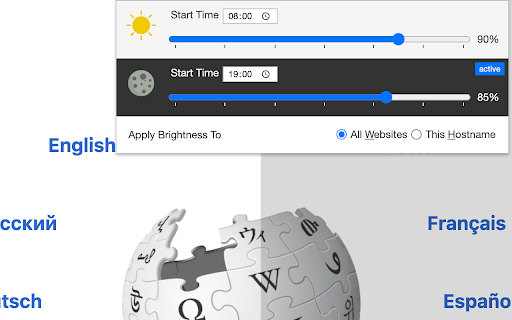
This extension reduces or increases the screen brightness level for both daytime and nighttime periods based on user-defined values. It helps the websites that do not support the native dark theme. Also, it can increase the brightness of websites that are too dark. It reduces the eyestrain while reading documents online when dark mode is not supported. The extension offers two different values for daytime and nighttime duration to enhance usability.

Features:
1. Control the darkness level of all websites or just a single hostname
2. You can increase or decrease the brightness level of a website
3. Supports keyboard shortcuts for every action.
4. You can disable the extension on a single website or entirely
5. Control the brightness level from 0% (completely dark) to 120% (20% brighter than the original)
6. Supports two different methods to decrease the brightness level.

Notes:
1. By setting the brightness level to 100%, the extension does not affect browser tabs (does not inject any CSS styling)
2. It is recommended to configure the start time for both daytime and nighttime. By default, daytime starts at 08:00, and nighttime starts at 19:00.
3. By adding a website to the exception list, brightness control is turned off for this website. You can use this feature to turn off the extension on websites that support native dark mode.
4. This extension does not reduce the screen brightness when printing a webpage. There is a CSS selector that only affects "screen" type displays.

What is the difference between this extension and other dark mode extensions (e.g. "Dark Reader™" or "Turn Off the Lights™" (I do not own these two extensions))?
These extensions manipulate the styling of all elements by using custom stylesheets. They convert the light theme to dark. This extension only injects a filter to reduce or increase the original brighness. So it does not perform any resource-intensive operations and does not alter the website's styling.
Technical
- Version
- 0.3.9
- Manifest
- V3
- Size
- 119KiB
- Min Chrome
- 88
- Languages
- 12
- Featured
- Yes
Metadata
- ID
- bcjiagkgnilmcngacjlfhmpdmbhbjcah
- Developer ID
- u998790a42d49632e0728e5a526305904
- Developer Email
- [email protected]
- Created
- Feb 13, 2018
- Last Updated (Store)
- May 9, 2026
- Last Scraped
- Jun 18, 2026
- Website
- —
- Privacy Policy
- —
Similar extensions
Alternatives to Adjust Page Brightness, ranked by description similarity.

Screen Dimmer – Brightness Controller
Easily dim or boost website brightness. Simple screen dimmer with custom levels for better eye comfort and visibility.
873
★ 2.0
Dark Reader
Dark mode for every website. Take care of your eyes, use dark theme for night and daily browsing.
7.0M
★ 4.7

Dark Mode
Dark Mode, read at night. Bluelight filter for every website. Relax your eyes at night and day.
20.0K
★ 4.4
Dark Theme - Dark Reader for Web
Dark theme switches any web pages to dark mode. Take care of your eyes during the day using a dark reader or change screen…
90.0K
★ 4.5

Dark Moonlight
It’s a Dark mode extension for the entire web. Helping you enjoy a more comfortable and relaxed browsing experience.
10
★ 5.0

Night shift
This is an intuitive extension that automatically changes the color scheme of web pages to a darker version to match the system's…
5

Dark Mode Toggle
Toggle dark mode on any website
8
★ 5.0

Brightness Control
The Adjust Brightness extension enhances your web browsing experience
118
Data sourced from the Chrome Web Store · last verified Jun 18, 2026.