
PriApps Print Extension 2
Print to PriApps
As of May 2026, PriApps Print Extension 2 has 7,000 users and a 5.00/5 rating from 1 reviews in the Workflow & Planning category.
Usersno change0%
7.0K
7,000
Ratingno change0%
5.00
1 reviews
Reviewsno change0%
1
Version
2.0.5
Permissions & access
- Permissions
- None declared
- Host access
- None declared
Screenshots


About
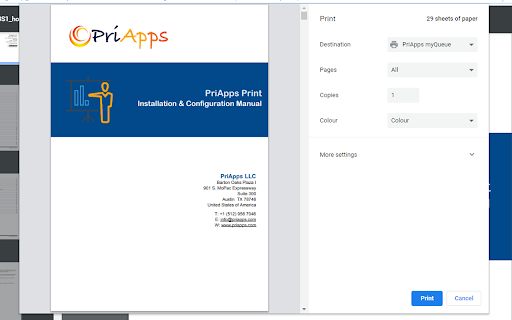
The PriApps Print Extension allows users of Chromebooks and Chrome browsers to submit print jobs to a PriApps Application Server (version 23.9.2 or later) for secure release on managed printers and MFPs, usage tracking, and cost control.

Once submitted to the PriApps Application Server, Print jobs can be securely released at any PriApps managed device regardless of its location within your organization.  Print jobs can be released using the PriApps touchscreen app on the printer or MFP, using your ID card or door access badge, or by using the PriApps Touch-Free app for smartphones and tablets.

This helps organizations increase the security of its confidential documents by ensuring unattended print jobs are not left lying around in the output trays of printers and MFPs.  Customers also testify to a 20% reduction in waste as documents are only printed when the user releases them at the device they choose.

PriApps tracks all print usage, as well as copy, scan & fax usage on copiers and MFPs for reporting, charge-back, cost recovery or analysis.

PriApps also helps organizations reduce the cost of printing & copying by providing a powerful range of features that help manage or enforce print policies.

These include:
- Rules-based printing
- Copy Control
- Quota Management
- Least-cost routing
- Cost Recovery

In addition to print management, PriApps provides intuitive document capture through Personalized Scan Workflows.  When authenticating at MFPs & copiers, users are presented with their own, pre-populated, scan workflows with immediate access to corporate address books, eliminating the need to configure every MFP or copier individually.

These include:

- Scan-to-myEmail
- Scan-to-Email
- Scan-to-homefolder
- Scan-to-network folder
- Scan-to-Google Drive

…as well as a range of other cloud-based document storage systems.

PriApps supports ANY make and model or printer and MFP, and is available as an on-premise, hybrid, or Cloud-based solution.
Technical
- Version
- 2.0.5
- Manifest
- —
- Size
- 28.4KiB
- Min Chrome
- 88
- Languages
- 1
- Featured
- No
Metadata
- ID
- bcihbjompegdechpdfgplomkadgcpfjh
- Developer ID
- u9259638030a018c68f4611071d04e676
- Developer Email
- [email protected]
- Created
- Oct 2, 2023
- Last Updated (Store)
- Oct 12, 2024
- Last Scraped
- May 31, 2026
- Website
- https://priapps.com/
- Support URL
- https://priapps.com/priapps-support/
- Privacy Policy
- https://priapps.com/privacy-notice/
Similar extensions
Alternatives to PriApps Print Extension 2, ranked by description similarity.
directprint.io printing
directprint.io enterprise printing for Chromebooks.
300.0K
★ 3.2

Infinity for Chromebooks (E, Beta)
Print to your corporate printers without going through the Google cloud
3

UniPrint for Chromebooks (Enterprise)
Print to your corporate printers without going through the Google cloud
—

Mobility Print
Mobility Print
7.0M
★ 2.6

Ricoh myPrint
Ricoh myPrint IPPS printer
20.0K
★ 4.4

Libdata IPP Extension
This extension is used to provide a Print Server on a Chrome Device that works with Libdata's Control Center Cloud sites. It will…
82

Printix
Chromebook printing from Printix cloud print management service.
30.0K
★ 3.3

ezeep Blue
Extension to print from your Chromebook or Chrome browser with your ezeep Blue account
10.0K
★ 4.6
Data sourced from the Chrome Web Store · last verified May 31, 2026.