
Zoom Page WE
Zoom web pages (either per-site or per-tab) using full-page zoom, text-only zoom, automatic fit-to-width and minimum font size.
As of May 2026, Zoom Page WE has 10,000 users and a 4.10/5 rating from 167 reviews in the Accessibility category.
Usersno change0%
10.0K
10,000
Ratingdown 0.5 percent−0.5%
4.10
167 reviews
Reviewsup 1.2 percent+1.2%
167
Version
33.5
Manifest V3
History
2 snapshotsTracking since May 1, 2026.
View as table
| Date | Users | Rating | Reviews | Version |
|---|---|---|---|---|
| May 1, 2026 | 10.0K | 4.12 | 165 | 33.5 |
| May 31, 2026 | 10.0K | 4.11 | 166 | 33.5 |
| Now | 10.0K | 4.10 | 167 | 33.5 |
Permissions & access
- Permissions
- tabswebNavigationcontextMenusnotificationsstorage
- Host access
- None declared
Screenshots




About
CHANGES

Version 33.5

• Improvements to popup panel.
• Minor bug fixes.

OVERVIEW

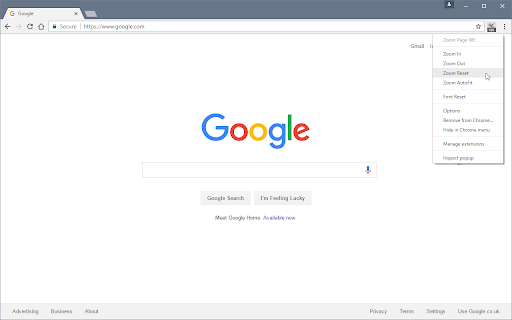
Zoom Page WE provides facilities to make the contents of a web page larger or smaller (either per-site or per-tab) using full-page or text-only zoom and minimum font size. AutoFit (fit-to-width) can be applied manually or automatically. Small images can be scaled to fit the browser window.

TOOLBAR BUTTON

After installation, there will be a new blue 'floppy-disk' icon on the main toolbar with a blue badge showing the current zoom level.

To change the zoom level for a page, click on the toolbar button to show the popup panel, then click on one of the six buttons on the right side of the popup panel:

• Type - toggles the type between Full and Text.
• Level (%) - shows a drop-down menu from which a specific level can be selected.
• In (+) - increases the level to the next defined level or by a fixed step.
• Out (-) - reduces the level to the next defined level or by a fixed step.
• Autofit - adjusts the level so the page contents fit the width of the browser window.
• Reset - applies the defined default full/text level depending on the current type.

To change the minimum font size for a page, click on the toolbar button to show the popup panel, then click on one of the two buttons on the left side of the popup panel:

• Minimum Size (px) - shows a drop-down from which a specific minimum font size can be selected.
• Reset - applies the defined default minimum font size.

SUPPORT

Please e-mail:  [email protected]

LICENSE

Distributed under the GNU General Public License version 2.
See LICENCE.txt file and http://www.gnu.org/licenses/
Technical
- Version
- 33.5
- Manifest
- V3
- Size
- 97.78KiB
- Min Chrome
- 88
- Languages
- 1
- Featured
- Yes
Metadata
- ID
- bcdjhkphgmiapajkphennjfgoehpodpk
- Developer ID
- ua5322ee4078535123b27bd21409dca85
- Developer Email
- [email protected]
- Created
- Nov 16, 2016
- Last Updated (Store)
- Apr 29, 2023
- Last Scraped
- May 31, 2026
- Website
- —
- Support URL
- —
- Privacy Policy
- —
Similar extensions
Alternatives to Zoom Page WE, ranked by description similarity.
Zoom for Google Chrome
Zoom in or out on web content using the zoom button and mouse scroll wheel for more comfortable reading. That to each percent value.
300.0K
★ 4.2

Auto zoom out
ページを画面サイズに合わせてズームアウトする拡張機能
478
★ 4.7

Zoomillum
Cinematic, context-aware zoom for clarity and accessibility.
8
★ 5.0

Scroll Zoom
Zoom web pages with the left or right mouse button and the scroll wheel.
3.0K
★ 4.3

Text Zoom & Reader — enlarge text, hide images
Text zoom to 200%, distraction-free reader mode, and one-click hide images - improve readability in your browser now.
70.0K
★ 4.4

Command+Scroll Zoom
Smothly zoom in and out web pages using Cmd+Scroll
25
★ 5.0

Web Font Size Changer
7 accessible font sizes that remember your preference for each website
11

Font Boost
Boost font size on any website. Per-site memory, line height, letter spacing & dyslexia font.
—
Data sourced from the Chrome Web Store · last verified May 31, 2026.