
Tab Mute Controller
Instantly find and mute tabs playing audio. Detect, control, and silence noisy tabs with one click.
As of June 2026, Tab Mute Controller has 1 users in the Productivity category.
Usersno change0%
1
1
Ratingno change0%
—
— reviews
Reviewsno change0%
—
Version
1.0.0
Manifest V3
History
2 snapshotsTracking since May 19, 2026.
Not enough history yet for this metric — the chart fills in as we collect more snapshots.
View as table
| Date | Users | Rating | Reviews | Version |
|---|---|---|---|---|
| May 19, 2026 | — | — | — | 1.0.0 |
| Jun 7, 2026 | — | — | — | 1.0.0 |
| Now | 1 | — | — | 1.0.0 |
Permissions & access
- Permissions
- tabsstoragescripting
- Host access
- <all_urls>
Screenshots



About
Tired of hunting through 20+ tabs to find the one blasting audio? Tab Mute Controller puts you in charge — instantly.

🔇 WHAT IT DOES

- Shows a live badge on the toolbar icon with the count of tabs currently playing audio
- One-click popup lists every audible tab with its favicon, title, and domain
- Mute or unmute any tab without switching to it
- Play or pause media directly from the popup
- Mute All playing tabs in one click (great for meetings and presentations)
- Unmute All with one click when you're ready
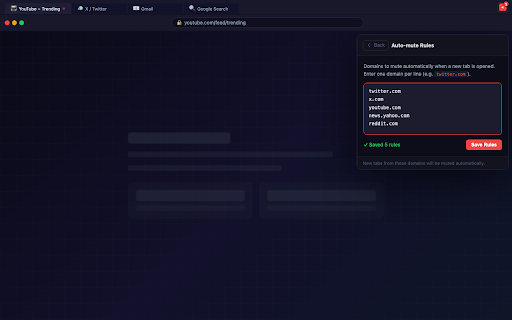
- Auto-mute rules — add domains that should always be muted when opened (e.g. twitter.com, youtube.com)

🎯 HOW TO USE

1. Click the Tab Mute Controller icon in your toolbar
2. See all tabs producing audio listed instantly
3. Click the mute button (🔊) to silence a specific tab
4. Click the pause button (⏸) to pause media on a tab
5. Click any tab row to jump to that tab
6. Use "Mute All" to silence everything at once
7. Open ⚙ Auto-mute rules to set domains that mute automatically

⚡ LIGHTWEIGHT & PRIVATE

- No background data collection
- No external servers or analytics
- Uses only the permissions it needs: Tabs, Storage, Scripting
- Open source

Perfect for: remote workers, researchers, students, power users, anyone who keeps many tabs open.
Technical
- Version
- 1.0.0
- Manifest
- V3
- Size
- 12.05KiB
- Min Chrome
- 88
- Languages
- 1
- Featured
- No
Metadata
- ID
- bccejjeopgceodignbfpmpfjckllakid
- Developer ID
- ue109e95b20702a6604aed85b303ef844
- Developer Email
- [email protected]
- Created
- May 18, 2026
- Last Updated (Store)
- May 18, 2026
- Last Scraped
- Jun 7, 2026
- Website
- —
Data sourced from the Chrome Web Store · last verified Jun 7, 2026.