
MaskIt: Blur, Replace, or Hide Social Media Names
Blur, replace, or hide your username, full name, and other words on social media profiles.
As of May 2026, MaskIt: Blur, Replace, or Hide Social Media Names has 22 users in the Productivity category.
Usersdown 8.3 percent−8.3%
22
22
Ratingno change0%
—
— reviews
Reviewsno change0%
—
Version
1.0
Manifest V3
History
4 snapshotsTracking since Apr 1, 2026.
View as table
| Date | Users | Rating | Reviews | Version |
|---|---|---|---|---|
| Apr 1, 2026 | 24 | — | — | 1.0 |
| Apr 21, 2026 | 28 | — | — | 1.0 |
| May 6, 2026 | 29 | — | — | 1.0 |
| May 18, 2026 | 20 | — | — | 1.0 |
| Now | 22 | — | — | 1.0 |
Permissions & access
- Permissions
- activeTabstoragecontextMenus
- Host access
- *://*.instagram.com/*, *://*.twitter.com/*, *://*.x.com/*, *://*.linkedin.com/*
Screenshots
About
Take control of your online identity with MaskIt!

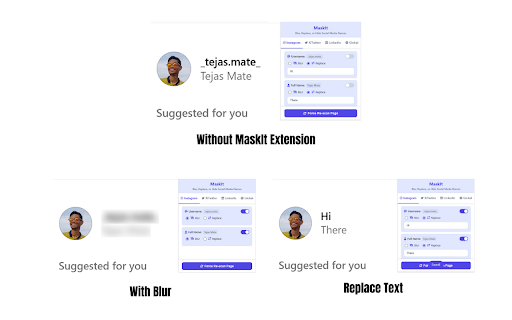
Ever wanted to browse social media, take a screenshot, or share your screen during a presentation without exposing your name and personal details? MaskIt is the ultimate privacy tool that lets you selectively blur or completely replace your identity on Instagram, Twitter/X, and LinkedIn.

With just a few clicks, you can instantly obscure your username, full name, and even a custom list of sensitive words (like your company or project names). Our goal is to give you peace of mind, allowing you to use the web on your own terms.

Key Features:
✨ Dual Masking Modes: Choose between a subtle Blur effect (which reveals on hover) or a complete Replace function that swaps text with a placeholder like [username].
🎯 Platform-Specific Control: Set different rules for Instagram, Twitter/X, and LinkedIn. What you hide on one platform doesn't have to affect the others.
🌐 Global Word List: Create a list of custom words to be masked everywhere, ensuring consistent privacy across all supported sites.
⌨️ Powerful Keyboard Shortcuts: Use Ctrl+Shift+X to instantly toggle all masks on or off for the current site, and Ctrl+Shift+H to force a re-scan of the page.
🔒 100% Private and Secure: MaskIt operates entirely on your computer. We do not track, collect, or store any of your data. Your privacy is our priority.

Perfect For:
Professionals who need to share their screen during demos without revealing personal profile info.
Content Creators making tutorials or live-streaming.
Privacy-conscious users who want an extra layer of anonymity while browsing.

Install MaskIt today and take the first step towards a more private and secure social media experience
Technical
- Version
- 1.0
- Manifest
- V3
- Size
- 31.89KiB
- Min Chrome
- 88
- Languages
- 1
- Featured
- No
Metadata
- ID
- bbplgdmjnpfmmnjhdkdkcgifbjofmkfg
- Developer ID
- u63717f734f2d98f0eb5d3c8fc8d0a3ab
- Developer Email
- [email protected]
- Created
- Jun 18, 2025
- Last Updated (Store)
- Jun 18, 2025
- Last Scraped
- May 31, 2026
- Website
- —
- Privacy Policy
- —
Similar extensions
Alternatives to MaskIt: Blur, Replace, or Hide Social Media Names, ranked by description similarity.

Mask & Blur Pro
Protects sensitive information by masking text and blurring content on webpages. Perfect for screenshots and screen sharing.
2.0K
★ 5.0

BlurIt - Instant Privacy Blur
Capture any screen and instantly blur sensitive information with pro-grade tools.
7

ChatMask - Blur Chat & Privacy Screen
Blur chats on Messenger, WhatsApp, Zalo & Telegram for privacy. Protect your messages from prying eyes with toggle controls.
39
★ 5.0

MyBlurWeb
Blur sensitive content on any website. Blur specific text, draw blur zones, auto-detect emails/numbers, and more.
4

Mistify
The screen-sharing safety net. Automatically blurs sensitive webpages to keep your private data private during meetings and demos.
6

Blurly: One-Click Element Blurring for Screen Sharing
The easiest way to blur web content. Protect your sensitive data for screen recordings and calls
8

Microblur
Blur highlighted area of the browser. Share your screen securely
5

Blur Stuff
Quickly blur selected elements on any webpage for privacy.
11
Data sourced from the Chrome Web Store · last verified May 31, 2026.