
ForceVault for Salesforce
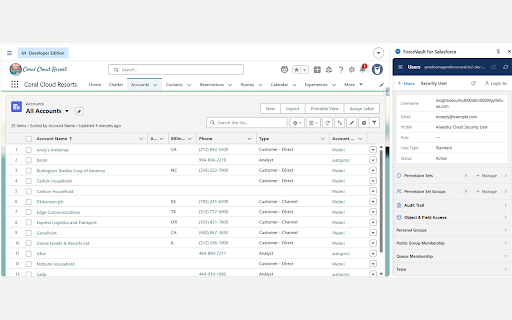
Explore Salesforce objects, fields, profiles, permission sets, users & metadata dependencies from your active org session.
As of June 2026, ForceVault for Salesforce has — users in the Developer Tools category.
Usersno change0%
—
—
Ratingno change0%
—
— reviews
Reviewsno change0%
—
Version
1.0.0
Manifest V3
History
1 snapshotsTracking since Jun 9, 2026.
Not enough history yet for this metric — the chart fills in as we collect more snapshots.
View as table
| Date | Users | Rating | Reviews | Version |
|---|---|---|---|---|
| Jun 9, 2026 | — | — | — | 1.0.0 |
| Now | — | — | — | 1.0.0 |
Permissions & access
- Permissions
- activeTabstoragecookiessidePaneltabs
- Host access
- *://*.salesforce.com/*, *://*.force.com/*, *://*.cloudforce.com/*, *://*.visualforce.com/*
Screenshots



About
ForceVault is a side-panel toolkit for Salesforce admins and developers. It uses
your existing Salesforce login session to give you fast, read-friendly access to
your org's metadata and security model — without leaving your browser.

Features:
• Objects & Fields — browse every object and field with labels, API names, and types, matching Object Manager.
• Profiles & Permission Sets — view object permissions, field-level security, Apex class access, Visualforce page access, system permissions, and custom permissions.
• Users — search users, view detail and related lists, manage permission set / group assignments, and review object & field access.
• Field-Level Security — see and set FLS when creating fields.
• "Where is this used?" — analyze metadata dependencies, including LWC/Aura source references and FLS access.
• Org Info — organization details, user licenses, and live API usage.
• Audit Trail — review setup audit history with filters and CSV export.
• Multi-org — automatically follows the Salesforce org in your active tab.

Privacy-first: ForceVault runs entirely in your browser, connects only to the
Salesforce org you are already logged into, and never sends your data to us or any
third party. No analytics. No tracking. No remote code.
Technical
- Version
- 1.0.0
- Manifest
- V3
- Size
- 107KiB
- Min Chrome
- 88
- Languages
- 1
- Featured
- No
Metadata
- ID
- bboaecfealjclaakkfnacfpledlpipoe
- Developer ID
- u1cd85fdac48a098e1c3c205867c90e84
- Developer Email
- [email protected]
- Created
- Jun 8, 2026
- Last Updated (Store)
- Jun 8, 2026
- Last Scraped
- Jun 9, 2026
- Website
- —
- Support URL
- —
Data sourced from the Chrome Web Store · last verified Jun 9, 2026.