
Rapid Scrapper
Automate and extract contents from any website easily
As of May 2026, Rapid Scrapper has 910 users and a 5.00/5 rating from 2 reviews in the Workflow & Planning category.
Usersup 5.4 percent+5.4%
910
910
Ratingno change0%
5.00
2 reviews
Reviewsno change0%
2
Version
1.0
Manifest V3
History
3 snapshotsTracking since Apr 1, 2026.
View as table
| Date | Users | Rating | Reviews | Version |
|---|---|---|---|---|
| Apr 1, 2026 | 863 | 5.00 | 2 | 1.0 |
| May 1, 2026 | 885 | 5.00 | 2 | 1.0 |
| May 31, 2026 | 890 | 5.00 | 2 | 1.0 |
| Now | 910 | 5.00 | 2 | 1.0 |
Permissions & access
- Permissions
- activeTabscriptingstorage
- Host access
- <all_urls>
Screenshots

About
Powerful Extension to extract useful contents from any website easily.
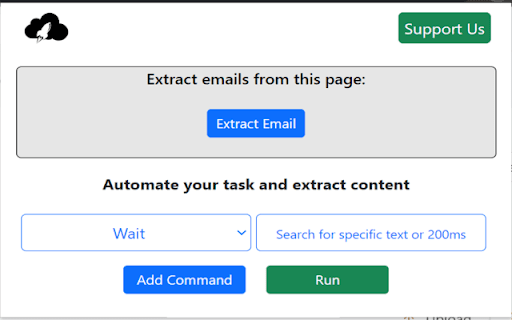
Rapid Scrapper is a extraction extension for Chrome. It is designed to be the most simple and most powerful web scraper you've ever used. No code is required. This extension can fetch all and unique email IDs and other contents from the web page and it will automatically download the result in your system.

Not only email id , it have other powerful features :
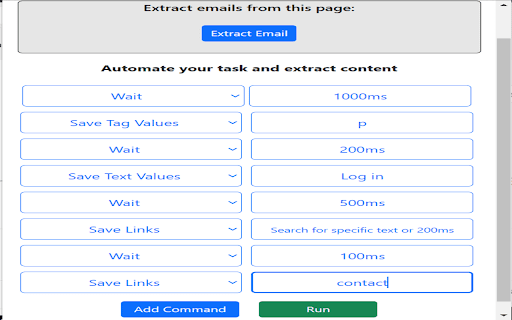
1: You can extract anything you want. You can specify any tag like p,h1,h6,span,div etc and it will extract values from all the specified tag available in the web page.
For this select command 'Save Tag Values' and in input box mention tag name you want to extract.

2: You can extract all the links available in the web page.
For this select command 'Save Links' and it will extract and download all the links from the webpage. Leave input box empty if you want all the links and if you want specific link, Let's say you want all the links which contains word 'about' in its URL then in the input box write that word which you want to search.

3: Extract and save all the HTML which contains specific word.
For this select command 'Save Text Values' and in input box write the word which you want to search in the web page and it will extract and download all the tags from the webpage which contains specified word.

4: Add command 'Wait' and in input box specify time in ms ,example - '500ms'. So it will wait for 500ms before executing next command.
Technical
- Version
- 1.0
- Manifest
- V3
- Size
- 112KiB
- Min Chrome
- 88
- Languages
- 1
- Featured
- Yes
Metadata
- ID
- bbmciiacdicifjefhmeaccbidfdhkdkc
- Developer ID
- ue8739c4d8d30f276676e5d8f62a9ce46
- Developer Email
- [email protected]
- Created
- Nov 26, 2022
- Last Updated (Store)
- Nov 26, 2022
- Last Scraped
- May 31, 2026
- Website
- primexsoftware.in
- Support URL
- —
- Privacy Policy
- —
Similar extensions
Alternatives to Rapid Scrapper, ranked by description similarity.

Click and Scrape
A simple tool to click and scrape data from web pages to JSON or CSV in seconds, no coding required
45

Email Extractor - One Click Lead
Effortlessly collect leads with our powerful extension that auto-extracts and saves email IDs from visited web pages.
356
★ 5.0

Email Extractor Tool
A extension that automatically extracts email IDs from web pages.
54
★ 5.0
Easy Scraper - One-click web scraper
A free web scraper for instant results. Scrape any website with one click. No coding required.
100.0K
★ 5.0

Email Extractor Live Web Scraper
Extract email addresses by simply searching the web. Fast, accurate, and easy to use — just search and collect.
3

Email Extractor Plus - Auto Save & Auto Tasks
Discover & extract emails from any webpage. Auto save emails as you browse. Automated tasks can extract emails from multiple pages.
424
★ 5.0

Email Hunter
Find and extract email addresses from the current page using regex matching. Copy extracted emails with a single click.
1.0K
★ 5.0

Data Scraper - AI Data Miner
With Data Scraper, you can extract website content in a few clicks. This web scraping tool delivers structured data without coding.
5.0K
★ 5.0
Data sourced from the Chrome Web Store · last verified May 31, 2026.