Fiber Chat - ChatGPT, Claude, DeepSeek, Gemini DeepResearch
Fiber Chat - ChatGPT, Claude, DeepSeek, Gemini DeepResearch
As of June 2026, Fiber Chat - ChatGPT, Claude, DeepSeek, Gemini DeepResearch has 11 users in the Productivity category.
Usersup 57.1 percent+57.1%
11
11
Ratingno change0%
—
— reviews
Reviewsno change0%
—
Version
2025.04.13
Manifest V3
History
3 snapshotsTracking since Apr 1, 2026.
View as table
| Date | Users | Rating | Reviews | Version |
|---|---|---|---|---|
| Apr 1, 2026 | 7 | — | — | 2025.04.13 |
| May 11, 2026 | 8 | — | — | 2025.04.13 |
| Jun 6, 2026 | 10 | — | — | 2025.04.13 |
| Now | 11 | — | — | 2025.04.13 |
Permissions & access
- Permissions
- activeTabstorage
- Host access
- None declared
Screenshots

About
# Fiber Chat: Seamless AI Research Assistant

## Overview
Fiber Chat enhances your online research by allowing you to explore topics in depth across multiple AI platforms without interrupting your browsing experience.

## Key Features
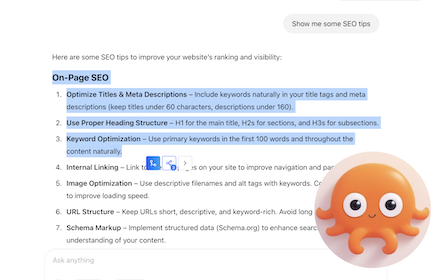
- Select & Expand: Highlight any text on a webpage—especially AI-generated content—to access floating action buttons
- Multi-Platform Research: Send selected text with custom prompts to ChatGPT, Claude, DeepSeek, and other AI assistants with one click
- Custom Prompts: Design and save your own prompts to guide how AI assistants analyze your selected content
- Background Processing: Open queries in new tabs that load in the background while you continue reading
- Time-Saving Workflow: Batch process multiple research questions simultaneously instead of waiting for sequential responses
- Continuous Learning: Seamlessly transition between reading and deeper exploration of interesting topics

## How It Works
1. Select text containing information you want to explore further
2. Click the Fiber Chat button that appears
3. The selected content is automatically sent to your preferred AI platforms with your custom prompt
4. Continue browsing while additional insights are generated in the background
5. Switch to the new tabs when ready to view comprehensive answers

## Customizable Settings
- AI Assistant Selection: Choose which AI platforms to enable through the options page
- Priority Configuration: Set the order of importance for your enabled AI assistants
- Personalized Workflow: Tailor the extension to match your specific research preferences and needs

## Perfect For
- Researchers comparing AI responses on complex topics
- Students looking to expand on learning materials
- Professionals who need quick, in-depth analysis of online content
- Anyone who wants to maximize productivity when working with multiple AI assistants

Fiber Chat transforms how you interact with AI platforms—turning disconnected research sessions into a smooth, continuous flow of knowledge exploration.
Technical
- Version
- 2025.04.13
- Manifest
- V3
- Size
- 476KiB
- Min Chrome
- 88
- Languages
- 1
- Featured
- No
Metadata
- ID
- bblnnedmppnlfalddigejddhjlmllneh
- Developer ID
- u95fbeb15a8273768f7935f5e5e5d707c
- Developer Email
- [email protected]
- Created
- Mar 24, 2025
- Last Updated (Store)
- Apr 15, 2025
- Last Scraped
- Jun 6, 2026
- Website
- —
- Support URL
- —
- Privacy Policy
- http://windchat.link/privacy
Similar extensions
Alternatives to Fiber Chat - ChatGPT, Claude, DeepSeek, Gemini DeepResearch, ranked by description similarity.

WebSelect
Select anything on website and instantly chat with AI
41

In Context
Quickly open the current page in ChatGPT or Claude AI to ask questions
—

Fliqsy: AI Sidebar with Built-in Page Intelligence
Access a powerful AI assistant in your sidebar to get answers, draft content, and boost productivity.
2

Immersive AI: ChatGPT Immersive translate summary rewrite language learning
Immersive AI: ChatGPT Immersive translate summary rewrite language learning
84

LinkFeed - AI Context Reader | Feed Webpages
Don't copy-paste, just feed it.
36
★ 5.0

Chat with Ai (gpt ,grok ,claude,gemini)
Open ChatGPT, DeepSeek, Gemini, Claude, Grok in sidebar, for explain, summarize, & Fix Grammer.
106
★ 5.0

Sen Chat: AI Sidebar - Chat with all AI models
AI chat, advanced web search, document interaction, and more into a convenient sidebar.
113
★ 5.0

CleverPage AI - Instantly Chat with Any Website
Interact with any webpage using AI - chat about the content or get instant summaries
12
★ 4.5
Data sourced from the Chrome Web Store · last verified Jun 6, 2026.