
LeetCode Difficulty Hider
Hide difficulty levels on LeetCode
As of May 2026, LeetCode Difficulty Hider has 2,000 users and a 4.70/5 rating from 10 reviews in the Productivity category.
Usersno change0%
2.0K
2,000
Ratingno change0%
4.70
10 reviews
Reviewsno change0%
10
Version
1.1.2
Manifest V3
Permissions & access
- Permissions
- storageactiveTab
- Host access
- None declared
Screenshots
About
LeetCode Difficulty Hider Chrome Extension: A Simplified Tool for Enhanced Learning
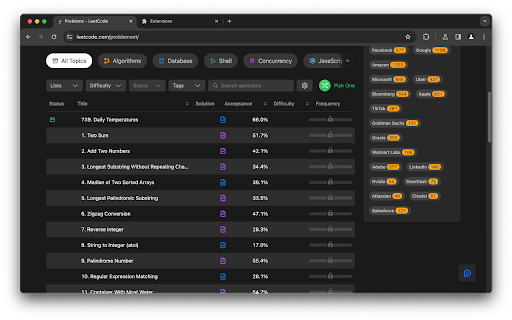
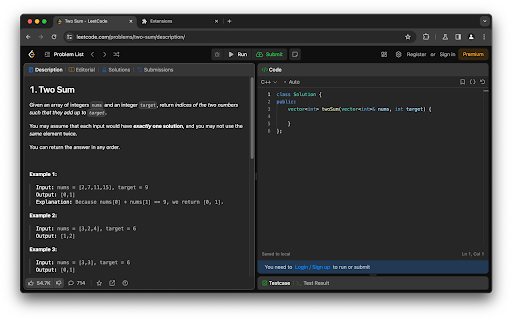
The LeetCode Difficulty Hider is a Chrome extension designed with a specific, valuable purpose: it hides the difficulty labels (Easy, Medium, Hard) of problems on both the international and Chinese versions of LeetCode. This straightforward functionality offers several key benefits that enhance the learning and problem-solving experience on LeetCode.

Key Functionality:
Sole Feature - Hiding Difficulty Levels: The extension's only function is to conceal the difficulty rating of each problem, thereby presenting them without any pre-assigned complexity level.
Why Install the LeetCode Difficulty Hider?
Encourages Unbiased Engagement with Problems: Without visible difficulty levels, users are more likely to approach problems based on their learning goals or interest, rather than being influenced by a label. This can lead to tackling a wider variety of problems.

Reduces Intimidation and Mental Blocks: Often, a 'Hard' label can intimidate, while an 'Easy' label might lead to complacency. Hiding these labels removes such mental blocks, encouraging users to focus on the problem itself.

Facilitates Deeper Learning: By engaging with problems without preconceived notions about their difficulty, users can deepen their understanding and problem-solving skills, focusing solely on the logic and concepts involved.

Simulates Real-World Scenarios: In real-world coding challenges, especially in interviews, problems aren't labeled by difficulty. Practicing in an environment that mimics this reality can better prepare users for such situations.
Technical
- Version
- 1.1.2
- Manifest
- V3
- Size
- 27.59KiB
- Min Chrome
- 88
- Languages
- 1
- Featured
- No
Metadata
- ID
- bbhibadheonokoekdgmhemjimhfkingb
- Developer ID
- uf39b7ae46ae065dcf477e5debcd755a1
- Developer Email
- [email protected]
- Created
- Feb 1, 2024
- Last Updated (Store)
- Jan 15, 2025
- Last Scraped
- May 31, 2026
- Website
- —
- Support URL
- —
- Privacy Policy
- —
Similar extensions
Alternatives to LeetCode Difficulty Hider, ranked by description similarity.

Leetcode Difficulty Tag Remover
Removes the difficulty of Leetcode question so that you dont get the mental setback whether the question is hard or easy
169
★ 4.5

LeetQuiet: Code with Focus. Not with Noise.
Hide the Solutions Tab and the Question Difficulty level in LeetCode to avoid temptation and boost problem-solving discipline.
34
★ 4.8

LeetCode Tag Customizer
Customize difficulty tags on LeetCode.
3

LT Companion
Your AI LeetCode assistant: hints, code analysis, test cases, approach suggestions, and focused practice mode.
112
★ 5.0

Leetecode Level Hider
Hiding the Questions Difficulty levels. Add the extension >>refresh Leetcode page >> and It'll work
—
★ 5.0

LeetCode Habit Builder
Block distractions and establish a daily routine of solving LeetCode questions by solving at least one LeetCode question a day.
36

LeetCode Solution Tab Blocker
Automatically closes LeetCode solution tabs to avoid spoilers.
1
★ 5.0

Leetcode Helper
Nice to have helper utilities for leetcode
—
Data sourced from the Chrome Web Store · last verified May 31, 2026.