
Equifax ICM
Equifax's Chrome E-File extension
As of June 2026, Equifax ICM has 204 users and a 5.00/5 rating from 1 reviews in the Workflow & Planning category.
Usersdown 1.9 percent−1.9%
204
204
Ratingno change0%
5.00
1 reviews
Reviewsno change0%
1
Version
7.0.0
Manifest V3
90-day change · In the last 90 days this extension 1 version update.
History
7 snapshotsTracking since Apr 1, 2026.
View as table
| Date | Users | Rating | Reviews | Version |
|---|---|---|---|---|
| Apr 1, 2026 | 208 | 5.00 | 1 | 6.1.0 |
| Apr 19, 2026 | 205 | 5.00 | 1 | 6.1.0 |
| Apr 29, 2026 | 197 | 5.00 | 1 | 6.1.0 |
| May 8, 2026 | 190 | 5.00 | 1 | 6.1.0 |
| May 16, 2026 | 193 | 5.00 | 1 | 6.1.0 |
| May 25, 2026 | 204 | 5.00 | 1 | 6.1.0 |
| Jun 6, 2026 | 201 | 5.00 | 1 | 6.1.0 |
| Now | 204 | 5.00 | 1 | 7.0.0 |
Changelog
- Jun 6, 2026description
Equifax Immigration Case Management Chrome E-File extension
Easily feed form data from the ICM application to government e-file systems!

The Equifax E-File solution allows users to seamlessly feed data completed within the ICM system over to government e-file systems.

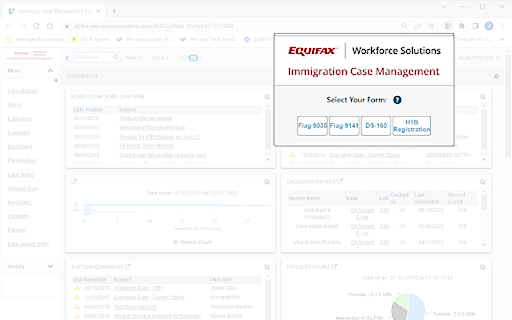
Currently built to support the ETA-9141, DS-160, ETA-9035, H-1B Registration and soon to be released ETA-9089, with plans to add more form options in the future.

The DS-160 currently supports the following visa types: H, K1, K2, K3, K4, L1, L2, P, and E Visa.

Easy to navigate, the extension features a clean design and simple controls to feed data into new or existing cases into government e-file sites.

No restrictions! Use of this extension is available to all Equifax ICM users. No add-ons required. As the extension populates information, specialized pop-ups prompting for errors or specific data input will appear.

Disclaimer:
Use of this extension requires an Equifax ICM user account as well as credentials necessary to access certain government e-file systems.

The Equifax E-File extension is designed for the sole purpose of populating information into forms for electronic submission. Equifax highly recommends that you carefully review all information populated before submitting to ensure accuracy.

Please note that Equifax cannot guarantee application acceptance due to extenuating circumstances, such as website technical issues or changes made by the government. You are responsible for verifying the status and confirming receipt of the application by the government agency once submitted. By continuing, you acknowledge and agree to the above.
Equifax Immigration Case Management Chrome E-File extension
Easily feed form data from the ICM application to government e-file systems!

The Equifax E-File solution allows users to seamlessly feed data completed within the ICM system over to government e-file systems.

Currently built to support the ETA-9141, DS-160, ETA-9035, H-1B Registration and ETA-9089, with plans to add more form options in the future.

The DS-160 currently supports the following visa types: H, K1, K2, K3, K4, L1, L2, P, and E Visa.

Easy to navigate, the extension features a clean design and simple controls to feed data into new or existing cases into government e-file sites.

No restrictions! Use of this extension is available to all Equifax ICM users. No add-ons required. As the extension populates information, specialized pop-ups prompting for errors or specific data input will appear.

Disclaimer:
Use of this extension requires an Equifax ICM user account as well as credentials necessary to access certain government e-file systems.

The Equifax E-File extension is designed for the sole purpose of populating information into forms for electronic submission. Equifax highly recommends that you carefully review all information populated before submitting to ensure accuracy.

Please note that Equifax cannot guarantee application acceptance due to extenuating circumstances, such as website technical issues or changes made by the government. You are responsible for verifying the status and confirming receipt of the application by the government agency once submitted. By continuing, you acknowledge and agree to the above.
- Jun 6, 2026short_description
Lawlogix's Chrome E-File extension
Equifax's Chrome E-File extension
- Jun 6, 2026name
LLX E-File Extension (6.1.0)
Equifax ICM
Permissions & access
- Permissions
- unlimitedStoragestorageactiveTabtabsactiveTab
- Host access
- https://ceac.state.gov/*, https://flag.dol.gov/*, https://my.uscis.gov/*
Screenshots
About
Equifax Immigration Case Management Chrome E-File extension
Easily feed form data from the ICM application to government e-file systems!

The Equifax E-File solution allows users to seamlessly feed data completed within the ICM system over to government e-file systems.

Currently built to support the ETA-9141, DS-160, ETA-9035, H-1B Registration and ETA-9089, with plans to add more form options in the future.

The DS-160 currently supports the following visa types: H, K1, K2, K3, K4, L1, L2, P, and E Visa.

Easy to navigate, the extension features a clean design and simple controls to feed data into new or existing cases into government e-file sites.

No restrictions! Use of this extension is available to all Equifax ICM users. No add-ons required. As the extension populates information, specialized pop-ups prompting for errors or specific data input will appear.

Disclaimer:
Use of this extension requires an Equifax ICM user account as well as credentials necessary to access certain government e-file systems.

The Equifax E-File extension is designed for the sole purpose of populating information into forms for electronic submission. Equifax highly recommends that you carefully review all information populated before submitting to ensure accuracy.

Please note that Equifax cannot guarantee application acceptance due to extenuating circumstances, such as website technical issues or changes made by the government. You are responsible for verifying the status and confirming receipt of the application by the government agency once submitted. By continuing, you acknowledge and agree to the above.
Technical
- Version
- 7.0.0
- Manifest
- V3
- Size
- 154KiB
- Min Chrome
- 88
- Languages
- 1
- Featured
- No
Metadata
- ID
- bbadkdjplailmlfkfhkkhpolmkenblan
- Developer ID
- u365ec69030f5e61dea74346a1ca724f4
- Developer Email
- [email protected]
- Created
- Jul 10, 2023
- Last Updated (Store)
- May 28, 2026
- Last Scraped
- Jun 6, 2026
- Website
- —
- Support URL
- https://www.lawlogix.com
- Privacy Policy
- https://www.equifax.com/privacy/privacy-statement/
Similar extensions
Alternatives to Equifax ICM, ranked by description similarity.

Wequity
Automate the completion of questionnaires with the Wequity assistant.
21
★ 5.0

EzyForms
Through this extension users will be able to fetch data from Ezy-System to fill their required webforms.
86
★ 5.0

EEOC Form Filler
Automatically fill out the U.S. Equal Employment Opportunity Commission form.
27

Formally Extension
Formally Browser Extension
135
★ 5.0

Treatment Data Entry Assistant
Autofill and stop automation for treatment data entry.
7
★ 5.0

Eformogi — Fill Any Form
Fill any form in seconds. School enrollment, medical, camp signups, college apps. Your family's data, entered once.
—

VisaKwik
Automates visa application form-filling for agencies on embassy websites (US, CA, UK, AU, VN, etc.).
27

WORKisROUND
Enables users to quickly and effortlessly fill in extensive forms on specific government websites with pre-prepared data.
5
Data sourced from the Chrome Web Store · last verified Jun 6, 2026.