
NoteGPT: YouTube Summary, Chat with AI Assistant, ChatGPT DeepSeek Claude
Summarize YouTube videos and turn transcripts into notes with AI. Generate captions, then translate, copy, or download subtitles.
As of June 2026, NoteGPT: YouTube Summary, Chat with AI Assistant, ChatGPT DeepSeek Claude has 400,000 users and a 4.92/5 rating from 7,476 reviews in the Productivity category.
Usersno change0%
400.0K
400,000
Ratingup 0.2 percent+0.2%
4.92
7.5K reviews
Reviewsup 23.4 percent+23.4%
7.5K
Version
2.0.2.17
Manifest V3
90-day change · In the last 90 days this extension 4 version updates, changed permissions.
History
23 snapshotsTracking since Apr 1, 2026.
View as table
| Date | Users | Rating | Reviews | Version |
|---|---|---|---|---|
| Apr 1, 2026 | 400.0K | 4.91 | 6.1K | 2.0.2.12 |
| Apr 5, 2026 | 400.0K | 4.91 | 6.1K | 2.0.2.13 |
| Apr 8, 2026 | 400.0K | 4.91 | 6.2K | 2.0.2.13 |
| Apr 16, 2026 | 400.0K | 4.91 | 6.2K | 2.0.2.13 |
| Apr 20, 2026 | 400.0K | 4.91 | 6.4K | 2.0.2.13 |
| Apr 23, 2026 | 400.0K | 4.91 | 6.5K | 2.0.2.13 |
| Apr 26, 2026 | 400.0K | 4.91 | 6.5K | 2.0.2.13 |
| Apr 29, 2026 | 400.0K | 4.91 | 6.6K | 2.0.2.13 |
| May 5, 2026 | 400.0K | 4.91 | 6.6K | 2.0.2.13 |
| May 8, 2026 | 400.0K | 4.91 | 6.8K | 2.0.2.13 |
| May 11, 2026 | 400.0K | 4.91 | 6.8K | 2.0.2.13 |
| May 13, 2026 | 400.0K | 4.91 | 6.8K | 2.0.2.13 |
| May 15, 2026 | 400.0K | 4.91 | 6.9K | 2.0.2.13 |
| May 17, 2026 | 400.0K | 4.91 | 6.9K | 2.0.2.13 |
| May 22, 2026 | 400.0K | 4.91 | 6.9K | 2.0.2.13 |
| May 26, 2026 | 400.0K | 4.92 | 7.0K | 2.0.2.13 |
| May 31, 2026 | 400.0K | 4.91 | 7.1K | 2.0.2.13 |
| Jun 3, 2026 | 400.0K | 4.91 | 7.1K | 2.0.2.14 |
| Jun 6, 2026 | 400.0K | 4.92 | 7.2K | 2.0.2.15 |
| Jun 8, 2026 | 400.0K | 4.92 | 7.2K | 2.0.2.15 |
| Jun 11, 2026 | 400.0K | 4.92 | 7.3K | 2.0.2.15 |
| Jun 15, 2026 | 400.0K | 4.92 | 7.3K | 2.0.2.16 |
| Jun 22, 2026 | 400.0K | 4.91 | 7.4K | 2.0.2.16 |
| Now | 400.0K | 4.92 | 7.5K | 2.0.2.17 |
Changelog
- Jun 22, 2026permissions
storage, webRequest
storage, webRequest, identity
- Apr 20, 2026description
NoteGPT Extension is your all-in-one AI tool for YouTube summary, YouTube transcript, and content creation. Instantly extract, summarize, and translate video content—even without subtitles. Whether you want to summarize YouTube videos or generate accurate YouTube transcripts, NoteGPT Extension helps you learn faster and work smarter by turning videos into clear notes, mind maps, slides, and podcasts.

Key Features
✅ Instant YouTube Summary & Transcript
Get precise AI YouTube summary and transcripts in seconds—even for videos without captions.
✅ Transcribe Long Videos — Even Without Subtitles (Up to 2 Hours)
Easily transcribe and summarize YouTube videos with or without captions. For videos without subtitles, we support up to 2 hours in length. Just one click to get your full transcript and download it instantly.
✅ Free Subtitle Download
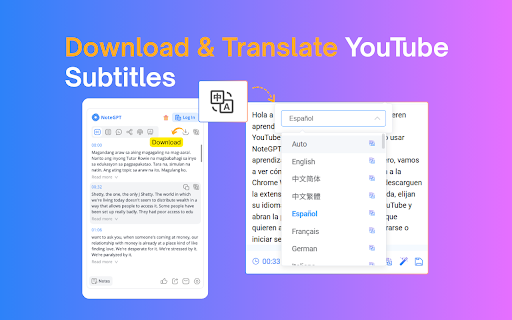
Easily download subtitles in multiple formats (TXT, SRT) for all your YouTube videos—free and fast.
✅ Translate YouTube Transcripts into 40+ Languages
Break language barriers with AI-powered translation of transcripts and summaries, perfect for global learners.
✅ AI Chat to Explore Video Content
Interact with your videos by asking questions, clarifying concepts, or diving deeper into topics using AI chat.
✅ Turn Notes into Mind Maps, Slides & Podcasts
Convert AI-generated notes into visual mind maps, ready-to-use presentations, or narrated podcasts with one click.
✅ Dark Mode & Browser Sync
Choose light, dark, or follow your browser’s theme for a seamless user experience.
✅ Prompt Library for Smarter AI Summary GenerationUse our built-in prompt library to get better AI summaries and explanations. Whether you're using NoteGPT as a YouTube video summarizer or exploring other content, these smart prompts help you get high-quality results—without typing prompts yourself.
✅ Custom Settings for YouTube Summary and AI OutputEasily customize your YouTube summary with options to set length, tone, or format. Whether you want a brief AI overview or a full in-depth YouTube video summary, NoteGPT adapts to your workflow and learning style.

How to Use
● Install NoteGPT Extension from the Chrome Web Store
● Open any YouTube video
● Click the NoteGPT Extension icon or summary panel on the right
● Choose to:
    ○ Transcript
    ○ Summary
    ○ AI Chat
    ○ AI Mind Map
    ○ AI Podcast
    ○ AI Presentation
● One-click download or translation of video transcripts.
● View or manage all your notes in the NoteGPT workspace (opens in a new tab)

FAQs
Q1: What is NoteGPT Extension?
A: NoteGPT Extension is an AI-powered Chrome extension that helps you summarize, transcribe, and repurpose YouTube videos, webpages, and PDFs. It turns long-form content into structured notes, mind maps, slides, or podcasts — all in one click.
Q: Is NoteGPT Extension free to use?
A: Yes! You get 15 free quotas per month with permanent storage. Upgrade anytime for unlimited use.
Q: Can I summarize videos without subtitles?
A: Yes. Even videos without captions are supported (up to 120 minutes). This requires 1 quota per 10 minutes.
Q2: How long of a video can NoteGPT Extension summarize or transcribe?
A: There’s no length limit for videos with subtitles — NoteGPT Extension can summarize and transcribe them regardless of duration. For videos without subtitles, the maximum supported length is 2 hours.
Q5: What else can I use NoteGPT Extension for?
A: Beyond YouTube, you can summarize webpages and PDF documents, translate transcripts into any languages, and generate visual mind maps, podcasts, and slide decks from your content.
Contact Us
Have questions, feedback, or need support? We’d love to hear from you.
Join our user group on Discord: https://discord.com/invite/wzNfuks8Qk
Or email us at [email protected]
🐦 Twitter/X: @NoteGPT_AINote
Learn more: https://notegpt.io/
NoteGPT Extension is your all-in-one AI tool for YouTube summary, YouTube transcript, and content creation. Instantly extract, summarize, and translate video content—even without subtitles. Whether you want to summarize YouTube videos or generate accurate YouTube transcripts, NoteGPT Extension helps you learn faster and work smarter by turning videos into clear notes, mind maps, slides, and podcasts. Key Features ✅ Instant YouTube Summary & Transcript Get precise AI YouTube summary and transcripts in seconds—even for videos without captions. ✅ Transcribe Long Videos — Even Without Subtitles (Up to 2 Hours) Easily transcribe and summarize YouTube videos with or without captions. For videos without subtitles, we support up to 2 hours in length. Just one click to get your full transcript and download it instantly. ✅ Free Subtitle Download Easily download subtitles in multiple formats (TXT, SRT) for all your YouTube videos—free and fast. ✅ Translate YouTube Transcripts into 40+ Languages Break language barriers with AI-powered translation of transcripts and summaries, perfect for global learners. ✅ AI Chat to Explore Video Content Interact with your videos by asking questions, clarifying concepts, or diving deeper into topics using AI chat. ✅ Turn Notes into Mind Maps, Slides & Podcasts Convert AI-generated notes into visual mind maps, ready-to-use presentations, or narrated podcasts with one click. ✅ Dark Mode & Browser Sync Choose light, dark, or follow your browser’s theme for a seamless user experience. ✅ Prompt Library for Smarter AI Summary GenerationUse our built-in prompt library to get better AI summaries and explanations. Whether you're using NoteGPT as a YouTube video summarizer or exploring other content, these smart prompts help you get high-quality results—without typing prompts yourself. ✅ Custom Settings for YouTube Summary and AI OutputEasily customize your YouTube summary with options to set length, tone, or format. Whether you want a brief AI overview or a full in-depth YouTube video summary, NoteGPT adapts to your workflow and learning style. How to Use ● Install NoteGPT Extension from the Chrome Web Store ● Open any YouTube video ● Click the NoteGPT Extension icon or summary panel on the right ● Choose to: ○ Transcript ○ Summary ○ AI Chat ○ AI Mind Map ○ AI Podcast ○ AI Presentation ● One-click download or translation of video transcripts. ● View or manage all your notes in the NoteGPT workspace (opens in a new tab) FAQs Q1: What is NoteGPT Extension? A: NoteGPT Extension is an AI-powered Chrome extension that helps you summarize, transcribe, and repurpose YouTube videos, webpages, and PDFs. It turns long-form content into structured notes, mind maps, slides, or podcasts — all in one click. Q: Is NoteGPT Extension free to use? A: Yes! You get 15 free quotas per month with permanent storage. Upgrade anytime for unlimited use. Q: Can I summarize videos without subtitles? A: Yes. Even videos without captions are supported (up to 120 minutes). This requires 1 quota per 10 minutes. Q2: How long of a video can NoteGPT Extension summarize or transcribe? A: There’s no length limit for videos with subtitles — NoteGPT Extension can summarize and transcribe them regardless of duration. For videos without subtitles, the maximum supported length is 2 hours. Q5: What else can I use NoteGPT Extension for? A: Beyond YouTube, you can summarize webpages and PDF documents, translate transcripts into any languages, and generate visual mind maps, podcasts, and slide decks from your content. Contact Us Have questions, feedback, or need support? We’d love to hear from you. Join our user group on Discord: https://discord.com/invite/wzNfuks8Qk Or email us at [email protected] 🐦 Twitter/X: @NoteGPT_AINote Learn more: https://notegpt.io/
Permissions & access
- Permissions
- storagewebRequestidentity
- Host access
- https://*.youtube.com/*, https://*.openai.com/*, https://notegpt.io/*
Screenshots




About
NoteGPT Extension is your all-in-one AI tool for YouTube summary, YouTube transcript, and content creation. Instantly extract, summarize, and translate video content—even without subtitles. Whether you want to summarize YouTube videos or generate accurate YouTube transcripts, NoteGPT Extension helps you learn faster and work smarter by turning videos into clear notes, mind maps, slides, and podcasts.

Key Features
✅ Instant YouTube Summary & Transcript
Get precise AI YouTube summary and transcripts in seconds—even for videos without captions.
✅ Transcribe Long Videos — Even Without Subtitles (Up to 2 Hours)
Easily transcribe and summarize YouTube videos with or without captions. For videos without subtitles, we support up to 2 hours in length. Just one click to get your full transcript and download it instantly.
✅ Free Subtitle Download
Easily download subtitles in multiple formats (TXT, SRT) for all your YouTube videos—free and fast.
✅ Translate YouTube Transcripts into 40+ Languages
Break language barriers with AI-powered translation of transcripts and summaries, perfect for global learners.
✅ AI Chat to Explore Video Content
Interact with your videos by asking questions, clarifying concepts, or diving deeper into topics using AI chat.
✅ Turn Notes into Mind Maps, Slides & Podcasts
Convert AI-generated notes into visual mind maps, ready-to-use presentations, or narrated podcasts with one click.
✅ Dark Mode & Browser Sync
Choose light, dark, or follow your browser’s theme for a seamless user experience.
✅ Prompt Library for Smarter AI Summary GenerationUse our built-in prompt library to get better AI summaries and explanations. Whether you're using NoteGPT as a YouTube video summarizer or exploring other content, these smart prompts help you get high-quality results—without typing prompts yourself.
✅ Custom Settings for YouTube Summary and AI OutputEasily customize your YouTube summary with options to set length, tone, or format. Whether you want a brief AI overview or a full in-depth YouTube video summary, NoteGPT adapts to your workflow and learning style.

How to Use
● Install NoteGPT Extension from the Chrome Web Store
● Open any YouTube video
● Click the NoteGPT Extension icon or summary panel on the right
● Choose to:
    ○ Transcript
    ○ Summary
    ○ AI Chat
    ○ AI Mind Map
    ○ AI Podcast
    ○ AI Presentation
● One-click download or translation of video transcripts.
● View or manage all your notes in the NoteGPT workspace (opens in a new tab)

FAQs
Q1: What is NoteGPT Extension?
A: NoteGPT Extension is an AI-powered Chrome extension that helps you summarize, transcribe, and repurpose YouTube videos, webpages, and PDFs. It turns long-form content into structured notes, mind maps, slides, or podcasts — all in one click.
Q: Is NoteGPT Extension free to use?
A: Yes! You get 15 free quotas per month with permanent storage. Upgrade anytime for unlimited use.
Q: Can I summarize videos without subtitles?
A: Yes. Even videos without captions are supported (up to 120 minutes). This requires 1 quota per 10 minutes.
Q2: How long of a video can NoteGPT Extension summarize or transcribe?
A: There’s no length limit for videos with subtitles — NoteGPT Extension can summarize and transcribe them regardless of duration. For videos without subtitles, the maximum supported length is 2 hours.
Q5: What else can I use NoteGPT Extension for?
A: Beyond YouTube, you can summarize webpages and PDF documents, translate transcripts into any languages, and generate visual mind maps, podcasts, and slide decks from your content.
Contact Us
Have questions, feedback, or need support? We’d love to hear from you.
Join our user group on Discord: https://discord.com/invite/wzNfuks8Qk
Or email us at [email protected]
🐦 Twitter/X: @NoteGPT_AINote
Learn more: https://notegpt.io/Technical
- Version
- 2.0.2.17
- Manifest
- V3
- Size
- 1.28MiB
- Min Chrome
- 88
- Languages
- 54
- Featured
- Yes
Metadata
- ID
- baecjmoceaobpnffgnlkloccenkoibbb
- Developer ID
- u2a715506235f05ab8c9642390d2ce1bc
- Developer Email
- [email protected]
- Created
- Feb 26, 2023
- Last Updated (Store)
- Jun 18, 2026
- Last Scraped
- Jun 22, 2026
- Website
- https://notegpt.io/
- Privacy Policy
- https://notegpt.io/extension-privacy
Similar extensions
Alternatives to NoteGPT: YouTube Summary, Chat with AI Assistant, ChatGPT DeepSeek Claude, ranked by description similarity.

DeepSum | YouTube AI Summary
Use YouTube AI Summary to transcribe youtube video to text and apply a powerful AI assistant as a video summarizer.
10.0K
★ 4.8

Awesum: AI YouTube video summaries
Save time on long videos and extract key ideas instantly. AI YouTube video summaries made in seconds.
38
★ 3.0

YouTube Summary & ChatGPT by Glasp
Access ChatGPT from the browser toolbar and get transcripts and summaries of YouTube videos. Powered by ChatGPT & Claude.
100.0K
★ 3.9

YouTube Transcript & AI Summary Generator – Powered by ChatGPT
Transcribe YouTube videos and create AI-powered summaries. Simple, accurate, and free.
216
★ 3.0

AI YouTube Summarizer — Transcript & Summary
Use YouTube Transcriber and Summarizer as youtube transcript generator. Summarize videos with AI and get key ideas to save time.
60.0K
★ 3.9

Extract YouTube Transcripts + Summarize in a New AI Tab
ver1.5 UPDATE - NOW SUPPORTS Grok(xAI)!
Instantly send YouTube transcripts to ChatGPT, Gemini, Claude, or Grok for summarization.…
29
★ 5.0
YouTube Summary with ChatGPT & Claude
Summarize YouTube videos, web articles, and PDFs to save time, powered by ChatGPT, Claude, Mistral AI, and Gemini.
2.0M
★ 4.3

YouTube Transcript & Summary with Timestamps -- TubeNotes
AI-powered transcription and summarization of YouTube videos with clickable links that take you to the moment in the video.
27
Data sourced from the Chrome Web Store · last verified Jun 22, 2026.