
JSI FB COOKIS
Login to FB using cookies and auto-change language.
As of June 2026, JSI FB COOKIS has 169 users in the Productivity category.
Usersno change0%
169
169
Ratingno change0%
—
— reviews
Reviewsno change0%
—
Version
3.0
Manifest V3
History
9 snapshotsTracking since Apr 23, 2026.
View as table
| Date | Users | Rating | Reviews | Version |
|---|---|---|---|---|
| Apr 23, 2026 | — | — | — | 3.0 |
| Apr 28, 2026 | — | — | — | 3.0 |
| May 5, 2026 | 21 | — | — | 3.0 |
| May 11, 2026 | 61 | — | — | 3.0 |
| May 16, 2026 | 76 | — | — | 3.0 |
| May 22, 2026 | 103 | — | — | 3.0 |
| May 29, 2026 | 109 | — | — | 3.0 |
| Jun 5, 2026 | 105 | — | — | 3.0 |
| Jun 11, 2026 | 95 | — | — | 3.0 |
| Now | 169 | — | — | 3.0 |
Permissions & access
- Permissions
- cookiesscripting
- Host access
- *://*.facebook.com/*, *://*.messenger.com/*
Screenshots
About
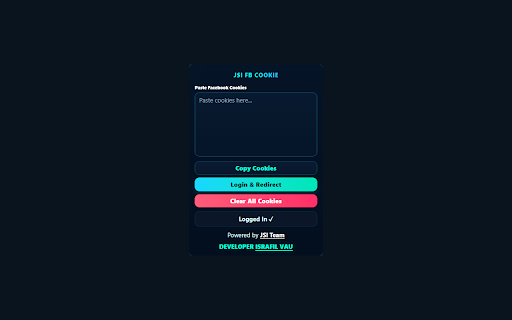
JSI FB Cookie Manager lets you manage your Facebook session cookies directly from your browser.

Features:
- Paste and apply Facebook cookies to log in quickly
- Automatically reads existing cookies if already logged in
- Copy current cookies to clipboard
- Clear all Facebook cookies and log out
- Auto-sets language to English after login

How to use:
1. Open the extension popup
2. Paste your Facebook cookies in the text area
3. Click "Login & Redirect" to apply cookies and open Facebook
4. Use "Clear All Cookies" to remove your session

This extension only accesses facebook.com and messenger.com cookies. No data is sent to any external server.

Developed by JSI Team.
Technical
- Version
- 3.0
- Manifest
- V3
- Size
- 12.15KiB
- Min Chrome
- 88
- Languages
- 1
- Featured
- No
Metadata
- ID
- bacnlhgglgjdlimcmleopeabhfnmikki
- Developer ID
- u6c031f16332da67539bee1d503b7edde
- Developer Email
- [email protected]
- Created
- Apr 22, 2026
- Last Updated (Store)
- Apr 22, 2026
- Last Scraped
- Jun 11, 2026
- Website
- —
- Support URL
- —
Data sourced from the Chrome Web Store · last verified Jun 11, 2026.