
Command Center
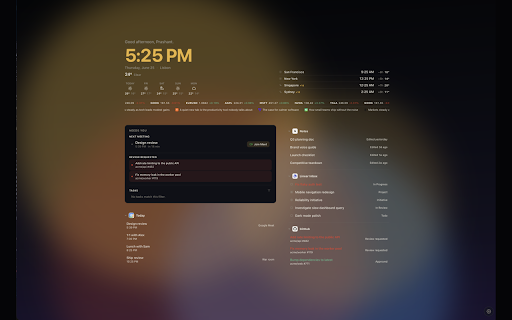
A calm new tab: world clocks, a dock of links, collapsible work streams, and your wallpaper.
As of June 2026, Command Center has — users in the Productivity category.
Usersno change0%
—
—
Ratingno change0%
—
— reviews
Reviewsno change0%
—
Version
0.1.0
Manifest V3
History
1 snapshotsTracking since Jun 27, 2026.
Not enough history yet for this metric — the chart fills in as we collect more snapshots.
View as table
| Date | Users | Rating | Reviews | Version |
|---|---|---|---|---|
| Jun 27, 2026 | — | — | — | 0.1.0 |
| Now | — | — | — | 0.1.0 |
Permissions & access
- Permissions
- storageidentity
- Host access
- https://api.open-meteo.com/*, https://geocoding-api.open-meteo.com/*, https://api.unsplash.com/*, https://images.unsplash.com/*, https://api.notion.com/*, https://api.linear.app/*, https://api.github.com/*, https://finnhub.io/*, https://hacker-news.firebaseio.com/*, https://api.todoist.com/*, https://api.frankfurter.dev/*, https://www.theverge.com/*, https://techcrunch.com/*, https://feeds.arstechnica.com/*, https://feeds.bbci.co.uk/*, https://rss.nytimes.com/*, https://feeds.npr.org/*, https://www.techmeme.com/*, https://www.googleapis.com/*, https://www.google.com/s2/favicons*
Screenshots


About
Command Center turns your new tab into a calm home base. Open a tab and you see what matters, and nothing you do not.

See the time where you are and wherever your people are, with the overlap window that shows when they are awake. Today's weather and the days ahead sit beside it.

A "Needs you" lane gathers whatever is actually waiting on you: your next meeting, ready to join in one click; pull requests that need your review; your Linear inbox; your tasks. Everything else you care about sits alongside, arranged however suits you.

Bring in only the services you use, each with your own account:
- Google Calendar and Google Tasks
- Notion
- Linear: assigned work, issues you created, what is due soon, your inbox, projects, and initiatives
- GitHub pull requests and issues
- Todoist

Keep a quiet eye on the markets and the day's headlines with optional tickers along the top, from the sources you choose.

Make it yours. Ten themes, from a stark black-and-white to a warm candlelit dark, all easy on the eyes, with your own wallpaper and themes you can design and share.

And it stays yours. Everything lives in your browser. Your settings follow you through Chrome; your accounts never leave your device. No tracking, no analytics, no server in the middle. Command Center talks only to the services you connect, and only ever to show you your own day.
Technical
- Version
- 0.1.0
- Manifest
- V3
- Size
- 161KiB
- Min Chrome
- 88
- Languages
- 1
- Featured
- No
Metadata
- ID
- bacjhcmdlcadommnfbghhkdmnfpjipmp
- Developer ID
- ud3f73f2acd5922ec3d44ce21712f03df
- Developer Email
- [email protected]
- Created
- Jun 26, 2026
- Last Updated (Store)
- Jun 26, 2026
- Last Scraped
- Jun 27, 2026
- Website
- strategicnerds.com
Data sourced from the Chrome Web Store · last verified Jun 27, 2026.