
R20Exporter
Export a Roll20 Campaign with all its assets to a ZIP file.
As of June 2026, R20Exporter has 10,000 users and a 4.44/5 rating from 16 reviews in the Productivity category.
Usersno change0%
10.0K
10,000
Ratingno change0%
4.44
16 reviews
Reviewsno change0%
16
Version
0.11.0
Manifest V3
History
2 snapshotsTracking since Apr 18, 2026.
View as table
| Date | Users | Rating | Reviews | Version |
|---|---|---|---|---|
| Apr 18, 2026 | 10.0K | 4.44 | 16 | 0.11.0 |
| Apr 28, 2026 | 10.0K | 4.44 | 16 | 0.11.0 |
| Now | 10.0K | 4.44 | 16 | 0.11.0 |
Permissions & access
- Permissions
- None declared
- Host access
- *://app.roll20.net/editor/
Screenshots
About
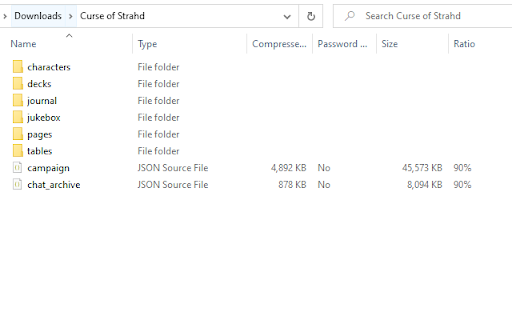
R20Exporter allows you to export a Roll 20 campaign and all of its assets into a ZIP file for backup/archiving purposes.

To export your campaign go to the settings tab in the Roll20 page (the gear icon on the far right of the sidebar) and at the top you should see a button "Export Campaign to ZIP". Simply click on it, then wait until the ZIP file is generated and downloaded.

While generating the ZIP file, do make sure you have the campaign tab focused in chrome (separate it in its own window if needed), otherwise the download speed of the zip will drop to very very slow transfer speeds since the javascript that generates the zip on the fly will be running as a low priority background process.

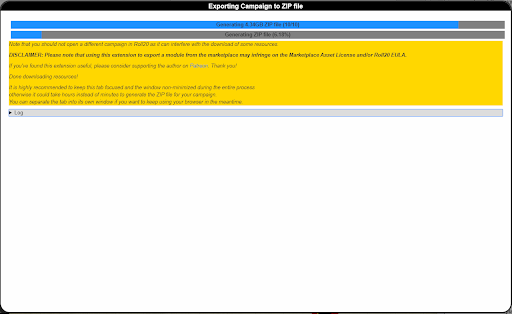
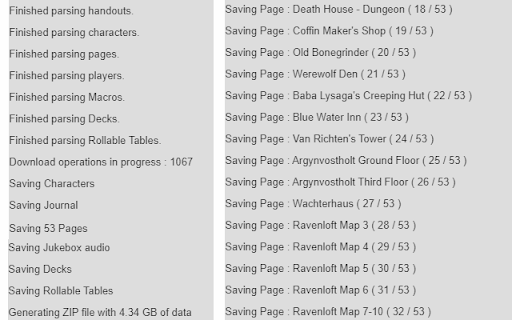
The dialog that opens will show you the various steps the script is undertaking and you can click the Log button to see a more detailed log of what is happening. That dialog window will also prevent you from messing around with the campaign. It is best to let the script do its thing unhindered and to not open another campaign in another window. Once the export process is complete, that window will close on its own and the ZIP file will be downloaded automatically.

To report any issues, please go to the GitHub issue tracker : https://github.com/kakaroto/R20Exporter/issues
Technical
- Version
- 0.11.0
- Manifest
- V3
- Size
- 1.32MiB
- Min Chrome
- 88
- Languages
- 1
- Featured
- No
Metadata
- ID
- apbhfinbjilbkljgcnjjagecnciphnoi
- Developer ID
- uda75ed42044101e449fbc760292883b0
- Developer Email
- [email protected]
- Created
- Jan 14, 2020
- Last Updated (Store)
- Oct 23, 2025
- Last Scraped
- Jun 5, 2026
- Website
- —
- Privacy Policy
- —
Similar extensions
Alternatives to R20Exporter, ranked by description similarity.

Brake Ace Data Export Helper
Export Brake Ace data and .CSV (GPS & braking) to use with 3rd party tools like victorise.co
—

Data Extractor for Amazon by Table Capture
Allows you to extract data from Amazon Advertising tables to Excel (XLSX) or CSV.
109

Discord Exporter - Chat & Attachment Downloader
Export Discord chats to Excel, CSV, JSON & HTML. Download attachments as ZIP. Filter by date & channel.
107
★ 2.3

Gumroad Exporter - Bulk Export in Seconds
Stop copying products one by one. Export your entire Gumroad library to CSV, Excel or JSON with one click.
11

CurseForge Earnings Exporter
Provides an export button on the Curseforge Transactions page to export CurseForge Author Rewards transactions to a PDF summary.
11

Claude Chat Exporter
Export Claude.ai conversations to Markdown
7.0K
★ 5.0

Local AI Chat Exporter
Export ChatGPT, Claude, Gemini, and Grok conversations to plain text files.
187
★ 4.0

Loop to Markdown Converter
Export Microsoft Loop workspaces to Markdown
430
Data sourced from the Chrome Web Store · last verified Jun 5, 2026.