
Screen Recorder: Zoom, MP4, Branding - Free
Free Chrome screen recorder. Record tabs, windows & screen with auto-zoom, webcam overlay, local-only privacy. No account, no cloud.
As of June 2026, Screen Recorder: Zoom, MP4, Branding - Free has — users in the Communication category.
Usersno change0%
—
—
Ratingno change0%
—
— reviews
Reviewsno change0%
—
Version
0.2.20
Manifest V3
90-day change · In the last 90 days this extension 1 version update, changed permissions.
History
2 snapshotsTracking since Jun 4, 2026.
Not enough history yet for this metric — the chart fills in as we collect more snapshots.
View as table
| Date | Users | Rating | Reviews | Version |
|---|---|---|---|---|
| Jun 4, 2026 | — | — | — | 0.1.0 |
| Jun 9, 2026 | — | — | — | 0.1.0 |
| Now | — | — | — | 0.2.20 |
Changelog
- Jun 9, 2026description
SimaRecord is a free Chrome screen recorder built for polished product demos, tutorials, walkthroughs, support clips, and bug reports.

It gives you premium screen recording features without forcing your video into the cloud: smooth click-driven auto-zoom, webcam overlay, microphone recording, live annotations, cursor spotlight, click effects, simple branding, local history, and a built-in editor for trimming and export.

Record a browser tab, your screen, or an app window. When you stop, your recording opens in a local editor for preview, trim, download, WebM export, GIF clips, and MP4 when supported by Chrome.

Everything stays on your machine. There is no account, no upload step, and no cloud processing in the Chrome extension.
SimaRecord is a free Chrome screen recorder built for product demos, tutorials, walkthroughs, bug reports, support clips, and polished browser demos — all without sending your video to the cloud.

Chrome screen recording without the cloud

Most screen recorders upload your video to their servers. SimaRecord keeps everything on your machine. No account required. No upload step. No cloud processing. Your recording stays private by default.

What you can record

Browser tab recording — capture exactly what is in your active tab
Full screen recording — record your entire display
App window recording — isolate any open application
Microphone narration — record your voice while you present
Webcam overlay — add a face cam in the corner

Features

Auto-zoom on click — your cursor becomes the director; the view zooms to every click automatically
Cross-page zoom continuity — zoom and cursor effects continue even when a recorded tab navigates to another page
Cursor spotlight — make your pointer unmissable
Click effects — visual feedback on every interaction
Live annotations — draw and highlight while recording
Webcam overlay — picture-in-picture face cam with shape, position, frame, background, and aura options
Voice cleanup — reduce keyboard noise, fan noise, room hiss, and background distractions
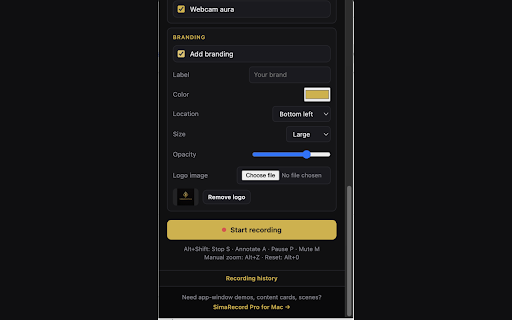
Simple branding — add your logo, watermark, brand color, placement, size, and opacity
Built-in editor — trim, preview, polish, and export without leaving the browser
MP4 export — export polished videos directly from Chrome
WebM and GIF export — create lightweight clips when you need them
Aspect ratio controls — export in original, widescreen, square, vertical, and other creator-friendly formats
Export quality presets — choose compact, balanced, or high quality
Scene polish — add clean studio, spatial demo, or launch-style presentation looks
Text overlays — add timed captions, labels, callouts, and title text anywhere in the recording
Intro and outro cards — generate title cards or upload your own PNG/JPG cards
Playback speed control — export at slower or faster speeds
Music upload — add background music to your recording
Keyboard hints — show useful shortcut or command hints in the final video
Local recording history — recordings are saved locally and remain accessible in the browser
Privacy-safe telemetry toggle — help improve SimaRecord without uploading recordings, URLs, page titles, or content

Export options

Export as MP4, WebM, or GIF. Choose compact, balanced, or high quality. Adjust aspect ratio, add title cards, text overlays, background music, scene polish, and branding before export. No account needed to download.

Who uses SimaRecord

Product managers recording demos. Developers filing bug reports. Customer support teams creating video walkthroughs. Designers sharing feedback. Teachers building tutorials. Founders making launch videos. Anyone who needs a Chrome screen recorder that respects their privacy.

The Chrome companion to SimaRecord Pro for Mac

SimaRecord Pro brings ProRes 422, Display P3, supersampled window capture, system audio, advanced webcam choreography, scene layouts, content cards, and native Mac polish. SimaRecord for Chrome is the free, private, browser-native companion — same philosophy, built for fast web recordings.
- Jun 9, 2026short_description
Record any tab with auto-zoom on clicks. Local, private, free. The Chrome companion to SimaRecord Pro for Mac.
Free Chrome screen recorder. Record tabs, windows & screen with auto-zoom, webcam overlay, local-only privacy. No account, no cloud.
- Jun 9, 2026name
SimaRecord for Chrome
Screen Recorder: Zoom, MP4, Branding - Free
- Jun 9, 2026host_permissions
(empty)
<all_urls>
Permissions & access
- Permissions
- tabCapturedesktopCaptureoffscreenactiveTabstoragescriptingdownloadswebNavigationaudioCapturevideoCapture
- Host access
- <all_urls>
Screenshots



About
SimaRecord is a free Chrome screen recorder built for product demos, tutorials, walkthroughs, bug reports, support clips, and polished browser demos — all without sending your video to the cloud.

Chrome screen recording without the cloud

Most screen recorders upload your video to their servers. SimaRecord keeps everything on your machine. No account required. No upload step. No cloud processing. Your recording stays private by default.

What you can record

Browser tab recording — capture exactly what is in your active tab
Full screen recording — record your entire display
App window recording — isolate any open application
Microphone narration — record your voice while you present
Webcam overlay — add a face cam in the corner

Features

Auto-zoom on click — your cursor becomes the director; the view zooms to every click automatically
Cross-page zoom continuity — zoom and cursor effects continue even when a recorded tab navigates to another page
Cursor spotlight — make your pointer unmissable
Click effects — visual feedback on every interaction
Live annotations — draw and highlight while recording
Webcam overlay — picture-in-picture face cam with shape, position, frame, background, and aura options
Voice cleanup — reduce keyboard noise, fan noise, room hiss, and background distractions
Simple branding — add your logo, watermark, brand color, placement, size, and opacity
Built-in editor — trim, preview, polish, and export without leaving the browser
MP4 export — export polished videos directly from Chrome
WebM and GIF export — create lightweight clips when you need them
Aspect ratio controls — export in original, widescreen, square, vertical, and other creator-friendly formats
Export quality presets — choose compact, balanced, or high quality
Scene polish — add clean studio, spatial demo, or launch-style presentation looks
Text overlays — add timed captions, labels, callouts, and title text anywhere in the recording
Intro and outro cards — generate title cards or upload your own PNG/JPG cards
Playback speed control — export at slower or faster speeds
Music upload — add background music to your recording
Keyboard hints — show useful shortcut or command hints in the final video
Local recording history — recordings are saved locally and remain accessible in the browser
Privacy-safe telemetry toggle — help improve SimaRecord without uploading recordings, URLs, page titles, or content

Export options

Export as MP4, WebM, or GIF. Choose compact, balanced, or high quality. Adjust aspect ratio, add title cards, text overlays, background music, scene polish, and branding before export. No account needed to download.

Who uses SimaRecord

Product managers recording demos. Developers filing bug reports. Customer support teams creating video walkthroughs. Designers sharing feedback. Teachers building tutorials. Founders making launch videos. Anyone who needs a Chrome screen recorder that respects their privacy.

The Chrome companion to SimaRecord Pro for Mac

SimaRecord Pro brings ProRes 422, Display P3, supersampled window capture, system audio, advanced webcam choreography, scene layouts, content cards, and native Mac polish. SimaRecord for Chrome is the free, private, browser-native companion — same philosophy, built for fast web recordings.
Technical
- Version
- 0.2.20
- Manifest
- V3
- Size
- 3.95MiB
- Min Chrome
- 116
- Languages
- 1
- Featured
- No
Metadata
- ID
- apbcgbnkadifgkmlffeljimoonenhkaj
- Developer ID
- u30fb184ec42cf05111ba37c35666ae4b
- Developer Email
- [email protected]
- Created
- Jun 3, 2026
- Last Updated (Store)
- Jun 9, 2026
- Last Scraped
- Jun 9, 2026
- Website
- simarecord.pro
- Support URL
- —
- Privacy Policy
- https://www.simarecord.pro/privacy-chrome
Data sourced from the Chrome Web Store · last verified Jun 9, 2026.