
Claudia
Record click-by-click browser actions and export step-by-step SOPs as markdown with screenshots.
As of June 2026, Claudia has 37 users and a 5.00/5 rating from 1 reviews in the Workflow & Planning category.
Usersno change0%
37
37
Ratingno change0%
5.00
1 reviews
Reviewsno change0%
1
Version
1.0.2
Manifest V3
90-day change · In the last 90 days this extension 1 version update.
History
13 snapshotsTracking since Apr 2, 2026.
View as table
| Date | Users | Rating | Reviews | Version |
|---|---|---|---|---|
| Apr 2, 2026 | — | — | — | 1.0.0 |
| Apr 17, 2026 | — | — | — | 1.0.0 |
| Apr 27, 2026 | 14 | — | — | 1.0.2 |
| May 7, 2026 | 15 | — | — | 1.0.2 |
| May 11, 2026 | 24 | — | — | 1.0.2 |
| May 15, 2026 | 25 | — | — | 1.0.2 |
| May 19, 2026 | 22 | — | — | 1.0.2 |
| May 23, 2026 | 25 | 5.00 | 1 | 1.0.2 |
| May 28, 2026 | 29 | 5.00 | 1 | 1.0.2 |
| Jun 2, 2026 | 27 | 5.00 | 1 | 1.0.2 |
| Jun 6, 2026 | 30 | 5.00 | 1 | 1.0.2 |
| Jun 11, 2026 | 36 | 5.00 | 1 | 1.0.2 |
| Jun 24, 2026 | 38 | 5.00 | 1 | 1.0.2 |
| Now | 37 | 5.00 | 1 | 1.0.2 |
Changelog
- Apr 17, 2026description
Record any process, step by step.
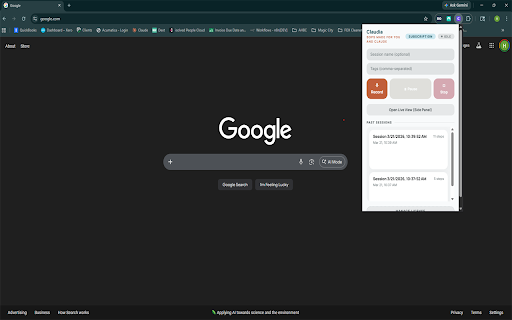
Claudia captures every click, navigation, form fill, and interaction as you work — automatically generating a numbered, screenshot-annotated procedure you can share with your team or use with AI coding assistants.

How it works:
Click Record and perform the process you want to document
Every action is captured with a screenshot and human-readable description
Edit steps in the live side panel view — rename, reorder, or delete
Export as a structured markdown file (SKILL.md) with screenshots
Perfect for:
Onboarding documentation
Standard Operating Procedures (SOPs)
Bug reproduction steps
Process handoffs between team members
AI assistant context (Claude Code skills, GPT instructions)
Features:
Click-by-click recording with automatic screenshots
Auto-generated step descriptions ("Click the Submit button")
Live side panel with real-time step preview
Inline editing — rename or delete steps before export
Export as markdown + screenshots (zip) or text-only
Keyboard shortcut (Ctrl+Shift+R) to start/stop
Session management — name, tag, and organize recordings
100% local — no data leaves your browser
Privacy first:
All data stays on your device. Screenshots and recordings are stored locally in your browser. The only external call is license validation — no browsing data is ever transmitted.
Record any process, step by step. Claudia captures every click, navigation, form fill, and interaction as you work — automatically generating a numbered, screenshot-annotated procedure you can share with your team or use with AI coding assistants. How it works: Click Record and perform the process you want to document Every action is captured with a screenshot and human-readable description Edit steps in the live side panel view — rename, reorder, or delete Export as a structured markdown file (SKILL.md) with screenshots Perfect for: Onboarding documentation Standard Operating Procedures (SOPs) Bug reproduction steps Process handoffs between team members AI assistant context (Claude Code skills, GPT instructions) Features: Click-by-click recording with automatic screenshots Auto-generated step descriptions ("Click the Submit button") Live side panel with real-time step preview Inline editing — rename or delete steps before export Export as markdown + screenshots (zip) or text-only Keyboard shortcut (Ctrl+Shift+R) to start/stop Session management — name, tag, and organize recordings 100% local — no data leaves your browser Privacy first: All screenshots and recordings are stored locally in your browser and never transmitted. The only external network call is a license key validation check — no browsing data, screenshots, or step content is ever sent.
Permissions & access
- Permissions
- tabsactiveTabstoragesidePaneldownloadsalarmsnativeMessaging
- Host access
- <all_urls>
Screenshots



About
Record any process, step by step.
Claudia captures every click, navigation, form fill, and interaction as you work — automatically generating a numbered, screenshot-annotated procedure you can share with your team or use with AI coding assistants.

How it works:
Click Record and perform the process you want to document
Every action is captured with a screenshot and human-readable description
Edit steps in the live side panel view — rename, reorder, or delete
Export as a structured markdown file (SKILL.md) with screenshots
Perfect for:
Onboarding documentation
Standard Operating Procedures (SOPs)
Bug reproduction steps
Process handoffs between team members
AI assistant context (Claude Code skills, GPT instructions)
Features:
Click-by-click recording with automatic screenshots
Auto-generated step descriptions ("Click the Submit button")
Live side panel with real-time step preview
Inline editing — rename or delete steps before export
Export as markdown + screenshots (zip) or text-only
Keyboard shortcut (Ctrl+Shift+R) to start/stop
Session management — name, tag, and organize recordings
100% local — no data leaves your browser
Privacy first:
All screenshots and recordings are stored locally in your browser and never transmitted.
The only external network call is a license key validation check — no browsing data, screenshots, or step content is ever sent.Technical
- Version
- 1.0.2
- Manifest
- V3
- Size
- 645KiB
- Min Chrome
- 88
- Languages
- 1
- Featured
- Yes
Metadata
- ID
- aoomflaajiflonnndoodjfcoakhllhgm
- Developer ID
- u3f4e09307d5ff21bdbd7d5ad4fc3cbb0
- Developer Email
- [email protected]
- Created
- Apr 1, 2026
- Last Updated (Store)
- Apr 14, 2026
- Last Scraped
- Jun 24, 2026
- Website
- —
- Support URL
- https://claudiasop.com/
- Privacy Policy
- https://claudiasop.com/privacy.html
Data sourced from the Chrome Web Store · last verified Jun 24, 2026.