
Pipes: watch your CI/CD pipelines
Watch GitHub Actions and GitLab CI/CD pipeline status across the repos you care about.
As of June 2026, Pipes: watch your CI/CD pipelines has — users in the Developer Tools category.
Usersno change0%
—
—
Ratingno change0%
—
— reviews
Reviewsno change0%
—
Version
0.1.0
Manifest V3
History
1 snapshotsTracking since Jun 15, 2026.
Not enough history yet for this metric — the chart fills in as we collect more snapshots.
View as table
| Date | Users | Rating | Reviews | Version |
|---|---|---|---|---|
| Jun 15, 2026 | — | — | — | 0.1.0 |
| Now | — | — | — | 0.1.0 |
Permissions & access
- Permissions
- storagealarmsnotificationssidePanel
- Host access
- https://api.github.com/*, https://gitlab.com/*
Screenshots



About
Pipes watches your GitHub Actions and GitLab CI/CD pipelines and shows you the moment a default branch breaks, so you find out from your browser, not from a teammate.

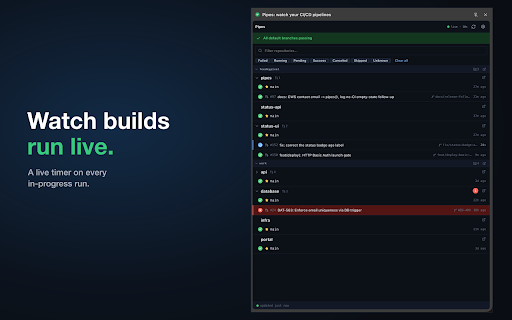
Pick the repositories you care about and Pipes shows, at a glance, the status of each default branch plus its open pull requests and merge requests. When a branch you watch starts failing, you get a desktop notification and a count on the toolbar; when it goes green again, Pipes tells you that too.

Key features

- One unified view of GitHub and GitLab pipeline status, grouped by owner
- Desktop notifications the instant a default branch fails or recovers
- Open pull requests and merge requests shown with their pipeline status
- A live timer on in-progress runs, so you can see how long a build has been going
- Side panel, popup, and a full options page
- Self-hosted GitLab and GitHub Enterprise supported (added on demand)

How to use it

1. Add a read-only access token for GitHub (fine-grained: Actions + Pull requests) or GitLab (read_api).
2. Choose the repositories you want to watch.
3. Leave Pipes running. It polls in the background and notifies you when something breaks.

Privacy
Pipes is fully client-side. There is no Pipes server. Your token and all settings stay on your device in local storage, and your token is sent only to the Git host you connected it to. No analytics, no tracking, no third parties. Full policy: https://feedmypixel.com/pipes-feedback/privacy/

Support and feedback
Report bugs or request features: https://github.com/feedmypixel/pipes-feedback/issues
Technical
- Version
- 0.1.0
- Manifest
- V3
- Size
- 111KiB
- Min Chrome
- 88
- Languages
- 1
- Featured
- No
Metadata
- ID
- aoijidjpiiphnblbeddcmmfkbdildnpl
- Developer ID
- ue1bca3780a46d49a93a4a5c36a28e349
- Developer Email
- [email protected]
- Created
- Jun 14, 2026
- Last Updated (Store)
- Jun 14, 2026
- Last Scraped
- Jun 15, 2026
- Website
- —
- Privacy Policy
- https://feedmypixel.com/pipes-feedback/privacy/
Data sourced from the Chrome Web Store · last verified Jun 15, 2026.