
Page Screenshot
Take a screenshot from the entire website with just one click!
As of June 2026, Page Screenshot has 10,000 users and a 3.86/5 rating from 7 reviews in the Productivity category.
Usersno change0%
10.0K
10,000
Ratingno change0%
3.86
7 reviews
Reviewsno change0%
7
Version
0.1.8
Manifest V3
History
1 snapshotsTracking since Apr 18, 2026.
View as table
| Date | Users | Rating | Reviews | Version |
|---|---|---|---|---|
| Apr 18, 2026 | 10.0K | 3.86 | 7 | 0.1.8 |
| Now | 10.0K | 3.86 | 7 | 0.1.8 |
Permissions & access
- Permissions
- storageactiveTabscripting
- Host access
- None declared
Screenshots

About
Page Screenshot is an addon that enables you to capture a full-page screenshot from any desired website.

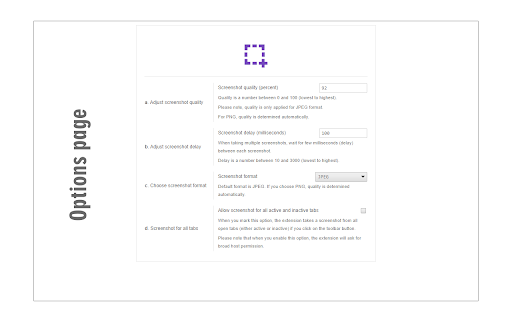
Please click on the toolbar button (or press Alt+Shift+D combination) to capture the screenshot. You can adjust the screenshot image format from the options page. Moreover, image quality and the time delay between multiple screenshots are also customizable. The screenshot will be saved to the default download location in your browser. Please note, to change the download location, visit the settings page in your browser.

Note 1: you need to "reload" all opened tabs before using the addon.

Note 2: for long-page websites, Page Screenshot automatically scrolls the page from top to bottom (vertical scroll) to capture the screenshot. But, it does not have a horizontal scroll in case the page is too wide.

To report bugs, please fill out the bug report form on the addon's homepage (https://mybrowseraddon.com/page-screenshot.html).
Technical
- Version
- 0.1.8
- Manifest
- V3
- Size
- 26.52KiB
- Min Chrome
- 88
- Languages
- 1
- Featured
- Yes
Metadata
- ID
- aoifpkjpdcfpdphnncjhgljdhpolajii
- Developer ID
- u5a225ce3ab29da06228223c7abbdd51f
- Developer Email
- [email protected]
- Created
- Mar 15, 2017
- Last Updated (Store)
- Dec 16, 2025
- Last Scraped
- Jun 3, 2026
- Website
- —
- Privacy Policy
- https://add0n.com/policies/mery.dev.txt
Similar extensions
Alternatives to Page Screenshot, ranked by description similarity.

HTML Elements Screenshot
Easily remove desired HTML5 elements with just one click!
10.0K
★ 3.8

Capture Full Page Screenshot
Capture a screenshot of your current page according to visible and fullpage with just one click.
2.0K
★ 5.0

AutoScroll Screen Capture
Capture full-page screenshots of any website
26

Full Page Screenshot
Capture full page screenshots with one click. Smart fixed element handling for clean, seamless results.
80
★ 5.0

Full Page Screenshot
A simple extension to capture a full-page screenshot of any website.
10

Full Page Screenshot
Capture full page screenshots including scrollable content (vertical and horizontal)
4

Full Page Screenshot
Capture and save full webpage screenshots locally
57

Panda Screenshoter - Full Page Screenshot
Capture full-page screenshots of entire web pages in one click. Save as PNG, JPEG, or WebP.
24
Data sourced from the Chrome Web Store · last verified Jun 3, 2026.