
FloatPost
Share tabs as workspaces + sync clipboard & files across devices
As of June 2026, FloatPost has 4 users in the Productivity category.
Usersdown 20.0 percent−20.0%
4
4
Ratingno change0%
—
— reviews
Reviewsno change0%
—
Version
2.3.0
Manifest V3
History
3 snapshotsTracking since Apr 18, 2026.
View as table
| Date | Users | Rating | Reviews | Version |
|---|---|---|---|---|
| Apr 18, 2026 | 5 | — | — | 2.3.0 |
| Apr 28, 2026 | 4 | — | — | 2.3.0 |
| May 8, 2026 | 5 | — | — | 2.3.0 |
| Now | 4 | — | — | 2.3.0 |
Permissions & access
- Permissions
- tabstabGroupsactiveTabstoragecontextMenussidePanel
- Host access
- <all_urls>
Screenshots


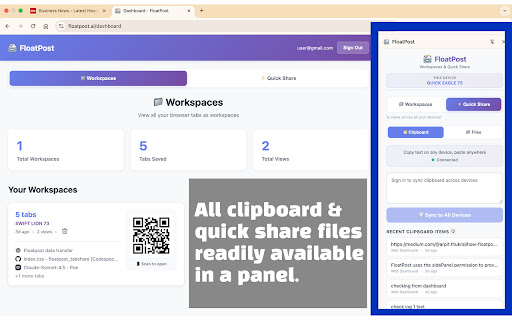
About
FloatPost lets you capture groups of browser tabs and share them as beautiful, visual workspaces with a single link.

✨ KEY FEATURES

⚡ Quick Share (No Setup Required!)
Copy text on phone, paste on laptop. Upload file on PC, download on mobile. Free: 5MB/file, 1hr retention. Pro: 20MB, 24hrs. Team: 50MB, 7 days + alerts. No strings attached!

🎯 One-Click Tab Capture
Install the extension once, then capture all open tabs with automatic screenshots in seconds

🔗 Instant No-App Sharing
Get a shareable link - anyone can view it in their browser without downloading or installing anything. Works on any device.

👁️ Visual Preview for Recipients
Recipients see screenshots of every page with clickable links - no app, no login, no hassle required

🔐 Optional Secure Accounts
Sign in with email OTP to sync workspaces across all your devices (optional for Quick Share)

📱 Multi-Device Sync
Access your saved workspaces from any browser or device with automatic device naming

📊 Smart Dashboard
Manage all your workspaces in one place with views, device info, and quick actions

📄 Export Anywhere
Download as PDF, Markdown, or HTML for Notion, Obsidian, or documents


⚡ HOW IT WORKS

1. Install the chrome extension
2. Click FloatPost → "Capture Current Tabs"
3. Extension screenshots all tabs automatically
4. Get a shareable link: floatpost.ai/w/abc123
5. Anyone with the link can view your workspace
6. You can also "Sign In" to your account and sync the workspace
7. Your device will be given a name and you can leave anywhere, pickup on anywhere
8. Sign in to your account on floatpost.ai/login and open the tabs on any browser

🔒 PRIVACY & SECURITY

- Works completely locally - tabs are captured on your device
- Only you control what you share
- No tracking or data collection
- Open source and transparent
- Your email address is used to log you in, your email address is your password

💡 USE CASES

Research: Share 40+ academic papers with your advisor in one link instead of messy screenshots or bookmark folders.

Design: Present 50 design inspirations to clients in 30 seconds instead of spending 30 minutes creating a mood board.

Consulting: Show competitor research findings with actual page screenshots, not just links that get ignored.

Learning: Collaborate with classmates by sharing all your research sources visually organized.

🆓 FREE TO USE

FloatPost is free to use with no signup required. Create and share unlimited workspaces.

---

FloatPost was built by developers frustrated with taking endless screenshots and creating presentations just to share browser tabs. We believe sharing web research should be as simple as sharing a link.

Try it now - capture your first workspace in seconds!

Visit floatpost.ai for more information.
Technical
- Version
- 2.3.0
- Manifest
- V3
- Size
- 31.87KiB
- Min Chrome
- 88
- Languages
- 1
- Featured
- No
Metadata
- ID
- aodhghpebaadimmjgagdlfglahfkckkl
- Developer ID
- u34baa49e94abf46463ee65c0b40edd5b
- Developer Email
- [email protected]
- Created
- Nov 10, 2025
- Last Updated (Store)
- Dec 11, 2025
- Last Scraped
- Jun 3, 2026
- Website
- https://floatpost.ai/
- Support URL
- —
- Privacy Policy
- https://floatpost.ai/privacy.html
Similar extensions
Alternatives to FloatPost, ranked by description similarity.

Boast Image
Capture and manage screenshots with Boast Image
6

SnapDrive - Capture & Share
The fastest way to capture screen snippets and share them instantly via Google Drive. Minimalist, secure, and ready for work.
18
★ 5.0

SnapShot
Screenshot & Annotate. Capture, mark up, and share in seconds.
60
★ 5.0

Image float board
make image float on browser
23
★ 5.0

CrossLink Share
Share files/clipboard across multiple devices
44

Ping Tab: Instant Link Sharing for Teams (Cross-Browser)
Share your tabs with teams and friends directly from your browser
7

Snap & Link (History)
Capture screenshots, overlay URL, and save history.
5

TAB BAG
One link for all your tabs. Carry your tabs wherever you go!
3
Data sourced from the Chrome Web Store · last verified Jun 3, 2026.