
BrowserShell
A shell for your browser — tabs, bookmarks, history, and AI as commands.
As of June 2026, BrowserShell has — users in the Developer Tools category.
Usersno change0%
—
—
Ratingno change0%
—
— reviews
Reviewsno change0%
—
Version
1.0.0
Manifest V3
History
1 snapshotsTracking since Jun 29, 2026.
Not enough history yet for this metric — the chart fills in as we collect more snapshots.
View as table
| Date | Users | Rating | Reviews | Version |
|---|---|---|---|---|
| Jun 29, 2026 | — | — | — | 1.0.0 |
| Now | — | — | — | 1.0.0 |
Permissions & access
- Permissions
- tabsactiveTabstoragebookmarkshistorybrowsingDatadownloadscookiesmanagementscriptingsessionsnotificationscontentSettingssystem.display
- Host access
- <all_urls>
Screenshots
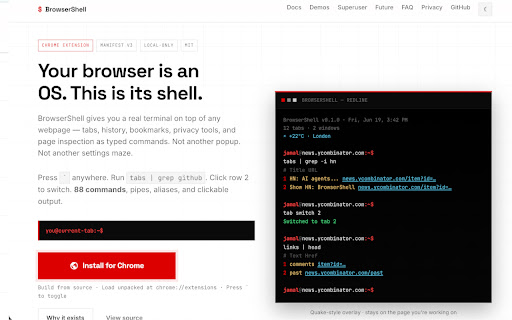

About
BrowserShell is a keyboard-driven terminal for Chrome. Press ` (backtick) on any page to open a Quake-style overlay and manage your browser with shell commands — no menus, no context switching.

WHAT IT DOES
• Toggle a full terminal overlay on any webpage (` or Ctrl/Cmd+Shift+K)
• Run 88 built-in commands for tabs, windows, bookmarks, history, downloads, and page inspection
• Browse browser state like a filesystem: ls /tabs, cd /bookmarks, cat /history
• Pipe and filter output: tabs | grep github, history | head
• Click numbered rows to run follow-up commands (e.g. tab switch 3, downloads show 1)
• Self-documenting: help, man <cmd>, apropos <term>, tab completion
• Privacy tools: siteinfo, forget (with --dry-run), permissions
• Optional on-device AI via Chrome's built-in AI when you run ai summarize

EXAMPLE COMMANDS
tabs                    # list open tabs
tab switch 3            # focus tab 3
go github.com           # navigate active tab
history search react    # search browsing history
bookmark search docs    # find bookmarks
links                   # list links on the current page
forget --dry-run        # preview site data deletion
siteinfo                # privacy footprint for current site

WHO IT'S FOR
Power users, developers, and anyone who thinks the browser should have a shell — not another popup or settings maze.

PRIVACY
BrowserShell runs entirely in your browser. No accounts, no analytics, no external servers. Browser data is accessed only when you run a command. Settings and shell history are stored locally in chrome.storage.local. Full privacy policy: https://jamalyusuf.github.io/BrowserShell/legal/privacy-policy/

Open source (MIT): https://github.com/jamalyusuf/browsershell
Technical
- Version
- 1.0.0
- Manifest
- V3
- Size
- 268KiB
- Min Chrome
- 88
- Languages
- 1
- Featured
- No
Metadata
- ID
- anflepbplgonnppecmfggjjgndgknaek
- Developer ID
- u9ac58efe6793f96a28df5d4ae9154a4e
- Developer Email
- [email protected]
- Created
- Jun 28, 2026
- Last Updated (Store)
- Jun 28, 2026
- Last Scraped
- Jun 29, 2026
- Website
- —
Data sourced from the Chrome Web Store · last verified Jun 29, 2026.