
Safer YouTube UI for Kids
Trying to make YouTube slightly safer for kids.
As of May 2026, Safer YouTube UI for Kids has 6,000 users and a 3.94/5 rating from 17 reviews in the Productivity category.
Usersno change0%
6.0K
6,000
Ratingno change0%
3.94
17 reviews
Reviewsno change0%
17
Version
20230207055522
Manifest V3
History
1 snapshotsTracking since May 1, 2026.
View as table
| Date | Users | Rating | Reviews | Version |
|---|---|---|---|---|
| May 1, 2026 | 6.0K | 3.94 | 17 | 20230207055522 |
| Now | 6.0K | 3.94 | 17 | 20230207055522 |
Permissions & access
- Permissions
- None declared
- Host access
- *://www.youtube.com/*, *://m.youtube.com/*, *://youtube.com/*
Screenshots
About
----------------------
   DESCRIPTION
----------------------

YouTube's parental controls are pretty much non-existent. Restrictive mode hides some things yes but not nearly enough. Plus there are no tracking/monitoring or filtering methods parents can use. On top of that the "suggested" and "trending" videos very often have content I personally wouldn't want my kids watching.

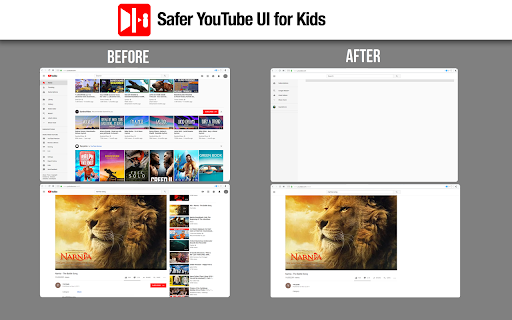
This extension is a very simple hack to hide most elements on the YouTube site and only show the basics. These lists may change over time but for now here's what is shown/hidden:

----------------------
  ITEMS SHOWN
----------------------
* Search Bar
* Playlist menu/list
* Subscriptions

----------------------
   ITEMS HIDDEN
----------------------
* Suggested / Next Up videos
* Number of items in the left/side-menu on YouTube site
* The GOD AWFUL "Trending" link
* History link (harder for kids to clear history)
* Video description
* Video comments
* Misc YouTube Header/Footer stuff

----------------------
   HOW TO USE
----------------------

1.) Install this extension. Enable it for "Private/Incognito" mode if necessary.
2.) Go to YouTube
3.) Enjoy a VERY minimal/bare-bones YouTube user interface
    with 85% of the crap hidden.

----------------------
   DISCLAIMERS/NOTES
----------------------

A) Yes this is not super secure and anyone (incl kids)
   of a certain age/technical skill will find ways around this
   but it's better than nothing for people in my situation with
   no other options.

B) Please note that this extension may stop working to varying
   degrees in the future if/when YouTube changes their site. I'll
   update/fix if possible when time permits and/or I (or others)
   are still using this.

C) This extension is not meant to eliminate the need for parental
   attention of what their kids are watching on YouTube - it's
   just to help make parents' job a little bit easier and less stressful.

D) This extension's toolbar icon is *intentionally* invisible so it's not
   immediately obvious where/how to remove it. However it can be removed
   in the usual extension/setting location.

E) This extension is similar to the similarly-named extension
   "Safer YouTube" by another person but that one didn't go far enough
   (for me) in what it hides/shows so that's why I made my own.
   Reference: https://goo.gl/TKqRtW.

F) Finally, this is a test/work in progress. Please leave any
   ideas/feedback anyone has here:
  https://emersondesignlog.blogspot.com/2019/03/safer-youtube-ui-for-kids.html


----------------------
    CHANGE LOG
----------------------
1.0.017: YT Channel/YT Studio links removed from dropdown menu

1.0.016: Adjustment requests from an end-user

1.0.015: Resolving a chrome manifest V3/permission issue.

1.0.014: The channel and subscribe buttons are now visible. The show-as-you-type search results is now hidden.

1.0.0.13: Updated extension to V3 of Chrome manifest format. Also added few new YT items to hide on request from an end-user.

20210627211035: Hiding couple additional items on YT home page (some, not all recommended "channels/topics").

20210510075148: Google still rejecting app for configuration reasons (?) - still trying to resolve.

2021042x: Google requested some configuration changes - attempting to resolve.


20210407: Addressing some Chrome technical issue that came up and slight tweak to the extension to hide a couple more things on YT.

20190319: Trying out hiding SUBSCRIBE button and AUTHOR/CHANNEL links.
By the way I *may* eventually make these toggles not global/hard-coded hide/show decision.
Technical
- Version
- 20230207055522
- Manifest
- V3
- Size
- 54.41KiB
- Min Chrome
- 88
- Languages
- 1
- Featured
- Yes
Metadata
- ID
- ampmnnjacddkgboncenjbijhbophacpd
- Developer ID
- u3d4dd9f0f66085cc507573eb467df991
- Developer Email
- [email protected]
- Created
- Mar 16, 2019
- Last Updated (Store)
- Feb 8, 2023
- Last Scraped
- May 30, 2026
- Website
- —
- Support URL
- —
Similar extensions
Alternatives to Safer YouTube UI for Kids, ranked by description similarity.
'Improve YouTube!' 🎧 (for YouTube & Videos)
YouTube, tidy & smart? Supercharge YouTube! Give it strong features, filter only the videos you want & exactly the look you like
400.0K
★ 4.5

Search Fixer for YouTube
Remove all distracting YouTube search suggestions, redirect shorts and much more!
10.0K
★ 4.6

YouTube Button Hider
Customize your YouTube experience by hiding buttons you don't use
17

YouTube Parental Control - Block any content! [QVI]
Take Full Control of YouTube – Add any keywords you want to block, videos containing these phrases in titles will no longer appear
172
★ 1.0

YouTube Shorts & Playables Remover
Removes Shorts and Playables from YouTube homepage, search results, and sidebar.
4.0K
★ 4.6

Youtube Hider
A lightweight Chrome extension designed to hide sensitive elements of YouTube's interface from prying eyes.
20
★ 5.0

Better YouTube
Hide YouTube Shorts across the site.
43
★ 5.0

YouTube Hide Watched Videos
Hide or dim watched videos and shorts on YouTube with customizable settings and individual video control
817
★ 4.8
Data sourced from the Chrome Web Store · last verified May 30, 2026.