
What's That Course?
Search for Cornell University courses by their course codes.
As of May 2026, What's That Course? has 8 users in the Productivity category.
Usersup 14.3 percent+14.3%
8
8
Ratingno change0%
—
— reviews
Reviewsno change0%
—
Version
1.0
Manifest V3
History
2 snapshotsTracking since Apr 1, 2026.
View as table
| Date | Users | Rating | Reviews | Version |
|---|---|---|---|---|
| Apr 1, 2026 | 7 | — | — | 1.0 |
| May 30, 2026 | 9 | — | — | 1.0 |
| Now | 8 | — | — | 1.0 |
Permissions & access
- Permissions
- storagecontextMenusscriptingcommandsactiveTab
- Host access
- None declared
Screenshots


About
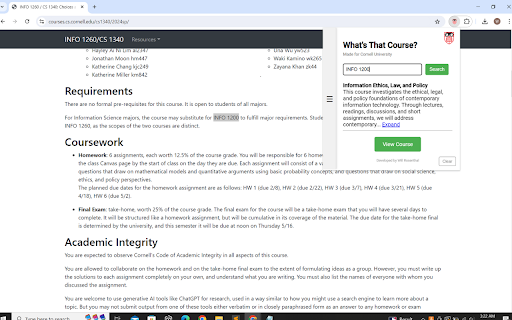
Have you ever found yourself staring at random course codes on Ed Discussion, reading through a list of course prerequisite codes, or browsing course reviews on the r/Cornell subreddit? Despite knowing the subject, you're left without the course title, forcing you to open up the Class Roster and search the code yourself.

Introducing "What's That Course?" - your handy tool for instantly decoding Cornell course codes right in your browser. This Chrome extension is designed to save you time and effort by providing quick access to course titles directly from any webpage. No more manual searches or switching tabs; simply highlight the course code, and let "What's That Course?" do the rest!

With "What's That Course?," you can instantly look up Cornell course titles by highlighting any course code. The extension integrates seamlessly into your context menu, allowing you to right-click on any selected course code to search directly. You can also use the extension's popup to manually enter and search for course codes. As an added convenience, hovering over highlighted course codes will display their titles in a tooltip without leaving the page.

To highlight all the courses on your page automatically, simply press the Detect Courses button in the extension's popup. This will scan the page for any course codes and highlight them for you, making it easier than ever to find the information you need.

This extension is perfect for use on Ed Discussion, Reddit, and more. Save time and streamline your academic planning with "What's That Course?" No more guessing, no more switching tabs - just the information you need, right when you need it.

Developed by Will Rosenthal.
Technical
- Version
- 1.0
- Manifest
- V3
- Size
- 34.44KiB
- Min Chrome
- 88
- Languages
- 1
- Featured
- No
Metadata
- ID
- amnpkieecicdklmhdjjhfhjflkfphmag
- Developer ID
- ue6aa388cc26f4f6337967d71fea01bb3
- Developer Email
- [email protected]
- Created
- Aug 6, 2024
- Last Updated (Store)
- Aug 6, 2024
- Last Scraped
- May 30, 2026
- Website
- —
- Support URL
- —
Similar extensions
Alternatives to What's That Course?, ranked by description similarity.

Tailwind CSS Cheat Sheet
A chrome extension for finding quickly all the class names and CSS properties with this interactive cheat sheet.
149
★ 5.0

Course Compass: College Class Info Lookup
Search engine for university course data
4

UBC Workday Hero
A Chrome extension to fetch and display UBC course and professor statistics.
40
★ 5.0

Course2Cal for RWeb
Extracts course information from RWeb and syncs it to Google Calendar. This extension is not affiliated with or endorsed by UCR.
6

WashU Workday Helper
Show RMP info when hovering over prof names & offers automatic clicker to streamline course selections.
292
★ 5.0

Badger Course Watch
Monitors UW-Madison course enrollment for open seats.
11

CityU Quick Course Adder
To help you fill the CRNs quickly.
2.0K
★ 5.0

Cornell Schedule to Google Calendar
Parse class schedule and add events to Google Calendar.
32
Data sourced from the Chrome Web Store · last verified May 30, 2026.