
Pluma
Spellcheck and edit text.
As of May 2026, Pluma has 40 users and a 1.00/5 rating from 1 reviews in the Workflow & Planning category.
Usersup 14.3 percent+14.3%
40
40
Ratingno change0%
1.00
1 reviews
Reviewsno change0%
1
Version
2025.1.1.0
Manifest V3
History
3 snapshotsTracking since Apr 1, 2026.
View as table
| Date | Users | Rating | Reviews | Version |
|---|---|---|---|---|
| Apr 1, 2026 | 35 | 1.00 | 1 | 2025.1.1.0 |
| May 1, 2026 | 39 | 1.00 | 1 | 2025.1.1.0 |
| May 30, 2026 | 45 | 1.00 | 1 | 2025.1.1.0 |
| Now | 40 | 1.00 | 1 | 2025.1.1.0 |
Permissions & access
- Permissions
- scriptingstoragetabs
- Host access
- http://*/*, https://*/*
Screenshots
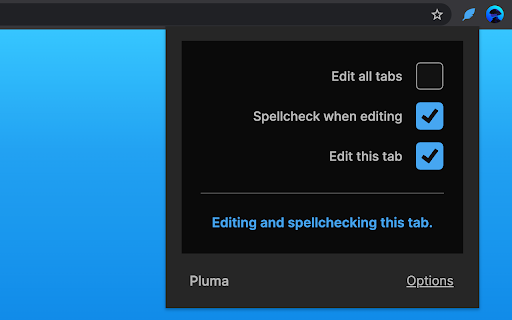

About
Pluma allows you to spellcheck and edit text as you browse. Proofread and mockup changes with immediate visual feedback. Save time by not having to use slower document and image editing programs to explore what-if possibilities.

FEATURES

• Edit text as you browse.
• Spellcheck when editing.

LIMITATIONS

Editing and spellchecking are provided by your browser. The more capable your browser is, the better your experience will be.

For a full list of limitations, please read the included guide after installing.

PRIVACY

Pluma respects your privacy.
https://nightmode.fm/software/pluma/privacy

DISCLAIMER

This software is provided under a no-contact and no-support model. Do not contact the author, for any reason, even if you think it would benefit the author.
Technical
- Version
- 2025.1.1.0
- Manifest
- V3
- Size
- 351KiB
- Min Chrome
- 102
- Languages
- 1
- Featured
- Yes
Metadata
- ID
- amjbjafbfajolchpcbfjpdggaeheicmb
- Developer ID
- u520474b80785cc49287b8751b6ae6fb4
- Developer Email
- [email protected]
- Created
- Sep 18, 2022
- Last Updated (Store)
- Jan 2, 2025
- Last Scraped
- May 30, 2026
- Website
- —
- Support URL
- —
- Privacy Policy
- —
Similar extensions
Alternatives to Pluma, ranked by description similarity.

Clipify
Transform selected text anywhere with AI rephrase, humanize, or run saved prompt shortcuts instantly with Clipify.
16
★ 5.0
Subeditor: Webpage Text Editor
Edit the text of any webpage on the fly, directly in your browser.
252

Unfluffer
Use Unfluffer to instantly transform your messy draft into a beautiful, persuasive copy that sells.
16
★ 5.0

SpellFast AI
SpellFast AI Grammer Checking
50
★ 5.0

Pruuf
This extension shows spelling and grammar proofing results for Malay, English and Chinese language.
303
★ 3.3

AI CopyEdit Pro
Unlock the power of effortless, accurate writing with AI CopyEdit Pro. Elevate your words to new heights, one error at a time!
27
★ 5.0

Polish - UX writing made easy
Edit text and share UX changes instantly
474
★ 5.0
ClaroSpeak
A simple text-to-speech reader with editing, proofing, speaking dictionary, color changing and word prediction.
20.0K
★ 3.5
Data sourced from the Chrome Web Store · last verified May 30, 2026.