
Screen Capture Tool - Full Page Screenshot
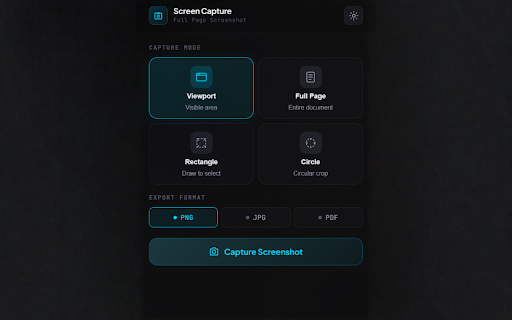
Capture viewport, full page, rectangular or circular screenshots. Export as PNG, JPG, or PDF. Privacy-first, no data collection.
As of June 2026, Screen Capture Tool - Full Page Screenshot has 13 users and a 5.00/5 rating from 1 reviews in the Developer Tools category.
Usersno change0%
13
13
Ratingno change0%
5.00
1 reviews
Reviewsno change0%
1
Version
2.1.0
Manifest V3
History
8 snapshotsTracking since Apr 27, 2026.
View as table
| Date | Users | Rating | Reviews | Version |
|---|---|---|---|---|
| Apr 27, 2026 | — | — | — | 2.1.0 |
| May 4, 2026 | — | — | — | 2.1.0 |
| May 10, 2026 | 1 | 5.00 | 1 | 2.1.0 |
| May 15, 2026 | 2 | 5.00 | 1 | 2.1.0 |
| May 21, 2026 | 3 | 5.00 | 1 | 2.1.0 |
| May 27, 2026 | 5 | 5.00 | 1 | 2.1.0 |
| Jun 3, 2026 | 6 | 5.00 | 1 | 2.1.0 |
| Jun 9, 2026 | 11 | 5.00 | 1 | 2.1.0 |
| Now | 13 | 5.00 | 1 | 2.1.0 |
Permissions & access
- Permissions
- activeTabscriptingdownloadstabsstorage
- Host access
- <all_urls>
Screenshots




About
📸 Screen Capture Tool: The Best Full Page Screenshot & PDF Extension
Screen Capture Tool is a powerful, privacy-first screen capture extension designed for speed and precision. Whether you need a full page screenshot, a quick viewport snap, or a custom rectangle selection, this tool delivers high-quality results instantly—with zero tracking.

🚀 TOP FEATURES FOR PRODUCTIVITY
📄 Full Page Screen Capture: Automatically scroll and stitch entire webpages into one seamless image. Perfect for long articles, landing pages, and design mockups.
🖥️ Visible Viewport Snap: Instantly capture exactly what you see in your browser window with a single click.
⬚ Custom Area Selection: Draw a precise rectangle or circle crop to capture specific UI elements, logos, or profile pictures.
💾 Export to PDF, PNG & JPG: Save your captures as lossless PNGs, optimized JPGs, or a professional PDF that matches your screenshot's dimensions perfectly.
✏️ Custom Filenames: Stay organized by renaming your files before downloading—no more "screenshot-123" clutter.
🛡️ PRIVACY-FIRST PHILOSOPHY
Unlike other screenshot extensions, we value your data.
100% Local Processing: Every screen capture stays on your device.
No Tracking: We do not use cookies, servers, or third-party analytics.
Zero Data Collection: Your screenshots are yours—always.

🛠️ HOW IT WORKS
Pin the camera icon to your toolbar for 1-click access.
Choose your mode: Full Page, Viewport, Rectangle, or Circle.
Preview your snap and choose your format (PNG, JPG, or PDF).
Download instantly with a custom name.

Version 2.1.0 | Created by Bishnu (Kartik) | Built with ❤️ in Nepal
Technical
- Version
- 2.1.0
- Manifest
- V3
- Size
- 247KiB
- Min Chrome
- 88
- Languages
- 1
- Featured
- No
Metadata
- ID
- algbignkaaffiioblibjcbklhmbjcapa
- Developer ID
- u0865da007c75db09ddf5708f9af5dade
- Developer Email
- [email protected]
- Created
- Apr 26, 2026
- Last Updated (Store)
- Apr 26, 2026
- Last Scraped
- Jun 9, 2026
- Website
- —
- Support URL
- —
Data sourced from the Chrome Web Store · last verified Jun 9, 2026.