
YouTube Filters – Hide Channels, Block Keywords, & Filter Search
Filter YouTube search results by channel, keyword, duration, upload date, language, and video quality.
As of June 2026, YouTube Filters – Hide Channels, Block Keywords, & Filter Search has 453 users and a 3.73/5 rating from 15 reviews in the Functionality & UI category.
Usersup 53.0 percent+53.0%
453
453
Ratingdown 8.8 percent−8.8%
3.73
15 reviews
Reviewsup 36.4 percent+36.4%
15
Version
1.1.8
Manifest V3
History
11 snapshotsTracking since Apr 7, 2026.
View as table
| Date | Users | Rating | Reviews | Version |
|---|---|---|---|---|
| Apr 7, 2026 | 296 | 4.09 | 11 | 1.1.8 |
| Apr 19, 2026 | 325 | 4.09 | 11 | 1.1.8 |
| Apr 24, 2026 | 333 | 4.09 | 11 | 1.1.8 |
| Apr 29, 2026 | 355 | 4.09 | 11 | 1.1.8 |
| May 4, 2026 | 348 | 4.09 | 11 | 1.1.8 |
| May 9, 2026 | 355 | 3.83 | 12 | 1.1.8 |
| May 12, 2026 | 353 | 3.83 | 12 | 1.1.8 |
| May 16, 2026 | 365 | 3.83 | 12 | 1.1.8 |
| May 20, 2026 | 395 | 3.79 | 14 | 1.1.8 |
| May 30, 2026 | 402 | 3.79 | 14 | 1.1.8 |
| Jun 8, 2026 | 447 | 3.73 | 15 | 1.1.8 |
| Now | 453 | 3.73 | 15 | 1.1.8 |
Permissions & access
- Permissions
- storagesidePaneltabs
- Host access
- https://www.youtube.com/*, https://youtube.com/*
Screenshots



About
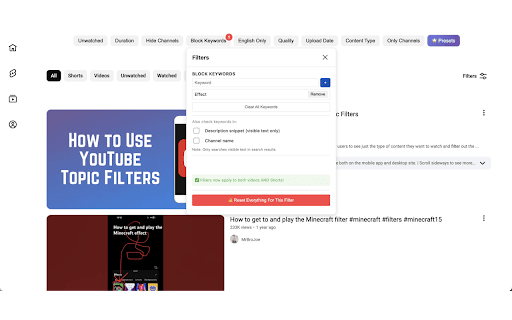
YT Filters is a powerful YouTube filters Chrome extension that helps you clean up YouTube search results and find better videos faster. Instead of scrolling through irrelevant or low-quality content, you can control exactly what appears when you search on YouTube.

Use YT Filters to:

•  Hide specific YouTube channels from search results

•  Block keywords you don’t want to see

•  Filter YouTube videos by duration and upload date

•  Filter videos by language and video quality

•  Remove unwanted, repetitive, or low-value content

Whether you want to avoid clickbait, hide certain creators, or narrow results to exactly what you’re looking for, YT Filters gives you simple, precise control over YouTube search.

Why permissions are required:

•   YouTube access: Required only to hide videos, channels, and keywords directly on YouTube pages.

•   Tabs: Used to detect when a YouTube page is active so filters can be applied •   correctly.

•   Storage: Used to save user preferences locally.

We do not collect personal data, browsing history, or analytics. All filtering happens locally in the browser.
Technical
- Version
- 1.1.8
- Manifest
- V3
- Size
- 559KiB
- Min Chrome
- 88
- Languages
- 1
- Featured
- Yes
Metadata
- ID
- alacjcbjjhnnafkkbfhgbdemhhkhfkml
- Developer ID
- u1bc3c1f67da8b5a21fa1cd97c4fee005
- Developer Email
- [email protected]
- Created
- Dec 15, 2025
- Last Updated (Store)
- Feb 18, 2026
- Last Scraped
- Jun 8, 2026
- Website
- —
- Support URL
- https://ytfilter.lovable.app/privacy
- Privacy Policy
- https://ytfilter.lovable.app/privacy
Similar extensions
Alternatives to YouTube Filters – Hide Channels, Block Keywords, & Filter Search, ranked by description similarity.

YT Filter Pro
Block YouTube videos based on keywords.
19
★ 5.0

TubeGate
TubeGate removes unwanted videos from your YouTube feed
8
★ 5.0

TubeTidy
Filter watched and long videos from your YouTube feed.
11
★ 5.0

YouTube Last Hour, Upload Date, View Count & Rating Filter
Restore YouTube’s Last Hour, Sort by Upload Date, View Count, and Rating filters for faster, smarter video search.
823
★ 2.4

Simplify YouTube
Hide features you don't use
91
★ 5.0

Youtube Hider: hide watched videos, Shorts and low views
Hides already watched videos from YouTube, as well as low views videos and remove Shorts.
1.0K
★ 4.1

YouTidy
Tidy up YouTube's player - hide unwanted controls, lock view modes, and block distracting hotkeys
—

tidytube - Declutter Youtube
Streamline your Youtube experience
490
★ 5.0
Data sourced from the Chrome Web Store · last verified Jun 8, 2026.