
Token Wise
Live token-cost estimates and one-click prompt rewrites for ChatGPT, Claude, Perplexity, Gemini, and Grok. Zero setup.
As of June 2026, Token Wise has 3 users in the Productivity category.
Usersno change0%
3
3
Ratingno change0%
—
— reviews
Reviewsno change0%
—
Version
1.2.2
Manifest V3
90-day change · In the last 90 days this extension 1 version update, changed permissions.
History
2 snapshotsTracking since Jun 6, 2026.
Not enough history yet for this metric — the chart fills in as we collect more snapshots.
View as table
| Date | Users | Rating | Reviews | Version |
|---|---|---|---|---|
| Jun 6, 2026 | — | — | — | 1.0.1 |
| Jun 18, 2026 | — | — | — | 1.0.1 |
| Now | 3 | — | — | 1.2.2 |
Changelog
- Jun 18, 2026description
Token Wise shows you what your next AI prompt is about to cost, and rewrites it in one click so it costs less.

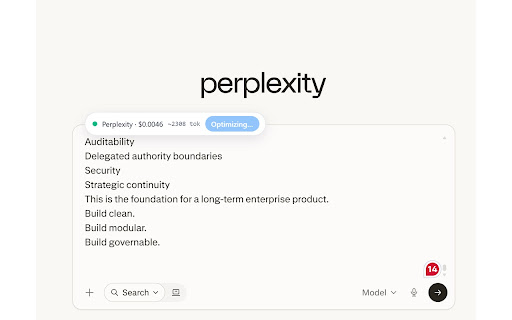
A small badge appears above the prompt box on the AI sites you already use. As you type, it estimates the length of your prompt and the cost of sending it, colour-coded so you can tell at a glance whether the prompt is cheap, average, or expensive.

When the cost looks high, click Optimize. Token Wise rewrites the prompt to be clearer, more specific, and shorter, and shows the original and the rewrite side by side with the estimated saving before you send. You can choose the focus of the rewrite: Balanced, Shorter, Clearer, or More specific.

Supported sites Token Wise works on ChatGPT, Claude, Perplexity, Gemini, and Grok. There is nothing to configure and no API key to enter.

Transparent cost estimates Every estimate is derived from each provider's own published per-token rate using a documented formula. The full methodology, including the per-model rate table and links to the provider sources, is published on the "How it works" page on our website so you can verify any number.

Your prompts stay private Prompts never leave your browser unless you click Optimize. When you do, the prompt is sent over HTTPS to our hosted rewriter and is not logged or stored. A "Local only" setting keeps everything offline if you prefer.

Built-in dashboard A small popup shows what you have saved today, over the last seven days, and in total. A history page keeps your last 100 optimizations and lets you export them as CSV. Everything lives in your browser.

Keyboard shortcut Press Alt + Shift + O on any supported site to optimize the current prompt without leaving the keyboard.
Token Wise — See what your prompt costs before you send it, and cut the cost in one click.

A small badge appears above the prompt box on the AI sites you already use. As you type, it estimates the length of your prompt and the cost of sending it, colour-coded so you can tell at a glance whether the prompt is cheap, average, or expensive.

Supported sites
ChatGPT, Claude, Perplexity, Gemini, and Grok. Nothing to configure and no API key to enter.

Optimize in one click
When the cost looks high, click Optimize. Token Wise rewrites the prompt to be clearer, more specific, and shorter, then shows the original and the rewrite side by side with the estimated saving before you send. Choose the focus that suits you: Balanced, Shorter, Clearer, or More specific.

Keyboard shortcut
Press Alt + Shift + O on any supported site to optimize the current prompt without leaving the keyboard.

Transparent cost estimates
Every estimate is derived from each provider's own published per-token rate using a documented formula. The full methodology, including the per-model rate table and links to the provider sources, is published on the "How it works" page on our website so you can verify any number.

Your prompts stay private
Prompts never leave your browser unless you click Optimize. When you do, the prompt is sent over HTTPS to our hosted rewriter and is not logged or stored. A "Local only" setting keeps everything offline if you prefer.

Side panel history
Open the side panel to browse your last 100 optimizations, see estimated savings per rewrite, and export everything as CSV.

Savings dashboard
A quick popup shows what you have saved today, over the last seven days, and in total. Everything lives in your browser storage.

More accurate with metadata monitoring (optional)
Enable in settings for improved cost tracking based on actual API response headers, plus finer token calibration across models.

"## What's New in v1.2.2"

Side panel history — Browse your last 100 optimizations, view per-rewrite savings, and export as CSV.
Savings dashboard — See daily, 7-day, and all-time savings at a glance from the extension popup.
Metadata monitoring (optional) — Enable in settings for more accurate cost tracking using actual API response headers, plus improved token calibration across models.
Keyboard shortcut — Press Alt + Shift + O to optimize without touching the mouse.
"Local only" mode — Keep everything offline if you prefer.
Improved token calibration — More accurate estimates across all supported providers.
- Jun 18, 2026host_permissions
https://www.perplexity.ai/*, https://perplexity.ai/*, https://chat.openai.com/*, https://chatgpt.com/*, https://claude.ai/*, https://gemini.google.com/*, https://grok.com/*, https://x.com/i/grok*, https://project--e1470999-249d-42cc-a8db-5a8c7600566a-dev.lovable.app/*, https://project--e1470999-249d-42cc-a8db-5a8c7600566a.lovable.app/*
https://chatgpt.com/*, https://chat.openai.com/*, https://claude.ai/*, https://www.perplexity.ai/*, https://perplexity.ai/*, https://gemini.google.com/*, https://grok.com/*, https://x.com/i/grok*, https://tokenwise.me/*, https://www.tokenwise.me/*
- Jun 18, 2026permissions
activeTab, storage, alarms, webNavigation
activeTab, scripting, storage, alarms, contextMenus, sidePanel
Permissions & access
- Permissions
- activeTabscriptingstoragealarmscontextMenussidePanel
- Host access
- https://chatgpt.com/*, https://chat.openai.com/*, https://claude.ai/*, https://www.perplexity.ai/*, https://perplexity.ai/*, https://gemini.google.com/*, https://grok.com/*, https://x.com/i/grok*, https://tokenwise.me/*, https://www.tokenwise.me/*
Screenshots


About
Token Wise — See what your prompt costs before you send it, and cut the cost in one click.

A small badge appears above the prompt box on the AI sites you already use. As you type, it estimates the length of your prompt and the cost of sending it, colour-coded so you can tell at a glance whether the prompt is cheap, average, or expensive.

Supported sites
ChatGPT, Claude, Perplexity, Gemini, and Grok. Nothing to configure and no API key to enter.

Optimize in one click
When the cost looks high, click Optimize. Token Wise rewrites the prompt to be clearer, more specific, and shorter, then shows the original and the rewrite side by side with the estimated saving before you send. Choose the focus that suits you: Balanced, Shorter, Clearer, or More specific.

Keyboard shortcut
Press Alt + Shift + O on any supported site to optimize the current prompt without leaving the keyboard.

Transparent cost estimates
Every estimate is derived from each provider's own published per-token rate using a documented formula. The full methodology, including the per-model rate table and links to the provider sources, is published on the "How it works" page on our website so you can verify any number.

Your prompts stay private
Prompts never leave your browser unless you click Optimize. When you do, the prompt is sent over HTTPS to our hosted rewriter and is not logged or stored. A "Local only" setting keeps everything offline if you prefer.

Side panel history
Open the side panel to browse your last 100 optimizations, see estimated savings per rewrite, and export everything as CSV.

Savings dashboard
A quick popup shows what you have saved today, over the last seven days, and in total. Everything lives in your browser storage.

More accurate with metadata monitoring (optional)
Enable in settings for improved cost tracking based on actual API response headers, plus finer token calibration across models.

"## What's New in v1.2.2"

Side panel history — Browse your last 100 optimizations, view per-rewrite savings, and export as CSV.
Savings dashboard — See daily, 7-day, and all-time savings at a glance from the extension popup.
Metadata monitoring (optional) — Enable in settings for more accurate cost tracking using actual API response headers, plus improved token calibration across models.
Keyboard shortcut — Press Alt + Shift + O to optimize without touching the mouse.
"Local only" mode — Keep everything offline if you prefer.
Improved token calibration — More accurate estimates across all supported providers.
Technical
- Version
- 1.2.2
- Manifest
- V3
- Size
- 77.58KiB
- Min Chrome
- 88
- Languages
- 1
- Featured
- No
Metadata
- ID
- akmhikhlfebjbipfbpadfaibemlkpclc
- Developer ID
- uc827e021643c52fb91a17b04dbc78078
- Developer Email
- [email protected]
- Created
- Jun 5, 2026
- Last Updated (Store)
- Jun 15, 2026
- Last Scraped
- Jun 18, 2026
- Website
- —
- Support URL
- —
- Privacy Policy
- https://tokenwise.me/privacy
Data sourced from the Chrome Web Store · last verified Jun 18, 2026.