
Storage Copier
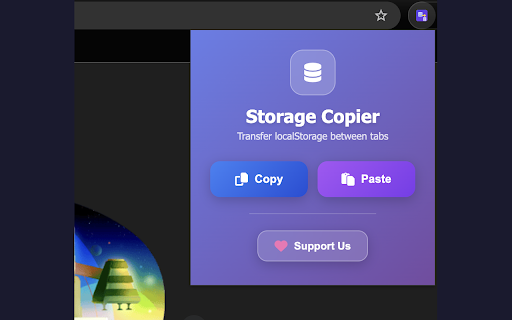
Copy local storage from one tab and paste it into another.
As of June 2026, Storage Copier has 10 users in the Developer Tools category.
Usersup 150.0 percent+150.0%
10
10
Ratingno change0%
—
— reviews
Reviewsno change0%
—
Version
1.0
Manifest V3
History
8 snapshotsTracking since Apr 7, 2026.
View as table
| Date | Users | Rating | Reviews | Version |
|---|---|---|---|---|
| Apr 7, 2026 | 4 | — | — | 1.0 |
| Apr 19, 2026 | 9 | — | — | 1.0 |
| Apr 26, 2026 | 8 | — | — | 1.0 |
| May 3, 2026 | 7 | — | — | 1.0 |
| May 11, 2026 | 8 | — | — | 1.0 |
| May 19, 2026 | 9 | — | — | 1.0 |
| May 29, 2026 | 6 | — | — | 1.0 |
| Jun 7, 2026 | 9 | — | — | 1.0 |
| Now | 10 | — | — | 1.0 |
Permissions & access
- Permissions
- storageactiveTabscripting
- Host access
- None declared
Screenshots
About
Local Storage Copier is a handy Chrome extension designed to make transferring local storage data between browser tabs quick and easy. Whether you are a developer testing across multiple environments or just need to replicate local storage data from one tab to another, this extension provides a simple and efficient solution. No need of copying multiple key value pairs of lines of local storage from one tab and pasting it to another. With this extension you can copy those key value pair in one click and paste to the local storage of any tab in just one click with safety.

Key Features:
One-Click Copy: Quickly copy all local storage data from the current tab with a single click.
Easy Paste: Paste the copied local storage data into any other tab with ease.
Seamless Integration: Works seamlessly across multiple tabs, ensuring smooth data transfer.
User-Friendly Interface: Intuitive and easy-to-use interface for both novice and experienced users.
Safe and Secure: Your data remains secure within your browser, with no external storage or data transfer.

How to Use:
Copy Data: Navigate to the tab from which you want to copy local storage data. Click on the Local Storage Copier icon and select 'Copy From Local Storage'.
Paste Data: Go to the tab where you want to paste the copied data. Click on the Local Storage Copier icon and select 'Paste To Local Storage'.

Ideal For:
Developers: Simplify the process of testing and debugging by easily replicating local storage data across different tabs.
Web Testers: Efficiently transfer test data between tabs without the need for manual entry.
Productivity Enthusiasts: Save time by quickly copying and pasting local storage data when working on multiple tabs.
Technical
- Version
- 1.0
- Manifest
- V3
- Size
- 375KiB
- Min Chrome
- 88
- Languages
- 1
- Featured
- No
Metadata
- ID
- akknoanpbojmlhhbeinhjhjichleppai
- Developer ID
- uab24f6a589d23da7a3f30149c160897c
- Developer Email
- [email protected]
- Created
- Jan 28, 2026
- Last Updated (Store)
- Jan 28, 2026
- Last Scraped
- Jun 7, 2026
- Website
- —
- Support URL
- —
Similar extensions
Alternatives to Storage Copier, ranked by description similarity.

Storage Copier
Copy local and session storage between domains
94
★ 5.0

Quick Copy LocalStorage Item
Quickly copy any localStorage item with one click
16

Tab Creation & Storage Transfer
🚀 Automate Tab Creation & Data Transfer — Simplify Your Workflow
This Chrome extension helps you automatically open tabs and…
17
★ 5.0

Devbox
A UI for local storage
157
★ 5.0

LocalStorage Transfer Kitty
Easily export and import localStorage data for any website, enhancing your browsing experience and data management capabilities.
45

Storage Copier
快速複製網頁中儲存在localStorage或sessionStorage的資料
5

Morty
This extension offers quick and hassle-free (1-click) copy/paste of localStorage/sessionStorage data across sites.
90

Tab Storage Copier
Copy/clear web storage & cookies. Manage session profiles. A time-saver for developers and testers.
7
Data sourced from the Chrome Web Store · last verified Jun 7, 2026.