
WebToEpub
Extension that converts Web Novels (and other web pages) into an EPUB for offline reading. Works with many sites, including: 1.…
As of June 2026, WebToEpub has 100,000 users and a 4.71/5 rating from 479 reviews in the fun category.
Usersno change0%
100.0K
100,000
Ratingdown 0.2 percent−0.2%
4.71
479 reviews
Reviewsup 3.0 percent+3.0%
479
Version
1.0.12.0
Manifest V3
History
9 snapshotsTracking since Apr 16, 2026.
View as table
| Date | Users | Rating | Reviews | Version |
|---|---|---|---|---|
| Apr 16, 2026 | 100.0K | 4.72 | 465 | 1.0.12.0 |
| Apr 22, 2026 | 100.0K | 4.71 | 467 | 1.0.12.0 |
| Apr 26, 2026 | 100.0K | 4.71 | 468 | 1.0.12.0 |
| May 7, 2026 | 100.0K | 4.71 | 469 | 1.0.12.0 |
| May 11, 2026 | 100.0K | 4.70 | 470 | 1.0.12.0 |
| May 18, 2026 | 100.0K | 4.70 | 473 | 1.0.12.0 |
| May 23, 2026 | 100.0K | 4.71 | 475 | 1.0.12.0 |
| Jun 1, 2026 | 100.0K | 4.71 | 477 | 1.0.12.0 |
| Jun 6, 2026 | 100.0K | 4.71 | 478 | 1.0.12.0 |
| Now | 100.0K | 4.71 | 479 | 1.0.12.0 |
Permissions & access
- Permissions
- cookiesdownloadsdeclarativeNetRequestscriptingstorageunlimitedStorage
- Host access
- <all_urls>
Screenshots
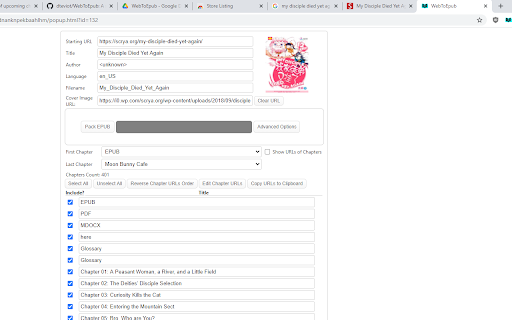
About
Extension that converts Web Novels (and other web pages) into an EPUB for offline reading. Works with many sites, including:
1. Baka-Tsuki.org
2. ArchiveOfOurOwn.org
3. FanFiction.net.
4. royalroad.com
5. www.readlightnovel.com (partial support)
6. Numerous other light novel sites

To use with Baka-Tsuki:
1. Browse to a Baka-Tsuki web page that has the full text of a story.
2. Click on the WebToEpub icon on top right of the Chrome window.
3. Check story details are correct.
4. Select image to use for cover.
5. Click the "Pack EPUB" button.
6. Wait for progress bar to finish (indicating the images being downloaded) and the generated EPUB to be placed in your downloads directory.

To use with Archive Of Our Own:
1. Browse to first chapter of story you want.
2. Click on the WebToEpub icon on top right of the Chrome window.
3. Check story details are correct.
5. Click the "Pack EPUB" button.
6. Wait for progress bar to finish (indicating the additional chapters are being downloaded) and the generated EPUB to be placed in your downloads directory.

To use with Royal Road/Readlightnovel
1. Browse to web page that has list of chapters of story you want.
2. Click on the WebToEpub icon on top right of the Chrome window.
3. Check story details are correct.
5. Click the "Pack EPUB" button.
6. Wait for progress bar to finish (indicating the additional chapters are being downloaded) and the generated EPUB to be placed in your downloads directory.

This software is licensed under GPL v3  http://www.gnu.org/licenses/gpl-3.0.en.html

Source code can be found at
https://github.com/dteviot/WebToEpub.  Or you can just unzip the chrome extension, as the code is javascript.

If you'd like to help with testing the latest Beta version, the latest version and instructions for loading it can be found at https://github.com/dteviot/WebToEpub/tree/ExperimentalTabMode
Technical
- Version
- 1.0.12.0
- Manifest
- V3
- Size
- 505KiB
- Min Chrome
- 120
- Languages
- 4
- Featured
- No
Metadata
- ID
- akiljllkbielkidmammnifcnibaigelm
- Developer ID
- u9c6da1c4ce4d2100cdb1e679212b028f
- Developer Email
- [email protected]
- Created
- May 24, 2016
- Last Updated (Store)
- Mar 5, 2026
- Last Scraped
- Jun 6, 2026
- Website
- —
- Support URL
- https://github.com/dteviot/WebToEpub/issues
- Privacy Policy
- https://github.com/dteviot/WebToEpub/wiki/Privacy-Policy
Similar extensions
Alternatives to WebToEpub, ranked by description similarity.

NetsuShelf
Convert supported web novels and story pages into EPUB files for offline reading.
13

FanfictionUltimate
The ultimate Chrome Extension for the best Fanfiction.net experience.
387
★ 4.7

Manga saver
Chrome extension to save your progress when you read manga/webtoon online!
43
★ 5.0

JapScan_PageSaver
Extension for Save Chapter and Page of Current Manga you read
163
★ 5.0

The Apothecary Diaries Wallpapers
Beautify your new tab with The Apothecary Diaries Wallpapers – elegant HD scenes from the world of ancient intrigue and mystery!
671
★ 3.8

MonapoFont
Use Monapo font and display ASCII Art correctly
416
★ 3.0

Wingdings Translator Tool
Converts Japanese, English, and Roman characters to Wingdings.
72
★ 5.0

Toilet-bound Hanako-kun Wallpapers
Bring mystery and charm to your tabs with Toilet-bound Hanako-kun Wallpapers – magical HD anime scenes in every new tab!
1.0K
★ 4.7
Data sourced from the Chrome Web Store · last verified Jun 6, 2026.