
URL Webhook Clipper
Send URLs, notes, and files via webhook or Airtable with right-click context menu
As of June 2026, URL Webhook Clipper has 163 users and a 5.00/5 rating from 1 reviews in the Workflow & Planning category.
Usersdown 5.8 percent−5.8%
163
163
Ratingno change0%
5.00
1 reviews
Reviewsno change0%
1
Version
2.0
Manifest V3
History
6 snapshotsTracking since Apr 1, 2026.
View as table
| Date | Users | Rating | Reviews | Version |
|---|---|---|---|---|
| Apr 1, 2026 | 173 | 5.00 | 1 | 2.0 |
| Apr 19, 2026 | 170 | 5.00 | 1 | 2.0 |
| May 3, 2026 | 164 | 5.00 | 1 | 2.0 |
| May 12, 2026 | 160 | 5.00 | 1 | 2.0 |
| May 25, 2026 | 170 | 5.00 | 1 | 2.0 |
| Jun 6, 2026 | 159 | 5.00 | 1 | 2.0 |
| Now | 163 | 5.00 | 1 | 2.0 |
Permissions & access
- Permissions
- activeTabstoragecontextMenusnotificationsscripting
- Host access
- None declared
Screenshots



About
🚀 URL Webhook Clipper – The Webhook Automation Tool

Automate Workflows with Webhooks
Send URLs, notes, and files instantly via webhooks and connect them with automation platforms like Make.com.
Perfect for lead management, invoice automation, and AI-driven workflows.

⚡ Key Features
✔ Send URLs Instantly – Share the current tab’s URL to any webhook.
✔ Webhook Automation – Connect data to workflows in Make.com.
✔ Multi-Webhook Support – Send data to multiple endpoints at once.
✔ Custom Notes & Attachments – Add detailed notes and drag & drop files.
✔ Dark Mode & Persistent Popup – Seamless UX with your browser settings.
✔ Secure Data Handling – Webhook configurations are stored locally, fully GDPR-compliant.
✔ Import & Export Webhook Settings – Easily transfer settings between devices.
✔ Webhook Response Handling – The response from Make.com is now displayed in the notes field.

✅ Save time, automate workflows, and streamline your tasks!

📥 Installation & Setup
🔹 From Chrome Web Store:
➡️ Install now:
chromewebstore.google.com/detail/url-webhook-clipper/akgfjejofhfldfhijdmndomkcimfngac

🔹 Manual Installation:
1️⃣ Download or clone the repository.
2️⃣ Open chrome://extensions/ in Chrome.
3️⃣ Enable Developer Mode (top right corner).
4️⃣ Click Load unpacked and select the extension folder.

🎯 How It Works – Automate Your Workflow
1️⃣ Click the URL Webhook Clipper icon in your Chrome toolbar.
2️⃣ Select the webhook destination
3️⃣ Choose a template (e.g., Lead Capture, Invoice Processing).
4️⃣ Add custom notes (optional).
5️⃣ Drag & drop files from Chrome’s download popup.
6️⃣ Click "Send to Webhook" – done!

✅ Automatically send website leads, invoices, and notes to the right tool!

🔧 Webhook Configuration & JSON Format
The extension sends data in the following JSON format:

{
  "url": "https://example.com",
  "title": "Page Title",
  "notes": "User entered notes",
  "template": "Lead Capture",
  "metaDescription": "Meta description of the page",
  "timestamp": "2024-03-13T20:00:00.000Z",
  "attachments": [
    {
      "name": "filename.pdf",
      "type": "application/pdf",
      "data": "base64-encoded-content"
    }
  ]
}
📌 Example Use Cases:
🔹 Save leads from a landing page
🔹 Automate invoice & document processing.
🔹 Auto-save research links for future reference.

🔒 Privacy & GDPR Compliance
✔ No tracking or analytics – 100% privacy-focused.
✔ Data stays in your browser – nothing is stored externally.
✔ Only sends what you explicitly choose – total control over your data.

📌 You can delete all stored data by:
- Removing webhook configurations
- Clearing browser storage
- Uninstalling the extension

🛠 Development & Contributions
Want to improve URL Webhook Clipper? Get involved!

📌 Report issues & suggest features: github.com/chris86tian/URL-Webhook-Clipper/issues
📌 Contribute & submit pull requests: ggithub.com/chris86tian/URL-Webhook-Clipper

📌 Changelog – Latest Enhancements
Version 2.0 - Latest Updates
🎉 New in Version 2.0
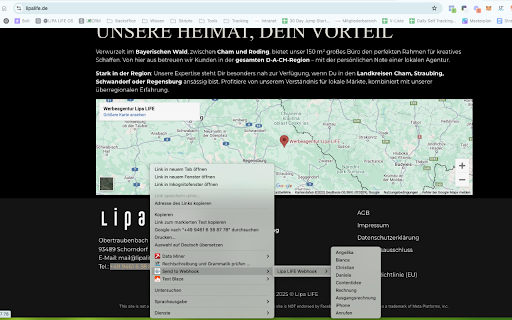
✅ Right-Click Context Menu: Send content directly from any webpage via context menu
✅ Unified Destination Dropdown: Single dropdown for both Webhooks and Airtable
✅ Clean Vertical Field Layout: Apple-style form design with perfect alignment
✅ Airtable Integration: Full support for Airtable bases and tables
✅ Dynamic Field Rendering: Automatic field detection and mapping
✅ Improved UX: Streamlined interface with better visual hierarchy
✅ Enhanced Error Handling: Clear, contextual error messages
✅ Session Persistence: Form data persists during browser session
🔥 Version 2.0 Highlights
Context Menu Integration
Right-click on any page, link, image, or selected text
Choose destination from organized submenu (Webhooks / Airtable)
Automatic payload creation with URL, title, and selection
Success/error notifications
Works seamlessly with both Webhook and Airtable destinations
Unified Destination Management
Single dropdown for all destinations (Webhooks + Airtable tables)
Visual grouping with optgroups
Icons for destination types (🔗 Webhooks, 📊 Airtable)
Dynamic field rendering based on selection

👤 Meet the Creator – Christian Götz
👋 Automation & AI Workflow Expert

🚀 Lipa LIFE – Digital Marketing & Automation
🌐 Website: lipalife.de

📸 Instagram – Business automation insights:
📷 instagram.com/christian__goetz/

☕ Support this tool
Donate via PayPal

✅ Why Use URL Webhook Clipper?
🚀 Automate your entire workflow – from lead capture to invoice processing.
🔒 Privacy-first – No tracking, all data stays in your browser.
📎 Supports Make.com for automation.

✅ Try it now and take your automation to the next level!
➡️ Install from Chrome Web Store:
chromewebstore.google.com/detail/url-webhook-clipper/akgfjejofhfldfhijdmndomkcimfngac
Technical
- Version
- 2.0
- Manifest
- V3
- Size
- 125KiB
- Min Chrome
- 88
- Languages
- 1
- Featured
- No
Metadata
- ID
- akgfjejofhfldfhijdmndomkcimfngac
- Developer ID
- u5fa602b6427bee28fc1e1c18438fda61
- Developer Email
- [email protected]
- Created
- Feb 4, 2025
- Last Updated (Store)
- Oct 10, 2025
- Last Scraped
- Jun 6, 2026
- Website
- lipalife.de
- Support URL
- https://lipalife.de/termin/
- Privacy Policy
- https://lipalife.de/datenschutzerklaerung/
Similar extensions
Alternatives to URL Webhook Clipper, ranked by description similarity.

Webhook Manager
A Chrome extension that allows you to send data to webhooks.
1.0K
★ 3.0

Bardeen: Automate Browser Apps with AI
Build automation with ChatGPT, Sheets, and other web apps. Scrape, export & extract data with AI to improve sales & productivity
200.0K
★ 4.4

MultiField CopyCat - Copy, Paste & Autofill Forms Instantly
Copy, paste & autofill multiple form fields instantly. Saves hours on repetitive form filling, data entry & QA testing.
2.0K
★ 4.1

Sync Webhooks: Data Transfer and AI Assistant
Sync Webhooks Automation & AI for seamless data transfer and content creation, boosting productivity with smart AI agents.
357
★ 3.9

Pabbly Connect Web Clipper
Send selected text to a Pabbly Connect workflow webhook URL.
595
★ 5.0

OpenThat.Link
Open links in your browser from Zapier, n8n, Make, or any webhook-capable tool.
7

ClickUp Champ
A browser extension for ClickUp
1.0K
★ 4.0

Knapsack
An AI side panel securely connected to your data
42
★ 5.0
Data sourced from the Chrome Web Store · last verified Jun 6, 2026.