Reelia Record - Screen Recorder & Editor
Record screen, website and webcam to a video - free, quick and easy.
As of May 2026, Reelia Record - Screen Recorder & Editor has 7,000 users and a 4.74/5 rating from 189 reviews in the Workflow & Planning category.
Usersno change0%
7.0K
7,000
Ratingno change0%
4.74
189 reviews
Reviewsup 0.5 percent+0.5%
189
Version
0.1.16
Manifest V3
History
2 snapshotsTracking since Apr 19, 2026.
View as table
| Date | Users | Rating | Reviews | Version |
|---|---|---|---|---|
| Apr 19, 2026 | 7.0K | 4.74 | 188 | 0.1.16 |
| May 13, 2026 | 9.0K | 4.74 | 189 | 0.1.16 |
| Now | 7.0K | 4.74 | 189 | 0.1.16 |
Permissions & access
- Permissions
- activeTabstoragetabCapturecontextMenusdesktopCaptureunlimitedStoragetabsscriptingoffscreen
- Host access
- *://us-central1-chrome-capture.cloudfunctions.net/*, https://www.googleapis.com/, https://apis.google.com/, https://checkout.paddle.com/*, https://y.clarity.ms/*
Screenshots

About
Reelia Record – Free, Fast & Easy Screen Recorder & Editor

Effortlessly capture and share your screen, website, or webcam in one click!
•   No Sign-Up Required
•   No Watermarks
•   Completely Free

🎥 Record Your Way:
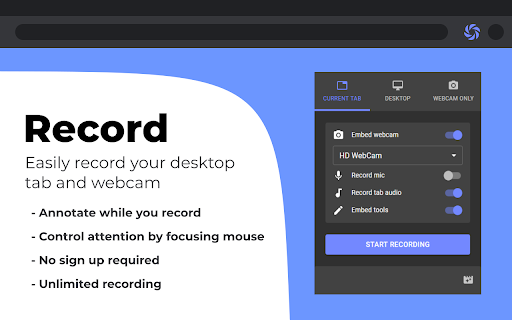
•   Versatile: Record your screen, specific app, browser tab, or just your webcam.
•   Engaging: Embed webcam & mic for screencasts.
•   Clearly Communicate: Annotate live while recording.
•   Focus Viewers: Highlight mouse clicks & movements.

🖊️ Edit Effortlessly:
•   Organized: Local library for your recordings.
•   Powerful Editor: Trim, cut, crop & merge clips.
•   Flexible: Easy undo/redo for any edit.

🌎 Share Instantly:
•   Quick Start: Record & share in seconds, no sign-up.
•   Formats: Export as WEBM, MP4, or GIF.
•   Coming Soon! Direct sharing to Slack, YouTube, Google Drive & more.

🔥 Why Reelia?
  ✔️ Unlimited Recording: No limits.
  ✔️ No Watermarks: Your content, your brand.
  ✔️ HD Quality: Crystal-clear videos.
  ✔️ Privacy First: Everything stays on your computer.

⚡ Quick Shortcuts:
•   Alt + Shift + R  →  Start/Stop Recording
•   Alt + P  →  Pause/Resume
    (Customize in Chrome > Extensions > Keyboard shortcuts or chrome://extensions/shortcuts)

🚀 Help Shape Reelia!
We're always improving based on your feedback!
  ✔️ Recording Library – Done!
  ✔️ Bug Fixes & Performance – Ongoing!

On Our Radar:
  ✨ More editing tools (text, blurs)
  ✨ More sharing options

💡 Ideas or Bugs?
Let us know via the "Support" tab in the Chrome Web Store.

🙌 Love Reelia?
Share with friends & leave a review! Your support means the world to us! 😊
Technical
- Version
- 0.1.16
- Manifest
- V3
- Size
- 1.51MiB
- Min Chrome
- 116
- Languages
- 51
- Featured
- Yes
Metadata
- ID
- ajhidbbpmnhjjffefekncbdbeopghnnn
- Developer ID
- u8cc30948aef8c42d6edaafdaec9ccbd7
- Developer Email
- [email protected]
- Created
- Oct 25, 2020
- Last Updated (Store)
- May 19, 2025
- Last Scraped
- May 25, 2026
- Website
- leolime.com
- Support URL
- —
Similar extensions
Alternatives to Reelia Record - Screen Recorder & Editor, ranked by description similarity.

QuickReel Screen Recorder - Free
100% Free screen recording with unlimited time. No watermarks, no restrictions. Private and simple.
20
★ 5.0

Screen & Webcam recorder - Flonnect
Allows Screen Recording from your Webcam and Desktop
100.0K
★ 4.6

Screen Recorder for Chrome Free
Record your screen, tab, or camera with advanced features.
191
★ 4.7

Recordo - Screen Recorder
Easily record your screen, browser tabs, or apps in high quality and save or share your recordings with Recordo.
13
★ 5.0

ScreenSend - Advanced Screen Recorder & Video Editor
Free unlimited video capture tool to record, edit, share videos instantly.
179
★ 5.0

Screen Recorder & Capture Full Page Screenshot
Record screen/Tab with audio, embed webcam & mic, capture full-page/visible/selected screenshots with built-in editor, export in HD
133
★ 5.0

Screen recorder
Elevate your productivity with Screen Recorder tool. Effortlessly capture and share your screen recordings for optimal efficiency.
4.0K
★ 3.6

Media.io - Free Video and Screen Recorder
An all-round video recorder & editor. Save, edit, and share your video instantly.
3.0K
★ 2.6
Data sourced from the Chrome Web Store · last verified May 25, 2026.